http://www.davidleeking.com/wp-content/themes/thesis_16

From the monthly archives:

September 2005

This time around, I’m reviewing the Las Vegas-Clark County Library District’s website. If you’re interested on the background of my reviews or past reviews, please see my first one.

Website at a Glance

Hits: Great visual design and navigation, nice and useful Info Guides, catalog and webiste are blended together, highlighting some Info Guides on the main page.

Further Reflection

Strengths:

  • Visual Design – awesome looking website! Colors, headings, choice of fonts – all work together nicely
  • Site Navigation – easy as pie
  • Info Guides – great job on subject type guides! Lots of great information, pulled from a variety of sources
  • Highlights (stuff above News & Press) - this is a great place to highlight new services and resources, like digital audio books, guides, or reference services
  • Events & Exhibits - very clean and simple
  • Catalog – attempted to integrate catalog into website (look and feel). That’s way more than most libraries have done!
  • Usability, Information Architecture – great – everything is clearly laid out – you know where you’re going when you click
  • Computer Reservation – you can reserve a computer by clicking on the main page – cool beans!
  • New resident link – cool idea! They are pulling out a subject guide to feature on the main page, which is a great way to display specific types of content
  • Main focuses – two stand out: content and connecting with a librarian. Can’t beat that!

Weaknesses:

Big Stuff:

  • Linking away from the library’s website – The Ask A Librarian link on the main page is a huge link, high up on the page, that links directly out of the library’s website (to a Nevada virtual reference service). That’s generally a no no on websites. Why? Website customers will immediately leave your site – if this service wasn’t what they were looking for, they’re gone. You can’t count those visits. And, you can’t give the customer more information. A better solution is to make a page describing the service and describing why patrons might want to use the service (and linking tot he service). Then link THIS page to the main page of the website. Problem solved.
  • Teen Zone – Using neon colors and adding pics of teens won’t attract teens. Interaction and content will. The Booklink Poll is a good start – just add LOTS MORE STUFF like that.
  • Just for Kids – My problem? This section is called “Just for Kids” – but it’s not. When I first looked at this page, the first event listed was “Women’s Diversity: 100 years of Influence.” Does that sound like a kid’s event? Also, just taking another peek at the page – it’s not really a kid’s site. Rather, it’s a site designed for parents with kids. Why do I say that? Besides the colors and the dinosaur at the top, there’s no interaction, no large words, no moving things – nothing to draw in a kid. Compare this to Nick Jr or even BookHive (done by a library). Both sites are obviously created for kids. The “Parents with Kids” thing isn’t a bad thing – just don’t call it “Just for Kids” if it’s not.

Small Beans:

  • Good Books – There’s a link on the main pages titled “Good Books.” Don’t they have music and videos? Why not point to more than just book recommendations?
  • Billboard effect – Quick, take a 5 second peek at the main page. Where’s the catalog link? The site is pushing people to the large links like Info Guides and Ask a Librarian. That’s not necessarily a bad thing… in fact, that might be exactly what the library wants – I really don’t know. But – library website planners should think about what the most important resources are, and make sure those resources are seen on the site. Steve Krug compares library web pages to driving past a billboard on a highway – is your message getting across?

In summary, the Las Vegas-Clark County Library District website looks great, works great, and is able to connect library customers to information and to librarians. Work on connecting teens and kids a little more, and this will be one solid website.
Share:
  • del.icio.us
  • Twitter
  • Facebook
  • email
  • Digg
  • FriendFeed
  • LinkedIn
  • Google Bookmarks
  • Technorati
  • BlinkList
  • Reddit
  • StumbleUpon
  • Tumblr
  • Netvibes
  • Ping.fm
  • MySpace
  • Print

{ 1 comment }

Actual Reference (not virtual)

by David Lee King on September 23, 2005

Aaron Schmidt at walking paper posted about IM yesterday, and made some points that actually relate, in a way, to what I was saying yesterday about the website as a destination.

Aaron’s post focused on IM reference – how IM reference is still very much a reference question, just like someone walking up to the desk, and how one might handle that in a day-to-day situation. His library has a first-come-first-served policy, so if he’s in the middle of an IM reference question, the person walking up to the desk has to wait his/her turn in line. And this gives Aaron an opportunity to introduce the waiting customer to IM reference, too.

That type of policy is another way to shift the focus from a computer-oriented task (answering an IM question) to simply another way of serving your library customers. Put another way, it removes the word “virtual” from virtual reference. Think about it – there’s nothing “virtual” about virtual reference. It’s an ACTUAL reference transaction, just like when someone walks up to the reference desk to ask a question is an actual reference transaction. With both, an actual customer is waiting in line, ready to be served.

Share:
  • del.icio.us
  • Twitter
  • Facebook
  • email
  • Digg
  • FriendFeed
  • LinkedIn
  • Google Bookmarks
  • Technorati
  • BlinkList
  • Reddit
  • StumbleUpon
  • Tumblr
  • Netvibes
  • Ping.fm
  • MySpace
  • Print

{ 0 comments }

Website as Destination

by David Lee King on September 22, 2005

I just saw a job posting at Washington University for an extremely cool-sounding job: the Director of the Digital Library. And that got me thinking… thinking about how we as librarians view our websites. Is the library website a tool to support the physical library’s activities, resources, and services, or is the library website an actual destination?

Let me throw out some numbers. At Kansas City Public Library in August, 202,105 customers walked through our physical doors. Our busiest branch had 31,233 visitors. The library’s website had 309,083 visitors (granted, many of those would be visits within our physical walls – using one of our public PCs). We staff our branches with anywhere from 4 to maybe 20 employees (a mix of part and full-time), and our Central Library with even more staff. Our website is staffed by 2 employees, who handle all the day-to-day business of running the website, plus frequently writing content to be placed on the site. Other staff also send content.

So, the short version:

  • big branch – 20+ staff (lower fte), 30,000 visitors
  • website – 2 staff (plus some content help from library staff), 309,000 visits
  • Which one has staffing issues?

I think it’s time to stop thinking of library websites as something that simply supports a library’s mission and goals. Rather, the library’s website IS the library, or at least as much a real, live part of the library as a physical library branch building is part of the library.

And if we as librarians start thinking that way – gee whiz, what would we change? Would staffing of the digital library change? Would we put different types of information on the website? Would we market things differently?

Stuff to think about – and I’d love to hear other’s reactions to this concept!

Share:
  • del.icio.us
  • Twitter
  • Facebook
  • email
  • Digg
  • FriendFeed
  • LinkedIn
  • Google Bookmarks
  • Technorati
  • BlinkList
  • Reddit
  • StumbleUpon
  • Tumblr
  • Netvibes
  • Ping.fm
  • MySpace
  • Print

{ 4 comments }

Google Blog Search Has Arrived

by David Lee King on September 14, 2005

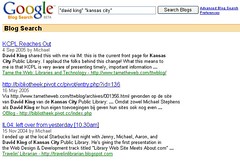
googleblogCheck this out – Google Blog Search. It’s just what it says it is – “Find blogs on your favorite topics.”

How does it work? Well… just like Google! You search just like you’d normally do with Google. There are a couple of differences between this and the normal Google:

  1. There’s a date after the title of each search result. Makes sense with blog posts, but it’s cool nonetheless. Finally, a date search that just might work like you think it should!
  2. No cached or similar pages links. Fine with me (well, I DO like the cached thing once in awhile…).
  3. At the bottom of the page there are links to subscribe to your search using RSS/Atom – you have the option to subscribe to 10 and 100 result feeds, either Atom or RSS versions.
  4. Like Google groups, you can toggle between Sort by Relevance and Sort by Date
  5. At the top of the search results page, a Related Blogs listing sometimes appears that lists at least one blog that is somehow related to your search.

And this isn’t just searching blogs. It is searching almost everything (well, everything in Google’s database) with an RSS feed. For example, I searched for “kansas city public library” and picked up articles and events that would have appeared in the RSS feeds on our subject guide pages. Which is even cooler! It doesn’t appear to be searching news site’s RSS feeds (like newspaper websites).

The best thing? This search doesn’t come to a screeching halt like Daypop or some of the other blogish search engines. This is a very cool addition to blog search products!

Another interesting side note: it also appears as an option/feature when I log into Blogger (what I currently use to post blogs). Should be some fun reading over the next few days!

Share:
  • del.icio.us
  • Twitter
  • Facebook
  • email
  • Digg
  • FriendFeed
  • LinkedIn
  • Google Bookmarks
  • Technorati
  • BlinkList
  • Reddit
  • StumbleUpon
  • Tumblr
  • Netvibes
  • Ping.fm
  • MySpace
  • Print

{ 0 comments }

Tech Tuesday Teleconferences

by David Lee King on September 13, 2005

I’m pretty psyched to be taking part in the Education Institute Tech Tuesday teleconferences that have been created by “the Partnership” – an organization made up of the the Executive Directors of the British Columbia Library Association, the Library Association of Alberta, the Ontario Library Association and the Saskatchewan Library Association.

Here’s a list of some of the upcoming teleconfereces:

Come join in ifyou can – should be a good time (and my first webcast/teleconference!).

Share:
  • del.icio.us
  • Twitter
  • Facebook
  • email
  • Digg
  • FriendFeed
  • LinkedIn
  • Google Bookmarks
  • Technorati
  • BlinkList
  • Reddit
  • StumbleUpon
  • Tumblr
  • Netvibes
  • Ping.fm
  • MySpace
  • Print

{ 0 comments }

Reading Lots of Blogs

by David Lee King on September 13, 2005

Meredith, in her Survey of the Biblioblogosphere: Attitudes and Behaviors, says “I don’t know how those of you who read more than 200 blogs manage to do it! I can barely keep up with 120 blogs (many of which I rarely read in their entirety). I guess there is a different between subscribing to a blog and actually reading all of the posts.”

Right now, I’m “reading” 174 feeds. But here’s what I really do:

  • “Keeping up” with 174 feeds doesn’t mean in-depth reading of those feeds
  • Some I browse through quickly
  • Some, I think “not interested” and move on to the next post in my feed reader
  • Some are photo blogs – I look at the photograph, think “cool” and move on
  • Some I spend more time on, read, click through the links, respond to (in Meredith’s post’s case), etc.
  • Some feeds don’t update very often, so reading them isn’t all that hard
  • Some posts are about the same thing that 20 other posts will be about, so I can skim/skip them

Generally, I read those 174 feeds the same way I flip through a magazine or a newspaper – I skim the headlines and the text for something interesting. If I find something, I stay for a while. If not, I move on.

Share:
  • del.icio.us
  • Twitter
  • Facebook
  • email
  • Digg
  • FriendFeed
  • LinkedIn
  • Google Bookmarks
  • Technorati
  • BlinkList
  • Reddit
  • StumbleUpon
  • Tumblr
  • Netvibes
  • Ping.fm
  • MySpace
  • Print

{ 0 comments }

Easy way to explain RSS

by David Lee King on September 13, 2005

Just saw this post this morning.

I think describing RSS as “automated web surfing” is a pretty good description – what do you think?

Share:
  • del.icio.us
  • Twitter
  • Facebook
  • email
  • Digg
  • FriendFeed
  • LinkedIn
  • Google Bookmarks
  • Technorati
  • BlinkList
  • Reddit
  • StumbleUpon
  • Tumblr
  • Netvibes
  • Ping.fm
  • MySpace
  • Print

{ 0 comments }

Cell Phones and Rock Concerts

by David Lee King on September 7, 2005

I just attended Kansas City’s Rock the Light VI concert – it was fun! Some highlights:

  • The bands on the main stage – they rocked
  • The satellite stage bands (I was in one of them) Go here for more pics of my day
  • Getting free tickets (complimentary tickets for bands playing on the satellite stages)
  • The venue – Starlight is an awesome place for a concert!
  • Raising $23,000 for hurricane victims (Third Day donated $10,000, and challenged the crowd to match that – the crowd gave $13,000)
  • Cell phone silliness!

Another sms shotAnd since this is a library technology blog, I’ll talk about the cell phone part. Starlight’s main stage includes a big screen hanging above the stage. Concert footage is usually shown on the screen, which is pretty cool. But cell phone users can dial 99777 and leave a text message that displays on the big screen, for everyone to see. Do you think the kids that attended the concert used that? Oh yeah – messages streamed nonstop the whole day. I took a pic – you can see examples of text messaging in it (bottom of the big screen). Cool shot of the drummer, too…

Some would call this a cool way to interact, to be part of the performance, or to enhance the concert experience. And it probably did all those things. At the same time, I found it sorta odd… example: during a slow part of a song, kids would scream when someone posted a message like “scream if you live in Liberty.” The two things (text message and performance) didn’t fit well together. Certainly gotta be odd for the band, if nothing else!

But either way, kids had and used their cell phones in a big way. In fact, rather than holding up lighters, Third Day asked everyone to hold up cell phones – I was awed in all geekiness at that point – 8000 cell phones glowing at once was pretty cool to see.

How does this relate to libraries? Well… those kids with cell phones – can they access your library via IM and/or sms/text messaging? Do they have the phone number to the reference desk? Are these on one handy card that you can pass out to library patrons?

Share:
  • del.icio.us
  • Twitter
  • Facebook
  • email
  • Digg
  • FriendFeed
  • LinkedIn
  • Google Bookmarks
  • Technorati
  • BlinkList
  • Reddit
  • StumbleUpon
  • Tumblr
  • Netvibes
  • Ping.fm
  • MySpace
  • Print

{ 6 comments }