February 2009

Watching Local News go Viral

by David Lee King on February 23, 2009

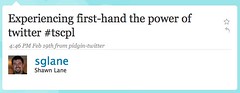
screenshot of twitter reactionWe live in a new world. A world in which local decisions made by very small groups can go viral, can be spread by a variety of social media tools, and can even reach global and unintended audiences. We are no longer private or anonymous! I watched just this thing unfold last Thursday at my library’s Board of Trustees meeting.

We Went Viral

By now, some of you have probably heard about the decision my library’s Board of Trustees made last Thursday regarding restricting access to four books in our collection. By the end of the evening, our very local library board meeting was the 7th hottest “trend” in Twitter.

I had decided to tweet the board meeting – I posted play-by-play public comments made by people in the community and the deliberations of the board on a hot topic. I used #tscpl as a hashtag, since I wanted to provide an easy way for people to follow the meeting as it progressed.
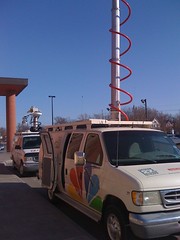
Camera Crews Getting Set UpAnd I started tweeting. I took photos of the local TV news vehicles lined up outside the library and a few pics of the meeting, and posted them to Twitter via the TwitPic service (a service that lets you easily share photos on Twitter). Jim Ogle, general manager at a local TV station (and cool tweep at @jimogle), was also present and tweeting at the meeting, as were a few other Twitter users.

Who followed the conversation? Local Topekans who weren’t at the meeting were following. Library staff that worked the evening shift were following along, too. Since I have my tweets linked to my Facebook status, Facebook friends were also following and participating by making comments and asking questions. Other librarians were following the meeting, as well.
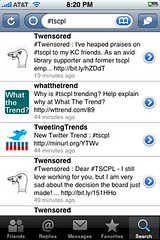
In other news, I trended in twitterAt some point in the evening, our hashtag, #tscpl,”trended” on Twitter. What’s trending? “Trending topics on Twitter are keywords that happen to be popping up in a whole bunch of tweets. We measure these topics and adjust them in real-time throughout the day. It’s a great way of finding out what’s happening right now.” – from Twitter’s blog.

And like I said, we were the 7th hottest trend for a while – sure wish I had a screenshot of that! The screenshot I DID get is from my iPhone, capturing some Twitter Trend-watching services that noticed our hashtag was trending.

We Went Global

The next day, the conversation continued, and it went global. People continued tweeting about the meeting and the decision, and I posted news stories as I found them. An AP reporter was at the Thursday meeting, so we made the AP newswire… and we quickly made the USAToday, the International Herald Tribune, and the Taipei Times, of all places. And of course the usual library-related news sites noticed.

Some unintended but interesting sites: two adult industry news sites (found via twitter searches for tscpl and topeka), some book industry news sites, and a children’s rights group. With some of these, I’m guessing they follow a combination of keyword searches and RSS feeds – they primarily picked up the AP story.

The conversation on those sites is continuing, since many of them allow comments on each article! It’s actually quite interesting to compare the local comments on the Topeka newspaper story to the comments on the USAToday story (98 comments so far).

We’re No Longer Private

What’s this all mean? That Twitter works great as a real-time information spreader and conversation starter. That people are interested even in seemingly local stuff. That … yes … even your small library board meeting is no longer private.

The WORLD is watching.

15 comments

Friend Customers like Gary Vaynerchuk

by David Lee King on February 19, 2009

Gary Vaynerchuk has some good things to say about social media. Here’s one example (embedded above) discussing how to “make friends” – watch it, then let’s discuss.

In this video, Gary talks about how to participate in social networks and how to friend people – this is essential for libraries! Some big points from his video:

  • think of the internet as a big conference or room or a mixer – in those settings, you find a group to talk to and jump right in
  • in social networks, you do the very same thing – you walk in, and you start saying hello (it’s not stalking)
  • if people are putting stuff out there, they know that people can see it (so it’s really ok to friend them)

Take-aways? Don’t be scared to friend people. Set up a library twitter account, facebook or myspace account, etc… then search for people using those tools who live in your community, and say hello by friending them.

Then start participating in their conversations.

OK – someone will say “but David, that’s weird.” No it’s not – it’s how the emerging online world works. Businesses are already doing this successfully (ie., Gary’s doing just this thing for his Wine business).

7 comments

Aaron’s Notes on Spool’s Talk

by David Lee King on February 18, 2009

Aaron Schmidt (cool guy and Walking Paper blogger), attended Jared Spool’s User Interface Engineering Roadshow Portlandand he took notes!

Jared spoke about User Experience (UX) – Good jems here:

  • the great netflix experience is invisible. bad design is apparent
  • the guy putting info into the database determines part of the user experience
  • eliminate major redesigns! [krug] break designs into small chunks
  • it is necessary for employees to understand everything
  • customers lean towards competitors with simpler UX
  • identify essential functionality and experience

And the best tidbit, which relates to my post from yesterday:

must have basic functionality before you can concentrate on delight

Go read the whole thing, and thanks Aaron for taking notes!

*pic by Jesper Rønn-Jensen*

Be the first to comment

Where Will David be this Spring and Summer?

by David Lee King on February 18, 2009

Speaking at the National Library of SpainI’ll be doing a bit of speaking, traveling, and conference attending this year – here’s where I’ll be through July:

  • February 25 – Webcast for SLA, Basics of Website Management, Part 2 (ok – no traveling on this one. Yay!)
  • March 12-17 – SXSWi (attending and geeking out)
  • March 28-April 2 – Computers in Libraries (one presentation, two preconference presentations)
  • April 22 – SEFLIN, North Miami, FL area – two presentations
  • April 24 – Lincoln City Libraries (Lincoln, NE) staff day
  • May 6 – Massachusetts Library Association
  • May 7 – Capital District Library Council, Albany, NY
  • June 19 – NEFLIN, Jacksonville, FL
  • July 9-15 – ALA in Chicago

And more to come, I’m sure. Make sure to say hi – always more fun when I know people!

2 comments

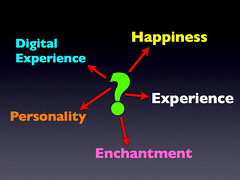
Experience Economy Goes by Many Names

by David Lee King on February 17, 2009

Experience is called many thingsJoseph Pine and James Gilmore noticed this thing they called the Experience Economy. They think we’ve moved beyond purchasing mere goods and services – now, we can purchase “experiences” (hence, the experience Economy). In their newest book, they blend the idea of experience with something they call Authenticity.

But Experience or the Experience Economy isn’t the only thing this notion is called – this post will introduce you to some other similar terms.

For example, when I read their book, I didn’t see much in the way of website experience. Certainly, the underlying ideas were there, but no concrete examples were given (it was written in 1999, so I’ll give them a break). That bugged me enough to write my own book about it, and I called the website version of it the Digital Experience.

Rohit Bhargava, who writes the Influential Marketing Blog, comes from a customer engagement and marketing/PR background. In his book Personality Not Included: Why Companies Lose Their Authenticity and How Great Brands Get it Back, he calls it personality. Here’s a quote from the introduction that explains what personality is:

“The theory of Personality Not Included is that personality is the answer. Personality is the key element behind your brand and what it stands for, and the story that your products tell to your customers. Every element of your business, from your interactions with your customers to the packaging of your product is an element of your brand personality, and these are the elements that inspire delight or indifference among your customers. In short, personality matters.”

I heard Jane McGonigal speak last year at SXSWi 2008. She presented on gaming and alternate realities … and called it happiness. Here are some notes I took from her presentation:

Question – are you in the happiness business? Our primary product soon will be happiness… Happiness is the new capital

Four key principles of happiness:

  1. satisfying work to do
  2. experience of being good at something
  3. time spent with people we like
  4. chance to be a part of something bigger

McGonigal’s description of happiness sounds VERY similar to Pine & Gilmore’s description of experience and Bhargava’s description of a company with personality.

Ever heard of Touch Points? It’s sort of like usability … but doesn’t focus primarily on how the thing works. Instead, it focuses on the experience customers have during their interactions with the product or service or website.

Ok, one more. A few years back when Kathy Sierra was still blogging, many of her blog posts focused on this same concept – but she called it enchantment and kicking ass.

See what’s going on?

It’s not quite usability (but lives there). It’s not quite marketing (but it lives there). It’s not quite design (but it lives there too). It’s not quite customer service (yep – lives there). Not quite library 2.0 (even lives there).

There’s a convergence in many different fields right now – gaming, marketing, PR, web design, customer service, etc. – that all have, as their utmost goal, providing the customer with a positive experience … an authentic experience … happiness … attracting them with personality … enchanting them … helping them “kick patootie.” (ok, my wash-your-mouth-out-with-soap upbringing just kicked in – sorry ).

Question – how are you working to enchant your users? Not just meet their information needs … but delight them? Are you providing a positive experience, and if so – how?

6 comments

Jenny Levine, ALA

1850s – libraries in Britain – pool halls in libraries, 1880s early chess club in a library

2005 or so – entering Eighth Age of librarianship – a participatory age.

Redefining what we mean by reading (Second Life avatar reading a book, avatars listening to someone else read a book in SL)

Gaming has been in the library (1850s) longer than KIDS have been in the library!

“stare at the screen all day” – it’s not passive – it’s active, and two-way

“he just sits there all day long…” – balance is the issue – shouldn’t read all day, play sports all day, game all day – gaming is not the problem – balance is

What would happen if video games would have been invented before books? – books are tragically isolating… no interaction, etc (Steven Johnson quote)

“aren’t social” – video games are actually very social.

“they already play videogames at home” (Eli Neiberger) – well, why do we do storytime at the library, if you can read at home? The library adds value to it… same thing with the library and gaming. We’re one of the last non-commercial facilities out there!

“Gaming is too loud…” Our libraries are loud, too!

“Libraries are about books” – and crocheting, and music, and etc etc etc – not just books anymore

“violent video games” – 85% of games are rated for everybody

Numbers – define gaming: any type of game. Summer reading is the biggest game in the library!

Who’s a gamer? Everyone pretty much – average age of gamer – 35 – middle-aged women are the largest demographic of gamers

talking about teaching a college-level statistics course for athletes – using Madden Fantasy Football

Gaming is a social experience for teens – gamers tend to be more civically engaged than non-gamers.

Games as readers advisory (from Beth Galloway): if you like to play Halo, here’s what you might enjoy reading…

Some libraries are offering Senior Spaces that have gaming as an introduction to technology. They use the Wii or the XBox, teens show the seniors how, then the seniors move to computer tech from there.

24 comments

Speaker – Thomas Frey, Senior Futurist at the DaVinci Institute

Planning the future is all about epiphanies – Frey is describing an epiphany he had

He used Shazam on his iPhone to figure out what song was playing in a restaurant, then was able to download the song right then. It was a transaction that happened right where he was at

Then he thought about the camera on his iPhone… why can’t you point your phone at something you want, take a pic of it, and buy it? Talking about the future of retail

Someone walking by – if you like his manbag, you can point and click your camera at it, then buy one for yourself

Showing pictures of different innovative library buildings

Now showing pics of Jay Walker’s private library

Showing pics of futuristic, robotic vending machines

another question – what music do we listen to now that we sill still be listening to in 100 years? The more important question is HOW will we be listening to it?

Talking about a variety of “ultimate future things” like vending machines, music players, drink dispensers, etc.

System thinking – what systems are we using today that are the equivalent of roman numerals and are holding us back?

Also technologies – roman numerals were a technology

Older vs newer synthesizer/piano keyboards (not sure I agree with him here, but I get the point)

slide rule

discussing the time between the end of an era and the beginning of a new one – lots of chaos lives there!

what’s in this era that’s going away? Fax, paper checks, keyboards, computer monitors, computer hardware, TV, sign language, invasive surgery, etc…

The end of wires! Yay. telephone, cable tv, internet, power… Frey thinks we’ll see wireless power within our lifetime

Evolution of Books: in what year will the last printed book be published?

Gutenberg press… showing the development of the printing press… Expresso Book Machine…

Amazon Kindle – it’s possible that within 5 years, something like this will cost about $20. Will libraries start handing out these things?

Books might become conversation – much more active… we ultimately don’t know

10 Global Trends

  1. 2007 more people lived in urban areas than rural areas
  2. more people cross country borders – more mobile
  3. more new product launches
  4. 2007 – over 550,000 new businesses being created in the US
  5. 2005 – more women reported being single – over 50%
  6. people working through and past retirement – more than doubled
  7. minorities will become the majority in 2042
  8. smaller families, bigger houses
  9. coming boom in data centers – youtube adds 50,000 clips or more to its library every week, etc…
  10. most educated country in the world is shifting – right now, it’s Canada

question – how long before you can get a PhD without being literate?

however you get the info into your head really shouldn’t matter – ebook, audio book, etc are all good

Socrates – never wrote anything.

Future of Education

they did an 18-month study

transition from teaching to learning… teaching requires experts.

Open Education Movement. Example – MIT videos all courses, you can you can take them for free

Wikiversity, Moodle, Curriki – similar idea

Learning drivers – what’s the most important thing students need to learn today?

12 dimensions of the future courseware architecture

modally agnostic, language agnostic… courses from everywhere, managed online

smart profiler & recommendation engine – finds what the person’s most interested in, etc

truch and accuracy – most of what’s being taught is theoretical

certification inputs… how much learning/classes do you need to do this job

official record-keeping system…

Basically more personal control, less control by institutions and teachers

Libraries will become the working laboratories for the creation of innovative new courses in this new, more independent education model

Starbucks. Commodit level is buying your coffee anywhere

Starbucks focuses on the experience level

New relevancy test – sorta like google’s pagerank, but in real life. People determine how relevant something is (ie., a library)

Library building – important still

8 recommendations of the library of the future

  1. create a search command center – people come because they’re searching for information. Help people conduct searches. Thinks future search attributes will include things like smell and taste. Why don’t we have search for the physical world?
  2. remote office space – [aside - how does that work with the physical library as important?] – Empire of One (one-person, highly outsourced, business). Cloud computing. “business colonies” – groups of people coming together for a project (like how movies are made now). Frey says the heart of every business colony will be the library. Hmm…
  3. production studios. people now want to help create information… have a blogging station. podcast studios.
  4. band practice studios.
  5. entertainment studios… gaming. Virtual world stations. mini theaters. exercise areas!
  6. The Expert Series. many people feel uncomfortable with new & changing tech.
  7. Time Capsule Room – archiving the history of the community. let the public decide what it should be… maybe local companies will want their history archived…
  8. poetry park. a public park that allows community members add inscriptions… “electronic outposts” (sort of a digital branch library). Libraries need to extend their influence so we’re always in front of the community…

Libraries need to become Epiphany centers for their communities.

6 comments

Playing with Mics

by David Lee King on February 14, 2009

I was playing with different microphones this morning – testing out four microphones for podcast & videocast quality, and decided to do a video test, too.

So here are 4 mics, plugged into my MacBook Pro laptop. Video is the cheesy-but-easy PhotoBooth. Microphones I tested were:

  • Samson C01U
  • Blue Snowball
  • Bescor TCM-88 lavalier mic
  • … and the Mac’s internal mic

So… which one do you think sounds the best? The worst? Were any/all/none adequate? Why? Thanks!

16 comments

Digital Branch Style Guide

by David Lee King on February 10, 2009

Thought someone might find this useful – it’s the styleguide we use for my library’s digital branch! It’s a long document, broken up into these sections:

  • General Guidelines for Blog Posts
  • Citing/Attribution
  • Featured Section
  • Comments – What to do with them
  • Creating a “Voice”
  • How Can I Get a Conversation Started?
  • I have a suggestion/problem. What do I do with it?
  • Staff Responsibilities

******************

Digital Branch Style Guide

Please follow these guidelines when writing blog posts on our public website. This document is a start – I hope to add to it as needed. Notice something glaringly obvious that I haven’t listed? Email it to me.

General Guidelines for Blog Posts

Post frequency/length:

  • Frequency:
    • 2 posts per week for each Subject Guide
    • Posts in the Services section – as needed
  • Length:
    • sufficient to cover topic
    • shorter is always better – just enough to cover the content

Formatting:

  • one space between sentences – not two!
  • avoid ALL CAPS
  • use a spell checker
  • break post into small paragraphs rather than one large chunk of text

Post titles:

  • keep them short, snappy, and descriptive
  • capitalize every word except prepositions (like a book title)

Internal Post Structure:

  • Bulleted lists are great
  • Subheads are great – helps people quickly scan content
  • Images that complement article tend to attract readers

specific words – Be consistent with these terms:

  • email (all one word, all lowercase)
  • website (all one word, all lowercase)
  • webpage (all one word, all lowercase)
  • web (lowercase)
  • Internet (uppercase “I”)
  • Our library – first reference is “Topeka & Shawnee County Public Library.” Second reference is “the library.”
  • Our website is “the Digital Branch.”
  • Refer to our Neighborhoods by their full title (i.e., the Travel neighborhood, the Health Information neighborhood)

Summary of post

  • Each post should have a summary – there are two ways to do this:
    • Create a summary paragraph in the summary box
    • Leave the summary blank – the beginning of the post will automatically be used as the summary

Tags:

  • Use 2-3 descriptive tags for each post
  • Tags are usually keywords that are descriptive of the content of a post
  • These should be different from a category. Ex – a post could be in the Books Subject Guide with a Category of Sci-Fi, and have tags like Steampunk, Robots, and Mars.

Links:

  • For book titles
    • make the book title the link text
    • don’t include the URL with the book title
      • Do this: The Hobbit (where “The Hobbit” is the text used for the link)
      • Don’t do this: The Hobbit – http://catalog.tscpl.org/asdfhasdf/etc.htm (where “The Hobbit” is NOT the link text, but the URL is also used as the link text)
  • Other links
    • When linking to webpages or blog posts, make the webpage title or the blog article title the link text
    • Refer to the link within a sentence, like this: “Topeka has a great library that everyone should visit.” (“great library” would be the link text used for our library’s URL)
    • Another example: don’t write “you can read the full report here” – using words like “here” or “click here” is generally bad practice. Instead, say “the charity released a report, which said…” (“a report” is the link text, and is incorporated within the sentence). This type of internal link reads better.

Citing / Attribution

It’s important to give proper attribution to sources, even online. Here’s how to do it:

  • Blog posts, newspaper articles, other websites
    • See the Links section above for linking
    • When you quote someone else’s text, make sure to link to the original source.
    • With the link to the original source, reference the site. For example, say “Here’s a lovely article on the Topeka Ave. bridge project (from the Topeka Capital Journal).” “Lovely article” links to the specific article, and “Topeka Capital Journal” links to the newspaper’s main site.
  • Images
    • If using an image from flickr, photobucket, or some other photo sharing service, include some type of attribution/pointer back to the original photo at the end of the article (i.e., “photo courtesy of JimBob” – “JimBob” would link back to the original photo).
    • Use photos with a Creative Commons license when possible
  • Videos
    • Include some type of link/attribution/pointer back to the original video (i.e., link back to the YouTube video if you use a video from YouTube)
  • How much of a quote can I do?
    • The U.S. Copyright Office FAQ on fair use (http://www.copyright.gov/help/faq/faq-fairuse.html) says this: “it is permissible to use limited portions of a work including quotes, for purposes such as commentary, criticism, news reporting, and scholarly reports. There are no legal rules permitting the use of a specific number of words, a certain number of musical notes, or percentage of a work.”
    • Don’t quote the whole thing!

Featured Section

The Featured Section is structured this way:

The first Feature Box is called Featured.

  • It features big programs, events and special features of the library.
  • Populated by PR and Event Resources

Guidelines for the other Feature Boxes:

  • The other feature boxes include Books, Research, Movies & Music, Gallery, Kids, and Teens.
  • These sections usually focus on content (Gallery, Kids and Teens boxes can post about a program)
  • Handouts, booklists, links should be part of that post. No programs with registration and limits should be posted there.

Comments – what to do with them?

  • respond
    • thank them for their comment
    • add something if possible – point to another similar book, a link on our site, etc.
    • if it’s a question, answer it
    • if it’s a criticism, answer it – or refer it to someone who Can respond appropriately
    • If the comment is negative, don’t repeat it! Respond without repeating the negative question/comment.
  • In general, don’t edit the comment. Usually, it’s better to correct in another comment. Only edit if the comment:
    • Has “bad” words (that our automatic naughty word filter didn’t catch)
    • Is derogatory
    • Has an unrelated link
  • delete if spam. For example: “I have checked that really there was great information regarding that. There was another also – http://healthbeautyproduct.blogspot.com/” is a spam comment. Usually, spam comments include this type of stuff:
    • poor grammar (sounds like they don’t really know the language)
    • PLUS links to unrelated websites
  • What to do if you don’t know what to do – ask the web team to read the comment.

Creating a “Voice”

  • Write in a conversational tone:
    • goal is to start conversations
    • if you wouldn’t say it in conversation, don’t write it
    • write “friendly” – just like we are at the desk!
  • Use active voice. Example – don’t write “The tree was struck by lightning.” Instead, write “Lightning struck the tree.”
  • Use inverted pyramid writing style (explanation at Wikipedia: http://en.wikipedia.org/wiki/Inverted_pyramid)
  • The first couple of sentences of your post displays as the summary, and appears in various places on our site as teasers to the whole article – so make it snappy!
  • Write in present tense when possible. Ex:
    • Don’t write “the book signing will be held next Tuesday”
    • Instead, write “the book signing is next Tuesday”

How Can I Get a Conversation Started?

Here are a couple of ideas on getting conversations started on your blog.

  • Write great content (always top priority)
  • Take part in the conversation:
    • read blogs and Topeka-area newspapers that allow comments
    • read blogs in your area of expertise
    • leave comments on those blogs, linking to your post in the comment
    • also link to those blogs in your post
  • Focus your posts on goals:
    • Before you write, answer this – “what do you want the reader to do?”
    • Provide a call to action (ie., tell them what you want them to do)
    • Ask for a response
    • Point them to things (like books in our catalog)

I have a suggestion/problem. What do I do with it?

Problems:

  • email the web team
  • tell us what’s wrong
  • include links or descriptive text if possible

Ideas for the site:

  • Email the web team/Digital Branch Manager:
    • Include description of idea
    • Digital Branch Manager will set up meeting if needed, share idea with web team and/or Managers, etc
    • Remember – all ideas are great, but not all ideas will be implemented on the site
  • hold regular meetings
    • i.e.., fun in Topeka blog meeting
    • discuss ideas
    • make suggestions to the web team

Staff Responsibilities

Blog moderator

  • make sure there are 2 posts per week
  • encourage writers
  • check in with Digital Branch Manager periodically
  • schedule regular meetings of content area
  • all the blog author stuff

Blog authors

  • write posts
  • check links
  • respond to comments
  • delete spam
  • periodically touch base with blog moderator

Digital Branch Manager

  • big picture development of branch
    • strategic planning
    • trend watching
  • talking to internal groups
  • talking to external groups
  • mentoring digital branch staff
  • developing new content areas and unique services and tools

Web Team

  • Webmaster/designer and Web Developer
  • designs new pages
  • keeps design fresh
  • day to day operations
  • maintenance and upgrades
  • builds new stuff

40 comments

I Was Featured in TK MagazineI recently gave a book-related interview for a local-to-Topeka magazine, TK Magazine. People actually read it! I’ve had a number of people stop me and say they saw “my article” – that’s sorta cool. Here’s the interview:

**********

In the March/April 2008 issue of TK, we introduced you to the Topeka and Shawnee County Public Library’s new “Digital Branch” – a library branch that exists entirely on the Web, enabling you to check out books, pick out movies and music, and just about anything you else you want to do at the main library (except you can do it all in your PJs!).

The whiz behind the development of the library’s website [aside - LOTS of very smart people built our website - definitely not just me!] is David Lee King. He has just published his first book, “Designing the Digital Experience,” which aims to help you create a website that offers such a positive digital experience that your visitors will not only return, but will share links to your site with all their friends, family and co-workers.

TK: What is “experience design?”

DK: Experience design is the practice of designing, well, lots of things – products, services, events, and environments – but with the customer’s experience fully in mind. A good example of experience design in action is a visit to two restaurants, McDonalds and Hard Rock Cafe. At McDonald’s, you get a sandwich, and the normal fast-food experience – rather bland (some would argue, just like the sandwich).

But when you visit the Hard Rock Cafe, the “experience” you have while at the restaurant is geared toward a theme – that of rock music. Everything, including the food and drink you order, the decor of the place, t-shirts you can buy, even the background music playing, is themed to provide you with a “rock and roll” experience that you can’t help but notice.

Hard Rock Cafe has designed an experience around rock and roll – only part of the total experience involves the actual food.

TK: How does that relate to my website?

DK: Websites are rapidly changing from electronic brochures about an organization or business to an actual destination, where real-life, real-time transactions take place. Take my bank, for instance. At my bank’s website, I can balance my checkbook, pay bills, and transfer money. I can do actual, real-world things at the website.

Organizations are starting to improve the experience their customers have while at the site in order to better serve their customers.

TK: What will our readers learn from your book?

DK: My book will quickly get you up-to-speed about what digital experience design is, and different approaches to take with your website in regards to digital experience. I also provide ideas to help jump-start your thinking about what your customers experience while at your website, and ways to help improve those experiences.

* original article online at TK Magazine, used by permission

** Photo by Bryan Nelson

Be the first to comment