June 2009

Steps to Mapping a Customer’s Journey

by David Lee King on June 29, 2009

Designing the Digital ExperienceAwhile back, I sent Valeria Maltoni (who writes the cool Conversation Agent blog) a copy of my bookDesigning the Digital Experience.

She’s been reading it, and blogged about it (very awesome – thanks, Valeria)! And in the process, she has some really good pointers about mapping the customer journey (which I wrote about in Chapter 11). She came up with some steps to mapping a customer’s journey:

  1. Connect the dots between internal preparedness and external needs – overcoming internal processes and barriers that block you from giving your customer a better “journey”
  2. Integrate what you say with what you do – “How are all of the messages you’re sending out in each medium integrating with the feedback you receive in that medium, for example? What are you learning and feeding back into the process?”
  3. Innovate at each touch point – “What process or tool have you not updated for a long time and needs revisiting, for example?”

… and each point discusses the “moment of truth” found in each of those steps.

Go read the whole post – good stuff there!
4 comments

Playing with iPhone 3GS Video

by David Lee King on June 22, 2009

Yes, I had a new iPhone waiting for me when I got home from Florida (among other things). I upgraded to the new iPhone 3GS … which takes video! Here’s what I’m finding out so far about the video quality:

One of my first videos, uploaded to blip.tv:

The video quality is about the same as you’d find on a Flip camera, so not too shabby! It films in QuickTime .mov format, using AAC for audio and H.264 for the video codec. It makes a standard-sized video of 640X480 when held in landscape mode.

Here’s a video I uploaded directly to YouTube (the new iPhone allows you to do that):

So – I like having a video camera ALWAYS with me, in my pocket. What I’m not quite used to yet is how the iPhone decides when it’s going to be in landscape or vertical modes. For example, this video

… was filmed and sent to YouTube in landscape mode … but it came out vertical (fyi – this shows off the iPhone’s macro video mode, too). This isn’t the first time that’s happened to me. Out of the four videos I’ve posted to YouTube so far, two are in landscape mode and two are vertical.

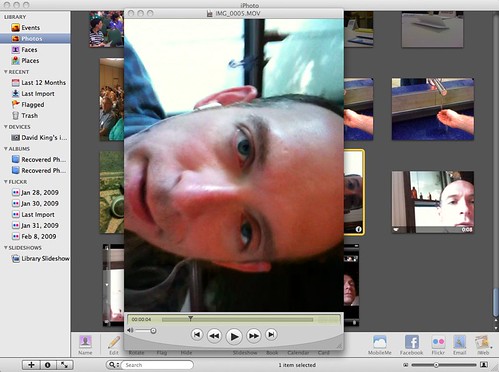
And that’s not the only place I’ve discovered quirks. Look what happened in iPhoto!

Uploaded to iPhoto - it's vertical!

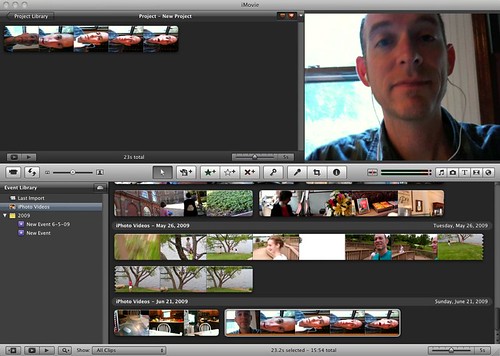
Even weirder in iMovie – check out the thumbnails iMovie generated – the thumbnails are sideways are squished for some strange reason, but the actual video is in landscape mode!

iMovie - vertical & Horizontal

It’s quite possible I just haven’t figured out something yet, but this is a bit irksome. Otherwise, uploading to a variety of places seems to work fine. So far, I have been able to upload my videos to:

  • my computer, to iPhoto and iMovie for editing (haven’t tried importing to Final Cut Express, but I’m sure that will work fine, too)
  • YouTube
  • Flickr, through Flickr’s uploading tool and via email
  • blip.tv via blip’s uploading tool (the first video in this post). I have also tried blip’s mobile email uploader, but haven’t seen any video show up in my blip account yet. We’ll see what happens with that!

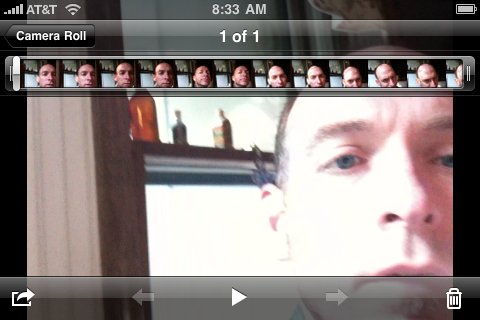
And one more thing – editing. Yes, you can do some extremely basic editing of your iPhone video – right on the iPhone. Here’s how it looks:

Editing video on the iphone!

See the timeline at the top of the video? You can click the beginning and ending points and trim the video’s beginning and ending. And that’s all. But that’s ok – I’ll probably end up dumping video to my Mac anyway for editing later. For some people, this will be pretty useful stuff.

So – my iPhone video report so far… will david figure out how to succeed in landscape mode? Will Apple usher in a new era of vertical video? Don’t hold your breath to find out!

47 comments

Tinkering in the Techie Toybox at NEFLIN

by David Lee King on June 22, 2009

The second presentation I gave at NEFLIN in Jacksonville, FL was Tinkering in the Techie Toybox – here’s the Slideshare version and a couple of links included in the presentation. Enjoy!

Links to other Techie Toyboxes I mentioned in the presentation:

Be the first to comment

Designing the Digital Experience at NEFLIN

by David Lee King on June 22, 2009

Last Friday, I gave two presentations at NEFLIN’s technology conference in Jacksonville, FL. The first one was Designing the Digital Experience, which is based on my book. Here’s the Slideshare version of the presentation!

Be the first to comment

Who Are Your Competitors?

by David Lee King on June 18, 2009

Library Rentals?Who are your competitors? Umm … David … we don’t have competitors … we’re a public library. I think you DO indeed have competitors. You probably have more competitors than you ever did, for that matter.

Think about it for a sec.

If I want a book, where can I go? The public library… unless it’s a popular book. Then I’m put on a waiting list. Or, I could just visit Barnes & Noble or Amazon and buy the book. I could even hang out at a Barnes & Noble for awhile, and read it there without buying. And drink a latte while reading, for that matter.

How about movies? Well, some libraries don’t carry blockbuster hits, so there’s really no competition there – come get your old documentaries here!

But my library carries new popular movies. And we have competition. The local Blockbuster and Hollywood Video rental stores are certainly alternatives. Also those Redbox movie dealies that are installed a couple places around Topeka. And Netflix. Which delivers to your door for a small monthly fee. You can even rent a movie from iTunes. Why spend any money? I can simply visit Hulu or YouTube for a quick video fix.

Music? Same thing. iTunes, blip.fm, last.fm, Pandora. Etc.

Gaming – surely that’s something we have down better. Possibly. Unless you have a mega-church in town. They probably have a better gaming setup than you.

Hmm … reference. That’s what we do well. Unless you venture online (see previous posts). Here, we are usually the last resort – people go to friends, family, and online services before us (read the OCLC Perceptions report for more info on that).

OK – so libraries have competition. What can you do about that? Here are some thoughts – please add more:

  • What do you do better than everyone else? Focus on that. Prioritize that.
  • You’re a natural community gathering place. Focus on your community. Feed it. Grow it.
  • Ask people why they don’t use your library. Use that information to improve your services.
  • Find your largest population segment of “potential patrons” and focus on growing patrons there.
  • Don’t focus on yourself or your stuff – instead, turn your focus on your customers and their needs.
  • Maybe it’s something as simple as rearranging your stuff so normal people can actually find things. We can do better than LC or Dewey call number order. Really.
  • Work on improving the experience at your library – both in the library and digitally.

What are you doing to compete for your patrons’ attention? And … since it’s a competition – what can we do to win?

40 comments

Tweetworthy Twitter Policy

by David Lee King on June 13, 2009

I just read A Twitterable Twitter Policy, by Jay Shepherd, who writes the Gruntled Employees blog (looks like a great blog for managers).

The article includes a brief intro to Twitter, then Jay talks about employee policies and Twitter use. The best part of the article is this – he created a Twitter policy using only 140 characters (so it’s Twitterable):

Be professional, kind, discreet, authentic. Represent us well. Remember that you can’t control it once you hit “update.”

Good stuff to remember when posting ANYTHING on the web, I think!

1 comment

Shiny New Facebook URL

by David Lee King on June 12, 2009

So – anyone else stay up to nab their name on Facebook? I’m now http://www.facebook.com/davidleeking … and an admitted dork, too. But a happy dork!

2 comments

The Destination Web is Morphing – Pay Attention!

by David Lee King on June 6, 2009

I’ve been reading and thinking about websites lately (oh really David? Who would have guessed?). Organizations simply don’t have one nice, tidy website to manage anymore. First, take a gander at these three articles:

OK – read those? Good. I think these guys are on to something. Some people are finding tools that work better for them. More social tools are appearing. Take blogs, for example. Some people were just blogging for the interaction, which they were getting, in a convoluted way, from comment boxes and RSS feeds. Twitter and Facebook status updates meet those needs much better – the interaction is there, it’s easy, and they can pass on fun remarks and pass URLs back and forth easier than through blogs and comments.

But the end of the destination era, like Steve Rubel claims? I’m not so sure about that. Instead of saying “it appears the destination web era is drawing to a close,” I’d say it’s morphing. Our traditional destination websites are not as important anymore. Why? Well… assuming you’ve placed your organization in all the current social media tools that your customers use … there are now more options. Want to find out about something at the library? You can go to our website. Or our Twitter tweet. Or our Facebook event. Want to read a post? You can visit the website to do that – but that’s not the best way to read blogs. Much better to subscribe to the feed.

Blogs, YouTube, Flickr, Twitter, SlideShare … those sites are created so you don’t have to visit the actual destination page. Instead, through RSS and embedding tools, it’s really pretty easy to subscribe to the content you’re interested in. Your destination isn’t the organization’s website – your destination is your feed reader.

But I said “I’m not so sure…” The destination site is still there for some things. Want to create a YouTube account? Gotta go to YouTube. Want a new library card? Have to fill out our form … on our website. Want to buy a book at Amazon? You can certainly browse elsewhere, but when it comes time to put in your credit card number, you’re (hopefully) doing that at amazon’s actual website.

And all that is not taking one big thing into account – our customers. Yes, at my library, some of our customers tweet. Some use Facebook. But right now, anyway, probably a majority of our customers still need to visit the website to do stuff (and I’m not even mentioning those that only walk in to the physical library).

You’ve heard it many times – go where your customers are. For libraries, the majority are still on our destination websites and in our buildings. But that is definitely spreading out. Some parts of our websites were really never intended to be destinations (conversations better suited to Twitter or a forum, for example). And those parts are going where they’re better suited. But some parts ARE still destinations. Why? Because those are places you can do the stuff of the organization (checking out, signing up, buying, filling out, etc).

photo by bitzcelt

2 comments