May 2010

Pennsylvania on Foursquare

by David Lee King on May 26, 2010

Gary Price over at ResourceShelf sent me this – State of Pennsylvania Now Participating in Foursquare; First State to “Sign-Up”

What an interesting project – the State of Pennsylvania apparently worked a deal with Foursquare to have branded Foursquare badges. So for example, if you check-in on Foursquare at one of VisitPA’s recommended Foursquare restaurants, you earn the PA Shooflyer badge.

Cool, huh? In fact, PA’s Deputy Secretary of Tourism is quoted in a PR Newswire article as saying “We would like to see every Pennsylvania  restaurant, retail store, historical site, and museum join Foursquare … ” That’s pretty amazing.

Libraries – is your library on Foursquare yet (we are)? Something to think about … especially if you’re in Pennsylvania, I guess!

ps – make sure to check out ResourceShelf – good stuff! Hey Gary, can we earn a special Foursquare badge for signing up ? :-)

Be the first to comment

Our First Completely Online Annual Report

by David Lee King on May 21, 2010

Our first all online, interactive annual report

Annual reports – gotta do ‘em, and they’re usually boring as all get out. Right? This year, we decided to be a bit creative and have some fun with ours.

OK – partly, we had to “be creative” this year – the printing budget was cut, so we couldn’t do our normal glossy, 4-color annual report. Sometimes, those types of constraints are a good thing!

So, my library’s Creative Group (marketing, programming, and the web dudes) put their collective creative heads together and came up with a really cool, interactive, all-online annual report. Take a peek!

Lots of parts and pieces came together here – some copywriting, some remixing of content created throughout the year, our director making a video in front of a green screen at WIBW, a local TV news station, and lots of heavy Flash creation (by Michael Perkins, our Digital Services Supervisor).

Even better – last night at our monthly board meeting, the board members loved it … and the local newspaper wrote an article about it, too. How often does YOUR library get an article, in the paper … about your annual report?

Good stuff (and good staff) at my library!

9 comments

Facebook and Privacy – is this REALLY a big deal?

by David Lee King on May 17, 2010

being of two mindsI’ve seen lots of posts on Facebook privacy issues the last couple of days, some taking about sharing, some about privacy, some just confused about the whole thing. Me? I’m of two minds about Facebook and privacy.

So I ask – is the privacy you [think you] have on Facebook REALLY that big of a deal?

On the one hand, of course it is. They should at least TELL you they’re going to do something before doing it. And they should let you opt in, rather than forcing you to opt out.

We are, after all, their bread and butter – no people, no Facebook.

On the other hand …. what are you trying to keep private on Facebook, when it comes down to it? Let’s take a peek at what you can share [or not] in Facebook:

First, there’s the “update me with your stuff” things, like status updates, new photos, and new videos:

  • If you want those to be private, you shouldn’t post them. Period.
  • Hello! Nothing’s private on the web. Even on Facebook.
  • If you want to share a status update with just some people, you can do that. Which is more than Twitter gives you.

Basic info, like:

  • Name: um … don’t open a Facebook account if you don’t want to share your name.
  • Gender: That’s rather apparent, isn’t it? Is it bad that you know I’m a guy?
  • Birthday: Hmm. I don’t really care. Should I?
  • Relationship Status: OK – so I have a recently divorced friend, and it was rather painful to watch his relationship status go from married to single to it’s complicated … back to single, etc. Maybe a case of sharing too much info, rather than one of privacy. So if your life’s on a rolloercoaster ride … don’t fill that one out.
  • Current city: big whoop. Google already knows this.
  • Hometown: That’s sort of important when connecting with past schoolmates.
  • Religious and Political views: I have em. So does everyone else.

Work and education:

  • Seeing that I have my resume online and brag about what my library does all the time, this obviously doesn’t bother me.

Likes and interests: stuff like music, movies, etc.

  • Oh man. You’ll find out that I like U2, Fountains of Wayne, and a weird, old-school christian alternative group (Daniel Amos Band). Will my life be ruined if you find this out? Nope. Will yours? I’m guessing not.

Contact info: So … the whole POINT with Facebook is to connect with people …

  • email: already published in many places online, including my website.
  • Mobile phone number: Not had a problem yet.
  • AIM, GTalk, etc IM: Already out there
  • Website URL: I want that shared.

Your friends list:

  • Is it bad that you know who I’ve friended? I don’t really think so. Then again, I’ll probably friend you if you ask, just for kicks.

************

Ok. It really doesn’t bother me that you know some or all of this stuff. At the same time, I DO know how to hide certain things – for example, most of my contact info is only available to Friends (as in people who friend me).

But – isn’t all this sorta beside the point? My basic contact info is already scattered all over the web. In fact, it was BEFORE I even had a Facebook account. My resume’s online. These days, I tweet, flickr, and Youtube you guys like crazy. So if you really want to know more about me, you can – with or without Facebook.

Want to talk about privacy? How about that credit card all of us plunk down in front of lots of 20-year old strangers every day at the mall or Walmart or a restaurant? Besides the kiddo who now has access to your credit card (not that anything’s ever happened to my credit card yet), every time you swipe, that company finds out more about you. Or how about your cell phone – your phone company knows where you are. Or Google? All those searches you just did? Yep. Google knows you.

Facebook and my taste in bands or what I said in a little text box? Not really on my radar.

How about you?

28 comments

Freak Out, Geek Out, or Seek Out Presentations

by David Lee King on May 17, 2010

The last couple of weeks, I’ve given my Freak Out, Geek Out, or Seek Out presentation a few times. On May 6, I gave the three-hour version at the “Social Media For the Social Good” event hosted by ohioNET and the Ohio Library Council.

I gave the two-hour version (embedded above) at Omaha Public Library on May 14. Both were fun times – lots of good discussion, and lots of nice people, too.

thanks ohioNET and Omaha Public Library!

Be the first to comment

Facebook & YouTube Demographics

by David Lee King on May 13, 2010

facebook Page stats
Facebook Insights

YouTube Stats
Youtube Insights

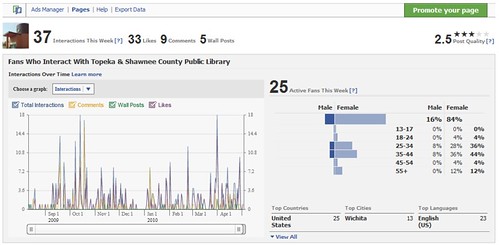
Yesterday, I was playing with Youtube and Facebook Page insights for my library, and found something interesting. Look at the demographics of who’s visiting us in those social networks – not 25-34 year olds. Not teens. Nope.

For Youtube, it’s 45-54 year old females. Followed closely by 55-64 year old women! Facebook looks a bit more “normal” to me – 35-44 year old and 25-34 year old females.

But wow. To me, those demographics really don’t much match up with what one’s first impression of a social network’s demographics would be. Ask anyone who the average viewer of  a YouTube video is, and you’ll hear “18 year old male.” NOT “Oh, I’m sure it’s a 50 year old female!”

What’s that mean to my library? Well, depending on our goals, a couple of things:

  • Goals. Did you read that? First, you need some goals. Take 10 minutes and figure out what your library’s goals for Youtube and your Facebook Page are.
  • Are we good with that demographic? If so, then great – we got em! Now, we need to make sure we’re creating targeted content in those social networks for that demographic.
  • If we aren’t hitting our targeted demographic, maybe our content needs to change … or who we friend needs to change.

What else? Anyone finding similar results in your organization’s Facebook Page or Youtube Insights? Do tell.

5 comments

Does your Website Look Professional?

by David Lee King on May 11, 2010

Would you buy a house from this business? I giggle every time I drive past this sign. It’s in the new construction part of my subdivision. Yes, you read it right – “Hack’s Quality Custom Homes.” Hack’s … as in hacked together. Definitely NOT a name that inspires trust OR quality, to me anyway!

But the sign made me think – how does your organization’s website look? Does it look professional, or does it look like “Hack’s Quality Websites” built it?

Here’s something fun to do – browse through a list of libraries in your state, and poke around on their websites for a bit. If your state is anything like mine, you’ll find some nicely-designed library websites, and many others that … well …  come up a bit lacking.

And I know why:

  • Some libraries, especially small ones, don’t hire web managers. They possibly can’t afford that position, so they have someone on staff do the web stuff as a small part of their many job duties, whether or not they actually have web skills.
  • Some web managers have more of an IT/Technical background rather than an online/web background. It’s really two different skill sets, though both are related to technology.
  • Some libraries simply haven’t yet prioritized their web services. Or it is a priority but there’s not much planning involved. Instead, they keep tacking new things onto an outdated website.

My point? I think this needs to change. If the front door of your physical building were broken, maybe creaky or even coming off its hinges, you’d fix it. No one wants the main entrance of their business/organization to not work right! It gives people a lasting impression … and not a good one, either.

Guess what? Your website is one of the front doors to your library. For many of us, it’s broken. We need to get it fixed! And not by Hack’s Quality Websites, either. Your website doesn’t have to be the most amazing thing they’ve ever seen on the web … but it DOES have to have all the basics, it should be attractive and balanced visually (or at least not be ugly), and shouldn’t cause anyone to stumble.

I think we can do better. I know my library can (which is why we’re redesigning again). I’m certain your library can do better, too. Even if you have little or no dedicated web staff. If you’re small, what can you do? Here are some ideas for starters:

  • Goals come first – figure out what you want your organization’s website to be/do, then work backwards from there
  • Can’t hire? Why not partner – with local ad agencies, with a local media organization, or even with a local school/college.
  • In a regional cooperative/consortium? It’s possible they can help.
  • Start learning! You probably have HTML and basic web-building books – it’s never too late to start learning a new skill.
  • Use a free design template, rather than designing from scratch. In fact, take this time to make your website blog-based, as well. Then it will be easy to update, as well.

What else? Anyone have other suggestions? Please share!

17 comments

My Facebook Privacy Settings

by David Lee King on May 4, 2010

One more Facebook post for today. Every Tuesday, I post what I call Tech Tuesdays. It’s a video series I create for the library (Topeka & Shawnee County Public Library). In the videos, I usually talk about library/techie-related things, like ebooks, databases, or fun websites. You can browse around the library’s Youtube channel to see more – just look for “Tech Tuesdays.”

This week, since Facebook was pretty fresh in my mind (see my previous post), I created a video describing how I am currently managing my Facebook privacy settings, and explain what the different settings do.

Thought someone else might find it useful! On a related note, I just ran across this: Consumer Reports Survey: 52 Percent of Social Network Users Post Risky Information. Interesting take (though I don’t agree with everything they said).

5 comments

10 Reasons to NOT Quit Facebook

by David Lee King on May 4, 2010

Last week, Dan at Rocket.ly posted Top Ten Reasons you Should Quit Facebook , in light of Facebook’s latest changes. His post makes some good points – definitely stuff to think about.

Yesterday, however, I started seeing people I know tweeting the link to Dan’s article, and saying “I might delete my account too.” Again – all fine and good, but that made me think: what about your organization’s Facebook Page? Will they delete that, too?

I’m not sure deleting your Profile or Page is the answer. So, I tweeted “come on people – why should you NOT quit facebook?” and received some excellent replies back. With that question in mind, and with some of the great answers tweeted back by some of YOU, I give you …

10 Reasons to NOT Quit Faceook (at least, not yet):

  1. Your customers are using Facebook. Librarians – walk around your library and see what people are doing. I’m guessing you’ll see lots of Facebook users. Maybe you should still be one, too.
  2. Your community is on Facebook. Quick, go to Facebook and do a search for your city. Narrow the search down to People. Most likely, down at the bottom of that search results page, it says “Over 500 results.” That means you just maxed out your search. Lots of people in your community use Facebook. In fact, Edison Research just released a report showing that 41% of Americans use Facebook. Translation – that’s 41% of your community. That you can reach. For free.
  3. Did I mention free marketing? Zbriceno says “… Keep FB ’cause all types of contact, events, photos, discussion posts, WORLDCAT book searching; one stop shop!” Your organization’s Facebook Page includes status updates, event calendars, comments, discussion boards, videos, pictures, instant messaging and private messaging. All ways to reach your community using Facebook (i.e., potentially 41% of your community) for free. Think about it.
  4. Teach proper privacy protocols. Instead of getting all “oh darn them, I’m gonna delete my account” – why not figure out the changes … then offer classes/blog posts/short screencast videos on how to manage Facebook privacy settings? For starters, make sure to check out Bobbi Newman’s post about that.
  5. Answer questions. From GinaMLS: “… to keep in touch w/users who are on FB and not looking at our websites.” Yes, your patrons can now visit your library online … without ever visiting your actual website. Kinda weird, huh? Are you there for them?
  6. Friend your customers. Friend those people you found in #2 above, and start interacting with them. Invite them to your fledgling “how to manage your Facebook privacy settings” class! Ask them if they care about privacy – it could start some good conversations.
  7. Say hi to your mom. Lots of people are on Facebook simply to connect with family. I talk to my sis, my mom and dad, my nieces and nephews, and even a cousin or two via Facebook.
  8. Don’t stop with your Mom – connect with friends and colleagues too. Cyndi23 said “… because classmates.com charges u when facebook does same and more for free.” So teach people how to connect with friends, family … and those old classmates. I’m enjoying the weird blended mix of personal contacts, professional contacts, friends, and family. All commenting on the same thing at times.
  9. Start conversations. Your organization has the potential for lots of Facebook contacts – use them for conversations. Send out updates talking about your organization’s stuff. Ask questions. Get responses.
  10. Use Facebook tools to tell Facebook what you think. Go ahead – set up a Facebook Page or Group dedicated to the evilness of the new Facebook privacy changes (or better yet, “Like” one of the many pages that have already been created). People have been vocal with Facebook before, and have succeeded. They actually DO listen to their community (though they seem to apologize rather than ask permission …).

So most definitely yes – keep tabs on what Facebook is doing. For that matter, keep tabs on what all the major social networks that you use are doing – it’s your stuff they’re messing with, after all. But is it a reason to quit Facebook, when almost half of your community is using that tool? I’m not so sure about that.

Pic by Max-B

51 comments

Where are your Customers Gathering?

by David Lee King on May 3, 2010

You know that phrase “go where your patrons are?” It’s always bugged me. Not because of the concept – the concept’s great. But because of the grammar – that ending in “are” thing. It’s never sounded right to me (says David, who got a B- in grammar).

At the Free State Social conference last week, someone – not sure who – added a word to that phrase that made a lot of sense to me. Or maybe it just sounds better to my ears. Anyway, here it is:

Go where your customers are gathering.

Besides just sounding slightly better (to me, anyway), it also gives a bit of direction, doesn’t it? Where “are” your customers/patrons? You don’t have to look around every corner for them – just find the places they’re already gathering … then figure out how to exist in those places.

So – where do your customers gather? I can’t answer that one, because it will look different for every organization. My library’s customers gather … at the actual library, on Facebook, at the mall. At church. In schools and our one university in town. And probably other places, too.

Chris Brogan put a marketing spin on the phrase during a small group session. He said “the marketplace convenes where it’s convenient.” Where are those “convenient” places in your community? Facebook is convenient for a lot of people (but not the people you probably think of when you think of Facebook). Not kids and younger teens (although they’re certainly there). Think people with easy, convenient access to the web, at work, at home, at school … and on their mobile devices. Just one example of many.

Find those convenient gathering places – online and off – and take your message/your services/your library to those places.

18 comments