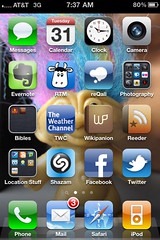
 Which apps have I been using enough that I want them on my main iPhone screen? Here’s a rundown (right now, I have two more screens of apps that I don’t use nearly as much, but are pretty handy once in awhile … like a flashlight or the calculator app):
- Messages – default text messaging app.
- Calendar – self-explanatory, and used a lot!
- Clock – I set lots of alarms to remind myself to do stuff (like picking up a child from dance practice). I also use the alarm clock feature when I’m traveling.
- Camera – self-explanatory. Does video too.
- Evernote – I use this for random note-taking, jotting down quick ideas, that type of thing. I also keep some lists here (ie., lists of books I want to read)
- RTM (Remember the Milk) – It’s a to-do list that works well with the Getting Things Done method.
- reQall – Very cool app that I just discovered. It’s replacing the Jott service I’ve been using, and doing a nice job of it, too. Basically, you can record a 30-second voice memo, and it turns it into text and emails that text to you. You can do a lot more with it … that’s for another post
- Photography – These are all different cameras, photograph editors, or effects that I’ve been playing with:
- CameraBag – has some neat filters, like 1962 (looks like an old photo, Fisheye, etc.
- Darkroom Pro – alternate camera I was playing with, until …
- Camera+ – I discovered this one! They were kicked out of the iTunes app store for awhile – not sure if they’re back yet. But it’s a great camera app – better than the default one, plus it has some great filters built-in. The only reason I haven’t replaced it with the default app is video (as in, it takes none).
- CameraPlus – not sure why I still have this here … must play with it again, then probably delete.
- PS Express – as in Adobe Photoshop Express. Great little app with some handy editing features.
- Flickr – a flickr browser.
- TiltShiftGen – makes those funky tiltshift “miniature” style photos. It’s fun!
- Photos – default iPhone photo browser.
- Qik Video Pro – this one’s been a disappointment. I bought it because it has some fun video filters (like black & white, frost, etc.). But guess what? It doesn’t do the 16X9 HD video that my iPhone 4 can do (even though the iTunes app store description says “works with iPhone 4!”). So that’s no fun! Otherwise … the app posts live video to Qik, and sends to other places like Twitter, Facebook, or YouTube.
- Bibles – a couple different Bibles I use:
- AcroBible – the NIV version. A classic.
- Bible (YouVersion) – I use the Bible part of this app, primarily … but it’s really more of a social network with a Bible in it. You can friend people, see any notes they create, set up virtual Bible studies, hook your calendar up with a variety of Bible reading plans, etc. The app comes from lifechurch.tv – a church that makes apps and social networks!
- TWC – as in The Weather Channel. Hey – I live in Tornado Alley!
- Wikipanion – a Wikipedia app. I bet I use this app almost every day…
- Reeder – a Google Reader app. Also used almost every day.
- Location Stuff – I’ve been experimenting with location-based services, so…
- Foursquare – you can be the mayor…
- Gowalla – another cool tool.
- Brightkite – a third service I play with.
- Loopt – the first location-based service on the iPhone.
- check.in – web-based app that lets you checkin to multiple places at once. Right now, I have it hooked into Foursquare, Gowalla, and Brightkite. It’s very beta, so doesn’t always work.
- Mayorama – lets you see how many checkins you need to be mayor (Foursquare only). Sorta fun playing with this… 31 more checkins until I’m mayor of Lake Shawnee!
- Whrrl – another location service.
- Shazam – cool music service. If I hear a song, I can hold it up, press “Tag Now” and find out who it is, and most of the time, it works great. Unfortunately, I’m often listening to weird college radio or a christian station … neither of which are mainstream. So I sometimes get an “unrecognized” out of it.
- Facebook – self explanatory.
- Twitter – self explanatory.
- And of course, my phone/mail/safari/ipod apps that show on every page.
So, that’s what I’m using. What do you have on YOUR smartphone’s main app page? What can’t you live without?
 Twenty two days ago, I asked readers to tweet
  Here’s my third post on Getting Permission. In the first post, I covered