 This morning, I was invited to talk about email management on Fox4kc.com’s morning show (I’ll update this post with a link/embed of the video if it appears).
As prep, they sent me this little fact – the average inbox of a corporate worker receives about 100 emails per day. Of those 100 emails, only 42% are important. Wow. A couple years ago I kept track of my email for a day, and received about 130 emails. I think I get more now!
So – what can you do to conquer email overload?
Here are five simple steps to email management:
- Remember the goal. It’s not getting rid of email, having Inbox Zero, etc. Your goal with email is to manage your job/life, get your work done, plan things, etc.
- Don’t check email every 5 minutes! Some people (myself included) can easily handle having email up constantly, getting email alerts, etc. And some people can’t. Those reminders interrupt their work, their train of thought, etc. Or it simple distracts them and keeps them from the task at hand. If that’s the case, maybe schedule specific chunks of time for email processing – 2-4 times a day, once an hour, or whatever works with your workflow. Adjust as needed.
- Don’t read email more than once! Actually do something with it the first time you read it. Then see #4…
- Use the Four D’s of Decision Making with your email inbox:
- Delete it. Is it informational, spam, an email newsletter, a reminder, etc? Read it then delete it. Or just delete it.
- Do it (if it takes less than 2 minutes). Does this email need a quick reply? Does someone need a bit of info from you? If you can do it fast, go ahead. Then delete that email!
- Delegate it. Should someone else do this? Send it on. Then delete it.
- Defer it (put it on your to-do list or turn it into an appointment). If the response is going to take longer than 2 minutes, put it on your task list as an action item, schedule a meeting, etc – whatever is needed. Then go to #5…
- Make some handy next action reminder folders. For example, in my work email I create project folders for emails on individual projects. I also have a Waiting For folder for replies or more info that I’m waiting on. Then I check those folders every week or so as a reminder. The idea here is that the email is moved out of your inbox.
How do you handle your email? Have any tips? Please share them in the comments!
email photo by alykat
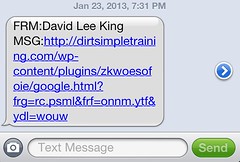 On Wednesday night, I was hacked.
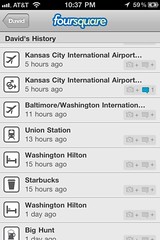 This afternoon, I checked in to a place on Foursquare that I’d never actually go visit in person. Nothing against interesting establishments … but the problem was, I wasn’t there – I was on a plane.
 Check out