Podcasting

Playing with the ProJive XLR iPhone Cable

by David Lee King on May 15, 2012

I just bought the ProJive XLR mic cable for my iPhone. What’s it do? It’s an XLR to headphone jack cable adapter, and it’s made to plug a normal XLR microphone into an iPhone.

This lets me use my better-quality microphones (well, better than the built-in iPhone mic, anyway) for recording. It works with any audio app (like the voice recorder) or with video apps, too.

So – check out the video above, and listen to the sound. Not bad for an iPhone video, huh? Also listen for the unmistakable cell phone interference – that “beep beep beep” noise that you sometimes hear when a cell phone is close to some speakers. I’ll have to experiment more – if that interference happens a lot, the cable isn’t going to be all that helpful.

But we’ll see. Until then, I can now get quality audio in my iPhone videos effortlessly. Sweet!

2 comments

I was on the Bibliotech Podcast

by David Lee King on December 1, 2011

Remember that Library Podcasts you Might Find Useful post of mine from a few weeks back? Well … I was just  interviewed on one of them!

The Bibliotech podcast, one of the five podcasts from Dquarium, interviewed me. I chatted with Kayhan B., Erin Anderson, and Doug Mirams, and we had a fun, interesting chat about the social web, new media, and the importance of well-designed library websites and digital branches.

Here’s the embed of the show (or better yet, just go subscribe via iTunes):

Bibliotech 10: Digitized and Virtualized by dquarium

bibliotech podcast

Not familiar with Bibliotech? Here’s what they say about their show: “Libraries have always been the backbone of any information society. Bibliotech is an audio podcast that discusses all things digital technology at our libraries. Hosted by Kayhan B., Erin Anderson and Doug Mirams (with occasional guests).”

So far, they’ve interviewed me, Michael Stephens, Sarah Houghton, Jan Dawson, and have talked about a variety of technology and web-related topics. Check it out!


1 comment

Youtube – The First 15 Seconds

by David Lee King on November 22, 2011

old fashioned timerWhat’s important in your Youtube videos? The first 15 seconds. According to Youtube’s Creator Playbook, you have 10-15 seconds to hook your viewer into watching the rest of your video. It’s extremely easy to click away from a video – just click and you’re gone. Especially if you’re watching in Youtube, since they have that Related Videos sidebar with other interesting-looking videos … click!

So those first few seconds need to be the best part of your video to keep people watching!

What do many of us do with those first 15 seconds?

  • a slow fade-in
  • cheesy music
  • attempt a flashy branded intro, titles, etc
  • or if it’s a screencast, we start right in with our computer screen – exciting stuff, huh?

Instead, here’s what Youtube says we should do:

  • Get to the point immediately – put your most compelling content first!
  • Quick teaser or summary of what’s going to be in the video, done by the person in the video. You can also welcome/greet the audience or ask a question/spark the viewer’s curiosity. Think inverted pyramid writing style, but for video.
  • branding, packaging, intros, … not as important, especially up-front. Let the content come first.
  • Intros should be minimal and short – 5 seconds is an optimal length

The goal? Make sure your viewers know what they’re watching. If they don’t know in 10-15 seconds … click – they’re gone.

Pic of hourglass from Bigstock

2 comments

Library Podcasts you Might Find Useful

by David Lee King on November 10, 2011

earbudsBobbi Newman at Librarian By Day just introduced me to two new librarian-focused podcasts. Thanks, Bobbi – I’ll have to take a listen!

I thought it might be useful to make a list of librarian-related podcasts, because there are a goodly handful of them at the moment, and they are all pretty useful.

These aren’t podcasts done by local libraries, for their local customers. Instead, these podcasts are all focused on us librarians.

And I’m using “podcast” loosely in my list – it includes audio-only podcasts, call-in live shows (that then turn into downloadable audio podcasts after the fact), and video shows.

List of Librarian Podcasts (the first two swiped from Bobbi’s post):

  • Whatever Mathers: Creative conversations with host Amy Mather and a revolving cast of surprise guests.
  • Circulating Ideas: the Librarian Interview Podcast: Interviews with librarians.
  • NCompass Live, from the Nebraska Library Commission: focus on library trends.
  • This Week in Libraries: Eric and Jaap from the Netherlands host a weekly video show with a bunch of interesting guests, usually talking about the future of libraries. Definitely international in scope.
  • T is for Training: call-in live show/podcast focused on training
  • Games in Libraries: A podcast about Games, Gaming, and Gamers in Libraries (sporadic at the moment)
  • Adventures in Library Instruction: A monthly podcast by and for library information literacy instructors and teaching librarians. The show includes features, interviews and discussion about teaching in libraries.
  • LibPunk: Live call-in show/podcast focused on hot topics in libraryland

Additions from the comments (some other really cool-sounding podcasts):

So – what am I missing in this list? Know of any other podcasts focused on the library/information professional industry? Let’s list them here. And make sure to listen/watch/call-in – give them a try, and see if you get something out of them!

19 comments

New Podcasting Host for Us

by David Lee King on November 8, 2011

dude listening to mp3sMy library has been podcasting for awhile, and we have been using blip.tv as our mp3 podcast hosting service. That has worked great … until now.

Blip.tv is a really cool video service. They have always focused on original web shows (think Epic Fu or Ask a Ninja), but historically they were also really friendly towards random, “share the stuff in your head” videobloggers and audio-only podcasters. So they were a great free alternative for a podcast hosting service.

Lately, Blip seems to be narrowing their focus to original web shows. Nothing wrong with that – businesses grow and change. But how does that affect us? Well – for me, though I have quite a few videos uploaded to Blip, you can’t find them in blip’s search engine anymore. They’re still hosted, and you can get to them on my videoblog – just not through Blip’s search engine.

And my library’s audio-only podcast? Blip is turning off the ability to upload all audio-only formats (that includes our mp3 files) starting December 13.

Bummer for us.

For my videos, no sweat – that’s easy. I’ll still upload them to Youtube (I’m already there anyway).

But finding a new podcast hosting service isn’t nearly as easy. For the most part, podcast hosting services actually cost money these days. Here are some of the more popular choices these days:

The big three – these are considered professional podcast hosting and distribution platforms:

  • Libsyn - plans start at $5 a month
  • podbean – they start out free, but add in monthly charges for added features and more storage space
  • blubrry - plans start at $12 a month

Free alternatives (your mileage will definitely vary with these):

A couple other alternatives:

  • hipcast – plans start at $4.95 a month
  • talkshoe – free, but it’s really more a live call-in show service that can be recorded and archived.

We ended up choosing Libsyn. Rob Walch, VP of Podcaster Relations at Wizzard Media (they own Libsyn) and host of the Podcast411 podcast, has spoken at two of the three Podcamp Topeka unconferences my library has hosted, and really knows his stuff. So we figured why not try them out?

So for now, we went with Libsyn’s $20 a month plan. It includes advanced statistics, a smartphone app, and more monthly storage. Since we plan on expanding our mobile multimedia offerings (i.e.., more audio and video stuff), paying for those features made a lot of sense to us. It’s still relatively cheap (compared to other stuff we buy or subscribe to, $240 a year is definitely cheap), and we get a dedicated podcasting platform and some really great statistics. Nothing wrong with that!

So – fingers crossed!

photo by skippyjon

7 comments

Basics of Podcasting Presentation

by David Lee King on April 19, 2011

I just finished giving a presentation on Podcasting basics to the local chapter of the American Women in Communication. It was fun – lots of good questions and comments.

I promised them I’d upload my slides, so … here you go!

1 comment

i-Microphone for the iPhone

by David Lee King on February 21, 2011

**warning** the first part of this video is very quiet, and the last part is LOUD – don’t scare your office-mates!

I occasionally shoot video with my iPhone, and have noticed that the internal iPhone microphone really isn’t all that great. Which is one reason I don’t use the iPhone video feature more often – the audio it records for video varies pretty wildly. For me, anyway!

So when I saw a link to Amazon for the i-Microphone, I clicked and read. And bought.

It’s cheap – it’s listed at $25.99 at Amazon right now. And it’s LOUD. The manufacturer’s website claims the i-Microphone boosts the audio level “up to 12 dB louder” – and I believe them!

Check out the video I made (embedded in this post). For the first part of the video, I’m using the built-in iPhone mic. Then I plug in the i-Microphone … and you can suddenly hear me. There is a HUGE difference in levels. HUGE.

So – if you like to shoot videos (or record audio) with your iPhone (or pretty much any device that can use a headphone jack plugin for audio) – you might find the i-Microphone pretty darn useful.

4 comments

Three Nice Microphones

by David Lee King on July 20, 2010

A couple of people have recently mentioned they like the quality of the sound in my videos, and have asked what microphones I use for videos and screencasts. Here’s what I’m using right now:

Audio-Technica ATR3350 lavalier

I usually plug this lavalier mic into my Sanyo Xacti videocamera. It’s cheap, it sounds fine, and it allows me to improve the sound of my videos. Did I mention it’s cheap (like $20 or so)? And for my Xacti anyway, it’s very easy to use – I just plug it into the viceocamera’s external mic input and forget about it – nothing else to mess with.

Samson C01U USB Studio Condenser and the Blue Snowball

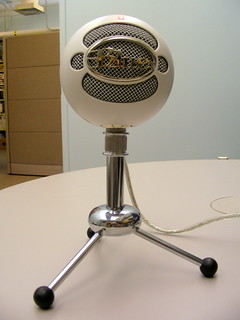
When I’m making a screencast, I usually plug one of these two mics into my laptop via a USB cable. I like the Samson better – it sounds better to my ears. Also, the Blue Snowball had an issue with Windows Vista (as in it didn’t work for me), so it hasn’t gotten as much use at work (my work laptop has Windows Vista loaded). I have used it without a hitch on my Mac laptop – it sounds great, and has a couple of different mic signal patterns that you’d use for different micing situations.

RØDE VideoMic

We have a semi-pro videocamera at work (the Canon GL 2). It has an ok mic built into it, but the RØDE mic is a fine shotgun mic. Plug it in, aim it at someone, and they’ll sound like they’re talking into the mic, even if you’re 10 feet away from them.

Tips on using these mics:

  • If you plan to plug the mic into your computer, buy a USB powered mic. Otherwise, you will also need to buy some type of soundboard or analog/digital signal converter to boost the audio signal up loud enough to play with. You might like doing that – if so, great! You’re sorta like me. But even though I happen to have some of that type of recording equipment, for a quick Jing screencast, nothing beats plugging the Samson USB mic into my laptop. One step and I’m done.
  • Batteries (the lavalier mic I use needs them) – buy two at a time. Because you WILL sit down, all ready to record, and find out that the battery’s dead … because you didn’t turn the mic off last time you used it. Been there, done that.
  • While we’re talking about on/off switches – if the mic has one (the lavalier and the RØDE Videomic do, doublecheck that you flipped it “on” before recording. I had to do some fancy editing on a video because part way through recording, I realized the mic was off (one of my more watched videos, too).
  • The really long cable (20′) on the lavalier mic will get frustrating. It gets tangled easily. But then, it only costs $20, so I can put up with that. I guess.

7 comments

How I Made my Screencast

by David Lee King on July 9, 2009

I’ve been asked by quite a few people, so … here’s how I made my Facebook Pages screencast:

  1. I used Jing Pro to record the screencast. There’s a free version – I whipped out $14.95 (have to pay it every year) for the pro version. Why? The pro version comes with that cool “webcam in screen” effect I used at the beginning and end of the screencast. It also records in MPEG-4 format, so I could easily edit it. It only records up to 5 minutes at a time, which is no problem – just record separate clips, then dump each clip into a video editing program (more on that in a sec).
  2. I plugged in a Samson CO1U USB Condenser Mic to get good quality sound on the speaking parts. It came out a little quiet – will need to play with that some more!
  3. Once the parts and pieces were recorded in Jing, I dumped each screencast clip into Apple’s iMovie, which is an easy-to-use video editor. I didn’t do much there – added a fade in and out to the beginning/ending of the screencast, spliced the clips together, added a bit of text … and removed all my goof-ups, extraneous pauses and “uhms” where I could. My goal was to get the screencast under 10 minutes so I could dump it to YouTube (and I was successful!).

And that’s about all! The combo of Jing Pro and iMovie worked great, the mic was easy to use … any questions? Anyone else used Jing Pro?

4 comments

Playing with Mics

by David Lee King on February 14, 2009

I was playing with different microphones this morning – testing out four microphones for podcast & videocast quality, and decided to do a video test, too.

So here are 4 mics, plugged into my MacBook Pro laptop. Video is the cheesy-but-easy PhotoBooth. Microphones I tested were:

  • Samson C01U
  • Blue Snowball
  • Bescor TCM-88 lavalier mic
  • … and the Mac’s internal mic

So… which one do you think sounds the best? The worst? Were any/all/none adequate? Why? Thanks!

16 comments