screencasting

Three Nice Microphones

by David Lee King on July 20, 2010

A couple of people have recently mentioned they like the quality of the sound in my videos, and have asked what microphones I use for videos and screencasts. Here’s what I’m using right now:
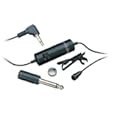
Audio-Technica ATR3350 lavalier

I usually plug this lavalier mic into my Sanyo Xacti videocamera. It’s cheap, it sounds fine, and it allows me to improve the sound of my videos. Did I mention it’s cheap (like $20 or so)? And for my Xacti anyway, it’s very easy to use – I just plug it into the viceocamera’s external mic input and forget about it – nothing else to mess with.

Samson C01U USB Studio Condenser and the Blue Snowball

When I’m making a screencast, I usually plug one of these two mics into my laptop via a USB cable. I like the Samson better – it sounds better to my ears. Also, the Blue Snowball had an issue with Windows Vista (as in it didn’t work for me), so it hasn’t gotten as much use at work (my work laptop has Windows Vista loaded). I have used it without a hitch on my Mac laptop – it sounds great, and has a couple of different mic signal patterns that you’d use for different micing situations.
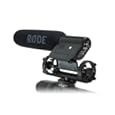
RØDE VideoMic

We have a semi-pro videocamera at work (the Canon GL 2). It has an ok mic built into it, but the RØDE mic is a fine shotgun mic. Plug it in, aim it at someone, and they’ll sound like they’re talking into the mic, even if you’re 10 feet away from them.

Tips on using these mics:

  • If you plan to plug the mic into your computer, buy a USB powered mic. Otherwise, you will also need to buy some type of soundboard or analog/digital signal converter to boost the audio signal up loud enough to play with. You might like doing that – if so, great! You’re sorta like me. But even though I happen to have some of that type of recording equipment, for a quick Jing screencast, nothing beats plugging the Samson USB mic into my laptop. One step and I’m done.
  • Batteries (the lavalier mic I use needs them) – buy two at a time. Because you WILL sit down, all ready to record, and find out that the battery’s dead … because you didn’t turn the mic off last time you used it. Been there, done that.
  • While we’re talking about on/off switches – if the mic has one (the lavalier and the RØDE Videomic do, doublecheck that you flipped it “on” before recording. I had to do some fancy editing on a video because part way through recording, I realized the mic was off (one of my more watched videos, too).
  • The really long cable (20′) on the lavalier mic will get frustrating. It gets tangled easily. But then, it only costs $20, so I can put up with that. I guess.

7 comments

How I Made my Screencast

by David Lee King on July 9, 2009

I’ve been asked by quite a few people, so … here’s how I made my Facebook Pages screencast:

  1. I used Jing Pro to record the screencast. There’s a free version – I whipped out $14.95 (have to pay it every year) for the pro version. Why? The pro version comes with that cool “webcam in screen” effect I used at the beginning and end of the screencast. It also records in MPEG-4 format, so I could easily edit it. It only records up to 5 minutes at a time, which is no problem – just record separate clips, then dump each clip into a video editing program (more on that in a sec).
  2. I plugged in a Samson CO1U USB Condenser Mic to get good quality sound on the speaking parts. It came out a little quiet – will need to play with that some more!
  3. Once the parts and pieces were recorded in Jing, I dumped each screencast clip into Apple’s iMovie, which is an easy-to-use video editor. I didn’t do much there – added a fade in and out to the beginning/ending of the screencast, spliced the clips together, added a bit of text … and removed all my goof-ups, extraneous pauses and “uhms” where I could. My goal was to get the screencast under 10 minutes so I could dump it to YouTube (and I was successful!).

And that’s about all! The combo of Jing Pro and iMovie worked great, the mic was easy to use … any questions? Anyone else used Jing Pro?

4 comments

Facebook Pages basics – a Screencast

by David Lee King on July 8, 2009

Want to see a larger version? Go here. YouTube version is here. Downloadable version is here. MP3 only version is here.

This screencast is for BIGWIG’s 3rd annual Social Software Showcase, being held Monday at the American Library Association’s annual conference.

How can you participate? Two ways:

  1. Watch the screencast and make a comment – what do you think? What are you doing with Facebook Pages?
  2. Show up at my table Monday, July 13, 10:30am. Instead of a formal presentation, show up having watched my screencast … and we’ll have a discussion about Facebook Pages!

So … this screencast is all about Facebook Pages. Here’s what I cover:

  • The basics of a Facebook Page – I describe what can be done with the Wall, the Info page, friending, status updates, events, discussion boards, and boxes.
  • Who uses your Facebook Page? I talk about the stats that come with a Facebook Page.
  • Facebook Apps – I briefly talk about the two apps my library has built
  • Connecting with customers – I talk about the ways a library can connect with customers using their Facebook Page.
  • And I mention my library’s Facebook Page quite a bit…. check it out!

So -  chime in in the comment box and at my table on Monday! I plan to also live stream the discussion – we’ll see how that goes.

42 comments

Tracking SXSW with Netvibes

by David Lee King on March 9, 2007

SXSW is this week! For those of you not familiar with SXSW, it’s a very cool “content” conference. It used to be pretty much just focused on music, but in recent years it’s also included film and “interactive” tracks. The Interactive track is the cool one – it’s all about techie web 2.0 stuff. Here’s a description from SXSW’s Interactive page – “Attracting digital creatives as well as visionary technology entrepreneurs, the SXSW Interactive Festival enables you to connect, discover and inspire your link to the cutting edge.” Translation = all the cool geeks will be there.

I can’t go to SXSW2007 this year (though I DID send my library’s web manager) – but I can certainly follow along via blogs, flickr, and videos! I didn’t want to add a bunch of tag searches to my normal feed reader, so to follow the conference, I’m using Netvibes and tags to track the conference – this screencast explains how I set up Netvibes to do this.

, , ,

4 comments

Library Catalog Usability and a Test of CamStudio

by David Lee King on December 11, 2006

I am playing with CamStudio, and needed to create a short screencast, so…

At the same time, I was looking at Sirsi/Dynix Horizon sites, and found something slightly amusing (to me, anyway) and thought I’d share.

Click the image to the right to watch the video (here’s the .mov version too, if the m4v version doesn’t work for you).

Does anyone else find this amusing? Disconcerting? Can’t we work on making those “nothing found” messages in our ILS/OPAC/Library Catalog systems a bit better? Hmm?

I certainly HOPE so!

And in other news… CamStudio works great! It’s very easy to use. The only thing I had to change right off the bat was to change the audio recording format from an mp3 file to a PCM file (whatever that is). I wanted to edit the screencast with Quicktime Pro – and I was getting silence when playing the video with mp3 audio in Quicktime. Switching to PCM (which I think is an uncompressed audio format) fixed that little problem for me.

, ,

6 comments

More Things Libraries Can Do With Videoblogs

by David Lee King on July 19, 2006

I’m working on a videoblog presentation I’ll be giving this fall, and discovered this cool list of “common genres” of videoblogs on Wikipedia. Here’s Wikipedia’s list and their definition of each videoblog genre, followed by my ideas for those videoblog genres in a library setting.

Personal
– Vlogs documenting the author’s life, the recounting stories from their past, or the airing of their opinions on various topics.

  • Any local or regional authors? Why not invite them in to talk about their lives, discuss their writing styles, etc?
  • Oral Histories from the community.
  • Topic-based histories – why not have three people talk about a common experience from their past or the region’s past (i.e., civil rights, the sixties), capturing different perspectives?

News – Vlogs covering news events.

  • Library news in video format (hmm… possibly a bit on the droll side). But how about capturing patron’s opinions of local news events? How abot providing the background, current happenings, and “where can you go for more” types of information about current local events as a community service?
  • Why not cover “extreme local events” that the normal news outlets might not pick up (and that highlight the library, if possible)? Examples: librarians picking up trash on the side of a highway, a library-sponsored charity event, librarians working in a soup kitchen, etc… things that draw positive attention to your library (all peppered with sneaky mentions of appropriate library materials that can be checked out).

Collaborative (also collective or group) – Vlogs with a collaborative nature.

  • Give your teens a cheap videocamera, and let them create. Then “publish” their creations on the teen’s library videoblog.
  • How about the librarians AND the teens working together to create something unique?

Political – Vlogs discussing political issues.

  • Politics can be a hot topic that libraries might not want to mess with. But how about this idea: gather short videos of all local candidates for mayor explaining why they love the library and why you should vote for them (again, as a community service). People will definitely watch.
  • Provide background information on issues, explaining how to find out more (ie., push those library materials again :-) .

Environmental – Vlogs discussing environmental issues, nature, and natural history.

  • Do you ever have a zoo give presentations at the library? Why not capture the moment on video and turn it into a videoblog post?
  • Same thing with seminars for adults – capture those naturalists discussing regional natural history, and drop the video on your library’s videoblog.
  • Or go one better – a library might, for example, have a list of hiking trails in the area. Why not send a librarian out to each of them with a video camera, capturing the highlights of each one? That way, your library can provide a great value-added service to the community, and possibly partner with some local organizations, too.

Media – Vlogs analyzing television, documentaries and other mass media.

  • This one’s easy – NEW BOOKS, MOVIES, ETC – that the library has. It would be a pretty easy task to gather the library’s best new fiction, for example, and quickly describe the plot and why someone might want to read it.
  • For universities – New [insert subject discipline here] materials this month at the library

Entertainment – Vlogs producing “shows” or short films.

  • Anyone ever watch Rocketboom or listen to Inside the Net? Both are “this week in cool geek technology” types of shows. Libraries can do this type of show for their customers by creating small video snippets showing cool online tools like Flickr. Focus on how your patrons can use the tools (i.e., how Grandma can use it to see photos of her lovely grandkids).
  • How about tech troubleshooting topics, like how to burn a CD, or how to hook up a digital camera to a PC (so Grandma can see those grandkid pics)?
  • Teens could probably have a blast creating a monthly short film. Your library could even partner with a high school, and have the videoblog show be an assignment, complete with writing, scripting, casting, etc.

Third party collections – Vlogs collecting videos from third parties.

  • Hmm… movie trailers…. of movies your library just received…
  • Short segments of music videos… of bands in your library’s CD collection
  • Maybe even something goofy like a “best viral video” feature, just for kicks

Educational – Schools and universities using vlogs as a teaching and creative medium.

  • There’s that partnering with the school thing again …
  • Capture all library events (author talks, seminars, etc) on video and drop them on your videoblog. That way, more patrons can “attend” the session (and you can count new fun statistics like downloads, visits, and hits in your annual “who attended our sessions” report).
  • Library tours fit here, as well.

Behind the scenes – Vlogs showcasing backstage activities of film production or other arts and skills.

  • OK – I just mentioned library tours in the Education genre above. But go one further with it – create a “what happens to the book I just returned” video to show how a library works, then advertise that video to schools (or make sure teachers have subscribed to your “just for teachers” RSS feed so they receive the video automatically).
  • Highlight library departments and staff
  • Why not expand this idea into the local community? Show backstage activities at other local cultural institutions (theater, ballet, etc). That could be great info to provide to your patrons.

Tutorial – Vlogs offering advice, demonstrations, how-to’s, and tutorials.

  • This is another easy one: bibliographic instruction. Put your classes online.
  • This is also where you can add some screencasting – actually walking customers through search engines, library databases, the library catalog, etc.

Travel – Vlogs serving as a travelogue, exploring different places around the world.

  • Explore your local area, and put that info online. You can go all out – list area attractions, include library materials related to that attraction, and include a short video of what you can do/see there.
  • Is a librarian taking a trip out of the country? Let him/her take the videocamera along (and make sure to add an extra day or two to their vacation time, too) and shoot something fun and unique about their travels, with commentary.

Religious – Vlogs discussing religious topics.

  • Libraries like to be neutral, and religion can be a hot topic. This genre is here primarily because churches and such tape their worship services, place them online, and some are even aggregating those services – it’s a great way for church members to participate when they missed the service.
  • But how about capturing different viewpoints on topics of interest (like I mentioned in the politics genre listed above), then surrounding those videoblog segments with some comparative religion readings from your collections?
  • For example, during Christmas… libraries like to have a display with Christmas, Kwanza, and Hannakuh books, right? Why not do the same, but with video on your library’s blog? Invite someone of each holiday persuasion to discuss what they like best, to point out differences, etc. (and still surround those videos with links to library materials about each tradition).

Magazine type or lifestyles – Vlogs discussing lifestyles and hobbies in a television magazine format.

  • Collaborate with your patrons here – highlight patron hobbies and collections in a short video magazine format. Remember to include pointers to library materials about the topic, too.
  • At least one of my library’s branches highlights kid’s collections in-house, in a display case. Why not go one step further, and create a video that highlights the collection AND mentions when the collection can be seen at the library?

Assignment-based – Vlogs consisting of assignments.

  • This one is talking about how some of the more news-style blogs that have “field reporters” who shoot video “on assignment.” Hmm… I’ll need to think about that one some… Anyone have any ideas?
  • Ooh. I have one. No, it’s gone. Dang.

Vlog Anarchy – Vlogs covering all or multiple genres.

  • Mix and match a couple of the above ideas, and you have what Wikipedia calls a “vlog anarchy.”

So you see, there are many ways a library can use video, RSS, and a little bit of creativity to create a library-based videoblog. Read the Wikipedia article about videoblogging – videoblogging and online video are growing like gangbusters, as more people realize there’s some cool video out there (i.e., they discover YouTube), as more people buy video-ready gadgets (like iPods), and as more people create and share their own videos online.

Your patrons are already discovering other cool online services (blogs, RSS feeds, bookmark managers, Flickr, Instant Messaging, connecting and communicating like they never have before… will your library be ready when a patron asks if you are planning a video feed of library programs?

,

Be the first to comment

David’s First Experiment with Screencasting

by David Lee King on June 23, 2006

I’ve wanted to play around with screencasting for awhile now, and recently when looking at job ads, it dawned on me – why not make a screencast of some bad website usability? That way, I can test out screencasting and at the same time, provide something marginally usaful to my blog, too.

So… here it is. In this screencast, I show and comment on some less-than-perfect usability on a college’s jobs page (basically, they let their jobs database get in the way of their design). I’m not sure how clear my points are, but then again it’s my first time doing this. It comes close to me thinking out loud.

For the screen capturing, I used Camtasia. Then I added a little video, titles, and editing via Windows Movie Maker, and then saved it as a Quicktime .mov file.

And let me add this: screencasting is COOL. I think screencasting could be extremely useful on websites – can you say quick, downloadable instruction sessions? Think about those subscription database tipsheets you make that explain, using text and screenshots, how to do a basic search. Why not turn those tipsheets into dynamic 1-2 minute videos that show how to do this earch, where to click, etc? And keep the original tipsheet, too – people learn in different ways, so the more reinforcement, the better.

Is anyone else using screencasting on their library websites?

, ,

20 comments