http://www.davidleeking.com/wp-content/themes/thesis_16

From the category archives:

Web 2.0

Have We Emerged Yet?

by David Lee King on February 25, 2010

budAndy at the Agnostic, Maybe blog (you are reading Andy’s blog, right? Good stuff there) recently posted Deconstructing Library 2.0 – and asked some good questions (I left a couple of comments).

Jenny Levine at The Shifted Librarian responded with a whole blog post (yay! Jenny posted! Jenny posted!). I almost responded in her comments, but needed some more time to process my thoughts. I’m not sure they’re processed yet. But I’ll throw this out – maybe y’all can help, and add to the discussion!

I’ll start us off with some observations from Jenny’s post. She quotes Andrew Burkhardt at the Information Tyrannosaur blog (yet another interesting blog to read) who said “The time has come for libraries to be social on the web. Social is the new normal. It has become mainstream and people expect it. Library 2.0 is not dead, it has just become boring and commonplace. And to quote Clay Shirky, “tools don’t get socially interesting until they get technologically boring.”

Then Jenny goes on to say this: “The hard part, though, is that Library 2.0 doesn’t really replace anything … the opportunities these new tools afford us are in addition to everything we’re already doing, which causes problems, because we don’t get additional resources to implement them … That means being out in your community physically and digitally …”

My question is – are we there yet? I don’t think so. Remember my recent Facebook post? I pointed out that successful library Facebook Pages have staff members actively pushing out content and participating with their users in Facebook. There were some shining examples, and there were some, for all practical purposes, dead pages, too. Maybe those libraries ran into Jenny’s reality of Facebook being “… in addition to everything we’re already doing, which causes problems, because we don’t get additional resources” … so they dropped they thing they didn’t find to be important.

Or maybe, for those libraries, the technology has not yet “become boring and [more likely] commonplace.”

Here’s what I’m noticing when I speak at a library staff day event. I’m usually brought in to speak about “emerging trends and transformations” (translation – web 2.0 tools, services, and underlying philosophies). At these libraries, there’s usually a small cluster of staff that “get it” and are glad I’m there. There’s also usually a couple of staff that think that I’m somehow ignoring the digital divide, forgetting about people who need reading glasses, or even making library services tough for old and poor people.

Then there’s everyone else. For the most part, this larger group hasn’t really adapted to emerging tools, services, or philosophies (but are very willing to learn and to experiment). This is where the new stuff isn’t yet commonplace. For example, maybe some of them have personal Facebook profiles, and use them to reconnect with high school buddies, or maybe their daughter who lives out of state. But when I introduce them to using an organizational Facebook Page to connect with their community – to “be the library” to those people, in that digital space … well, that’s a whole different enchilada.

It’s the very same reaction that some staff might have if they were told to get out of the building, attend a local community focus group … and represent the library while there. It’s different like that … in the same way.

So, my tally on the good stuff mentioned in those posts:

  • “The time has come for libraries to be social on the web” – Yes, definitely.
  • “Social … has become mainstream and people expect it.” Yes and no. A growing segment of our community DOES expect it – but maybe not our traditional “regulars” who visit our physical spaces.
  • “Library 2.0 doesn’t really replace anything … the opportunities … are in addition to everything we’re already doing” – Yes, definitely.

Emerging = growing pains. For many of us, I think that’s where we are right now. We are emerging in many ways, and will continue to do so. But that emerging thing brings a lot of growing pains with it – new things to learn, new priorities, new philosophies to adapt to our organizations, new jobs being created to meet new needs.

Yay! and Ouch! at the same time. What do you think?

Share:
  • del.icio.us
  • Twitter
  • Facebook
  • email
  • Digg
  • FriendFeed
  • LinkedIn
  • Google Bookmarks
  • Technorati
  • BlinkList
  • Reddit
  • StumbleUpon
  • Tumblr
  • Netvibes
  • Ping.fm
  • MySpace
  • Print

{ 6 comments }

Foursquare and Libraries – Anything There?

by David Lee King on January 25, 2010

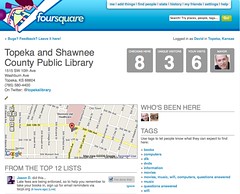
Library entry in foursquareFoursquare is a location-based game. From Foursquare’s website: “We’re all about helping you find new ways to explore the city. We’ll help you meet up with your friends and let you earn points and unlock badges for discovering new places, doing new things and meeting new people.”

Basically, Foursquare works like last.fm or librarything, but instead of sharing music you’ve listened to or books you’ve read, you’re sharing places you’re visiting, and aggregating that list out to your friends.

To play, install an app on your phone, via an iPhone or Android app (a Blackberry one is in the works). You can also use the mobile version of their website for other phones that have web access. Then go visit places … like a coffee shop, a restaurant … basically wherever it is that you go. Once there, “check in” with the app. Checking in gives you points and badges. If you visit a place more than anyone else, you become the “mayor” of that place (until your title is swiped by someone else).

Friend people, and see your points tallied with everyone on your friends list. In the process, you can also create to-do lists and tips at each place you visit, and suggest things for your friends to try or do. Every time you do something, it can be shared with your Twitter and Facebook friends.

wifi tag in foursquareSo … how does this relate to libraries again?

Well… here are some ideas for your library or organization on Foursquare:

  1. Add your library as a place, or edit the entry if someone else has already added it. You can enter your street address (Google map is included, phone number, and your library’s Twitter name.
  2. Add tags relevant to the library. For example, I have added the tags library, books, music, movies, and wifi to my library’s Foursquare entry. If you are in the area (Foursquare is a location-based service, so it knows where you are) and search for wifi – guess who’s at the top of the list? Yep – the library.
  3. Add Tips and To Do lists. When you check in to a place, you have the option to add tips of things you can do there, and you can create To-Do lists of things you want to do there. For libraries, both are helpful – it’s a way to broadcast your services to Foursquare players. To Do lists are handy, because you can make the list and other players can add those To Do list items to their lists, too. When they do something on those lists, they gain points. Think of it as a fun way to get people doing stuff at your library! Just think – someone could gain points by getting a library card – how cool is that?
  4. Add your big events. Then, you can have an event check-in with prizes for the first person who checks in, etc.
  5. Shout outs. These are a type of status update, and can be sent to Twitter and Facebook. So do stuff, then shout out that you’ve done them.

Ok – so Foursquare is definitely fadish right now, and is mainly played by Twitter and Facebook users. But it’s also a great way to connect with a very active, involved online mobile community – and pretty much every city and town has that these days.

Here are a couple of other articles on Foursquare:

We’ll see how it goes – if you’re curious, feel free to follow me on Foursquare!

Update – check out my follow-up post, Foursquare and Libraries – Definitely Something There!

Share:
  • del.icio.us
  • Twitter
  • Facebook
  • email
  • Digg
  • FriendFeed
  • LinkedIn
  • Google Bookmarks
  • Technorati
  • BlinkList
  • Reddit
  • StumbleUpon
  • Tumblr
  • Netvibes
  • Ping.fm
  • MySpace
  • Print

{ 18 comments }

#5000 Tweets: What’s that Done for Me?

by David Lee King on January 8, 2010

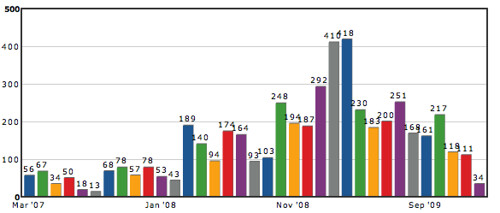
tweetstats

I started experimenting with Twitter on March 6, 2007 (I am @davidleeking on Twitter), and I have just posted my 5000th tweet! What’s that gotten me, exactly? Actually quite a few things, including friends, connections to people, and some actual work, too.

First for some normal stat type things. Right now, I have:

  • 3198 followers
  • been included on 250 lists (mostly on librarian, kansas, rockstar, and social media lists)
  • created 4 lists of my own (that 20 people follow)
  • compiled a huge list of favorites
  • Also compiled 417 DMs that I need to delete but haven’t yet – most are other Twitter followers, saying something like “thanks for the follow, please click here” :-) But some are more relevant, like working out details of conferences I helped plan or some more personal conversations that didn’t need to be broadcast.

But how about those connections? Twitter isn’t about stats – it’s all about connecting with people. How has that looked over those 5000 tweets?

I have made some new friends through Twitter, and have kept up connections to people that I’ve met once or twice (like @shelitwits or @ifroggy).

Twitter has also given me connections to some smart “popular” people that I follow elsewhere, and normally wouldn’t have direct access to. People like Chris Brogan, Beth Kanter, and Kathy Sierra. They sometimes reply to my tweets – and in this way, Twitter has leveled out the playing field a bit. For the most part, people I want to talk to are a reply away.

I am also connected to lots of friends and colleagues, librarians, local friends and acquaintances, and other people sharing my love of social media tools.

That “actual work” thing. I have done real work that is connected to Twitter. Work that includes:

  • Overseeing three work-related Twitter accounts
  • Creating some goals for our primary library twitter account
  • I have written and spoken about Twitter. I have given at least three presentations on Twitter, and have written about Twitter in my book and in more than one magazine article.
  • When I have a work-related question? I sometimes go to Twitter first, and get quick, useful responses within minutes.
  • I use Twitter at conferences for discussion, committee planning, and (of course) dinner planning!
  • Remember when my library went through that book challenge last year? I tweeted the public meetings, and even “Twitter trended.”

Other general silliness, from TweetStats:

  • I generally tweet in the mornings and late afternoons
  • I tweeted the most during the library’s book challenge about 1 year ago
  • I average 6.1 tweets a day
  • I use Tweetdeck a lot
  • I have had 21 twooshes (a 140-character tweet, according to Tweetstats)!

So … looking back, has it been a useful 5000 tweets? I think so. I have made some friends via twitter. I have talked to people about projects, worked through ALA stuff, and shared things that interested me. I have shared jokes, sent links to my blog posts … and had fun.

p.s. – did you know that people tweet about their 5000th tweet? I sure didn’t… !

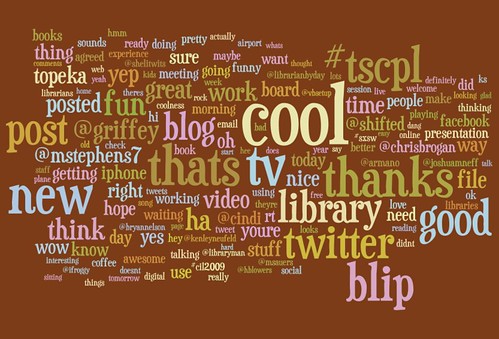
Twitter wordle screenshot

www.wordle.net

Share:
  • del.icio.us
  • Twitter
  • Facebook
  • email
  • Digg
  • FriendFeed
  • LinkedIn
  • Google Bookmarks
  • Technorati
  • BlinkList
  • Reddit
  • StumbleUpon
  • Tumblr
  • Netvibes
  • Ping.fm
  • MySpace
  • Print

{ 3 comments }

Designing the Digital Experience Presentation

by David Lee King on January 7, 2010

On Tuesday, I gave a Designing the Digital Experience presentation at Nassau Library System in New York. It was a fun time – lots of good questions and discussion!

So … here are the slides from that talk. Enjoy!

Share:
  • del.icio.us
  • Twitter
  • Facebook
  • email
  • Digg
  • FriendFeed
  • LinkedIn
  • Google Bookmarks
  • Technorati
  • BlinkList
  • Reddit
  • StumbleUpon
  • Tumblr
  • Netvibes
  • Ping.fm
  • MySpace
  • Print

{ 0 comments }

23 Things Kansas starting soon!

by David Lee King on December 19, 2009

Kansas librarians, pay attention! You might be interested in 23 Things Kansas, a 23 Things program for our state.

What is a 23 Things program? From the 23 Things Kansas website, it’s “a fun way to learn about and practice with online tools for community, sharing and productivity.”

And it’s a pretty cool thing – for January-April, you learn about many emerging web-based tools – some familiar, some not quite so familiar. Each week focuses on one thing – for example, the week I’m facilitating is all about web-based video. So that week, we will play with sites like YouTube and Vimeo, search for videos in video search engines, and some of us will even create videos and upload them to the web. And then some.

Want to find out more? Go visit the website … and don’t forget to register!

Share:
  • del.icio.us
  • Twitter
  • Facebook
  • email
  • Digg
  • FriendFeed
  • LinkedIn
  • Google Bookmarks
  • Technorati
  • BlinkList
  • Reddit
  • StumbleUpon
  • Tumblr
  • Netvibes
  • Ping.fm
  • MySpace
  • Print

{ 5 comments }

Widening your Nets, Decentralizing your Web Services

by David Lee King on December 9, 2009

Last summer while at ALA’s annual conference in the Chicago area, a couple friends and I were eating lunch at the Corner Bakery Cafe and saw this ad on one of the tables.

facebook URL ad

The interesting thing about the ad wasn’t so much the content itself (though I’m sure it’s good stuff). We got all geeked out over the URL associated with the ad. Why? Because they didn’t point to their website.

Instead, they pointed directly to their Facebook Page.

Think about that for a sec, because there are some pretty large implications for library web services. I know that many of us have worked for years to centralize all our websites, tools, and services into one place – preferably at www.mylibrarysnamegoeshere.org …. some of us have worked hard to get federated search tools to work on that library website, and have even integrated some of our library catalog content into our websites, as well.

But people aren’t visiting our websites (well, not in droves, anyway). They are going to other places, like Facebook (and YouTube, and Google, and …). And of course we should be active in some of those social sites. But what about pointing directly to those social sites … in an ad? That’s taking it one step further, isn’t it? Pointing directly AWAY from our website … to some social tool like Facebook?

This could work for libraries. If you have a Facebook Page, check out your Page demographics (Facebook provides some basic stats on Facebook Page visitors). Who’s your main audience in Facebook? Doing anything for that group of patrons already?

If so, you might think of taking it one step further, and pointing them directly to the Facebook Page. Why?

  • This group already uses Facebook
  • Your Facebook Page comes ready-made for interaction – comments, discussions, and likes.
  • it can have an easy-to-remember URL (i.e., ours is facebook.com/topekalibrary)
  • For the customer, it’s a direct connection to the library. Once they “become a fan,” they get all your stuff… reminders, questions,comments, etc.

But even better – for us sneaky librarians, it’s also a direct connection to a segment of our customers. But not just any customers – these customers already use Facebook and actually LIKE to interact. If they have become a fan of your library, that means they like to interact … with the library.

So don’t be shy! Spread out your nets … decentralize those web services. Send out status updates. Ask questions. Start discussions. Get feedback about new services. And in the process, have fun interacting with a group that actually WANTS to interact.

Share:
  • del.icio.us
  • Twitter
  • Facebook
  • email
  • Digg
  • FriendFeed
  • LinkedIn
  • Google Bookmarks
  • Technorati
  • BlinkList
  • Reddit
  • StumbleUpon
  • Tumblr
  • Netvibes
  • Ping.fm
  • MySpace
  • Print

{ 2 comments }

Community Discussion Guidelines for our Digital Branch

by David Lee King on November 18, 2009

Remember my post from last summer about comments at my library’s website? Here’s a follow-up post to that earlier discussion.

Because of all those comments (some of which were mean, snarky and personal), we needed a good, fair, “official” way to deal with them. So I started poking around other websites with commenting policies and guidelines, and came up with a library version of commenting guidelines.

I ended up adapting ours from NPR’s Community Discussion Rules. Want to see a whole bunch of these? Check out  the Online Database of Social Media Policies – good stuff.

Our discussion guidelines are posted (via a link) beside the comment box on each page of our website. Here’s what it says:

*******************************

Community Discussion Guidelines:

Here are some guidelines to posting comments and content at Topeka & Shawnee County Public Library’s digital branch. The goal? To help you have fun!

We encourage comments:

  • We want to hear from you! Please post comments, questions, and other thoughts … as you think them. That’s what we’re here for.
  • Stay on Topic – stick to the subject and issues raised by the post, not the person who made it or others that commented on it
  • Think before you press the publish button. Remember that this is a public forum, and your words will be archived on this site and available for anyone to find for a long time – the web has a very long memory.
  • If you can’t be polite, don’t say it. Respect is the name of the game.  You must respect your fellow commenters.

Some Don’ts:

  • Don’t post copyrighted materials (articles, videos, audio, etc) that you do not have permission to reproduce or distribute.
  • Don’t post content that installs viruses, worms, malware, trojans, etc.
  • Don’t post content that is obscene, libelous, defamatory or hateful
  • Don’t post spam
  • Don’t post personal, real-life information such as home addresses and home phone numbers.

What will we do?

  • We’ll respond to comments, answer questions, and provide suggestions as appropriate.
  • Sometimes we’ll join a comment thread to help focus (or refocus) the discussion, or to get people talking.
  • If you break one of the guidelines above (or come close to it), we’ll email you and ask you to stop. We might also post a reminder to the discussion. If it continues, we will delete your comments and block you from posting.
  • We will remove any posts that are obviously commercial or otherwise spam-like.
  • We will remove content that puts us in legal jeopardy, such as potentially libelous or defamatory postings, or material posted in potential breach of copyright.
*********************************
Does your library or organization have similar policies or guidelines? Drop a link to them in the comments!
Share:
  • del.icio.us
  • Twitter
  • Facebook
  • email
  • Digg
  • FriendFeed
  • LinkedIn
  • Google Bookmarks
  • Technorati
  • BlinkList
  • Reddit
  • StumbleUpon
  • Tumblr
  • Netvibes
  • Ping.fm
  • MySpace
  • Print

{ 6 comments }

Purdue Adds Twitter & Facebook Participation to Classes

by David Lee King on November 3, 2009

Found this at Mashable – “Students at Purdue University are experimenting with a new application developed at the school called Hotseat that integrates Facebook, Twitter, and text messaging to help students “backchannel” during class.”

I’ve certainly seen some good uses of status updates during conferences, from discussions about a presenter’s content, to asking questions of other people in multiple committees during an ALA Annual conference, to … yes … planning for lunch with friends.

But this could be a pretty useful tool – from the simple “what did he say again” types of questions, to thinking “out loud” about content …

Cool project! It will be an interesting one to watch, to be sure.

Share:
  • del.icio.us
  • Twitter
  • Facebook
  • email
  • Digg
  • FriendFeed
  • LinkedIn
  • Google Bookmarks
  • Technorati
  • BlinkList
  • Reddit
  • StumbleUpon
  • Tumblr
  • Netvibes
  • Ping.fm
  • MySpace
  • Print

{ 7 comments }

Library 101 – New Video, Song, and Resource has Launched!

by David Lee King on October 29, 2009

Library 101 has launched! There are a few things you should know about the project:

But even better than watching the video, listening to the song, or reading an essay is this – please participate by commenting! Let us know what YOU think is a “Library 101″ for your library – what do you think librarians need to know to succeed? Tell us in the comments attached to each essay!

Share:
  • del.icio.us
  • Twitter
  • Facebook
  • email
  • Digg
  • FriendFeed
  • LinkedIn
  • Google Bookmarks
  • Technorati
  • BlinkList
  • Reddit
  • StumbleUpon
  • Tumblr
  • Netvibes
  • Ping.fm
  • MySpace
  • Print

{ 10 comments }

IL2009: Experience Design Makeover

by David Lee King on October 28, 2009

Here’s my Tuesday morning presentation on Experience Design Makeovers for library websites. Even better – some of the presentation was livestreamed here and here!

Enjoy!

Share:
  • del.icio.us
  • Twitter
  • Facebook
  • email
  • Digg
  • FriendFeed
  • LinkedIn
  • Google Bookmarks
  • Technorati
  • BlinkList
  • Reddit
  • StumbleUpon
  • Tumblr
  • Netvibes
  • Ping.fm
  • MySpace
  • Print

{ 3 comments }