From the category archives:

Web 2.0

Mississippi Library Association Presentation

by davidleeking on November 1, 2007

Mississippi library associationI recently spoke at the Mississippi Library Association’s annual conference, held in Vicksburg this year. I had a blast! My first job out of library school was in Mississippi, so I was able to hang with old friends - very nice indeed.

And here’s a link to the 2.0/emerging trends presentation I gave.

Enjoy!


Share:
  • del.icio.us
  • Digg
  • Furl
  • Technorati
  • BlinkList
  • Reddit
  • E-mail this story to a friend!
  • Facebook
  • Google
  • LinkedIn
  • Pownce
  • StumbleUpon
  • TwitThis

{ 1 comment }

IL2007, Day 3: Building Web 2.0 Native Library Services

by davidleeking on November 1, 2007

Casey Bisson (met him for the first time - nice guy!)

“Libraries are much larger than our books and our OPACs”

Catalog challenges:

  • usability
  • findability
  • remindability

We use Linux daily - it’s the dominant platform of most social web apps

IBM saves over $900,000,000 annually because of LInux

Scriblio.net (used to be his WPOPAC) - very cool. He’s making this easily available to other libraries!

“sites that allow comments value their users”

“Your website is not a marketing tool - it’s a service point.”

Then Casey did a successful live install of Scriblio! Very cool. It’s basically Wordpress with some customized widgets and plug-ins (and your catalog records) - took him 11 1/2 minutes, it seemed easy to do.

It’s going to work with Horizon soon. Book jackets come from Amazon.

Share:
  • del.icio.us
  • Digg
  • Furl
  • Technorati
  • BlinkList
  • Reddit
  • E-mail this story to a friend!
  • Facebook
  • Google
  • LinkedIn
  • Pownce
  • StumbleUpon
  • TwitThis

{ 0 comments }

IL2007, Day 2: Promoting Play Through Online Discovery: Lego Building

by davidleeking on October 30, 2007

Meredith Farkas:

issue - lots of people don’t have access to continuing education programs

hands-on learning is important

online courses can be run cheaply

talked about Five Weeks to a Social Library:

had 40 participants, all kinds of libraries

tools used:

drupal - it allows multiple blogs, all in the same place, and static content, too

blip.tv

opal

lessons:

playing with technology is essential to learning technology

reflective learning makes ideas stick

learning from peers can be more important than learning from a sage on the stage

online learning can be developed on the cheap

Helene Blowers:

Lego Building: Learning through Play

learning 2.0 has been duplicated over 200 times internationally - coolness.

what can you do to continually keep up with changes?

need to think of ourselves as players

(note to self - still print out presentation… Helene had some tech problems)

becomes a knowledge player

  • take 15 minutes a day to explore something new
  • subscribe to 5 blogs: librarianinblack - sarah does a great job at short informative posts; techcrunch; what i learned today - Nicole does reflective learning stuff; wired; learning 2.0 - 3 new things a month
  • tag “play items” in del.icio.us
  • create a learning blog
  • PLAY!!! give yourself and others permission to play.

become a guide - someone who exhibits and explains points of interest

become a discovery guide:

  • it’s about learning
  • remove the classroom
  • exposure is the 1st step towards learning
  • learners have as much to share as guides
  • focus on FUN
Share:
  • del.icio.us
  • Digg
  • Furl
  • Technorati
  • BlinkList
  • Reddit
  • E-mail this story to a friend!
  • Facebook
  • Google
  • LinkedIn
  • Pownce
  • StumbleUpon
  • TwitThis

{ 0 comments }

IL2007, Day 1: Cranky? Boomers & Older Adults are Greying the Internet!

by davidleeking on October 29, 2007

Cranky? Boomers & Older Adults are Greying the Internet!, Allen Kleiman

seniornet, thirdage, eons - examples of senior-focused social networking cites

these sites are doing something, but aren’t doing a very good job of it.

said a 46 year old isn’t a baby boomer… ??? (picky sideline thing)

most of these sites are focused on seniors or boomers with money

some sites resemble facebook with wrinkles

search engine - cranky.com - developed by eons

Boomers! TV - they do a series of online / tv shows on aging issues…

senior bloggers - benefits:
- helps older adults keep their minds share
great way to meet people
easy to share life experiences, wisdom, and information through blogs
might give the blog author a bit of fame

17% of seniors have read someone else’s blog (3% have created a blog)

they are having the teens teach the older adults how to play the Wii

Share:
  • del.icio.us
  • Digg
  • Furl
  • Technorati
  • BlinkList
  • Reddit
  • E-mail this story to a friend!
  • Facebook
  • Google
  • LinkedIn
  • Pownce
  • StumbleUpon
  • TwitThis

{ 1 comment }

IL2007, Day 1: Integrating Libraries & Communities Online

by davidleeking on October 29, 2007

Integrating Libraries & Communities Online, Glenn Peterson, Marilyn Turner

Marilyn Turner

bookspace.org - they made this. It’s cool. It brings together book lists, author lists, librarian tips, etc… many genre guides

it’s only focused on books - so it still has the traditional librarian bias to content

they include a librarian’s blog on each genre page

assign 2 people per genre pages

not volunteer activities - instead, they say it’s part of your job. Part of performance expectation! Awesome! Web Services Manager works with other managers to make sure web content is part of review process

Glenn Peterson:

Customer Contributed Content

user comments on books and other titles

harry potter and the deathly hallows - 234 comments! wow. they had 60 comments while the book was still on order - talking about how the stroy line would go. neat.

social features:
user comments
blogs
book lists
browse a list of recent comments
user profiles
name, about me, reading interests - that’s neat. theya’re looking at librarything’s profile for ideas
they have a wall-of-books - images of book jackets to see what books each user has checked out…

wanting to do: users wo are reading X are reading Y

wanting to create a friend’s list, a facebook-like wall

challenges - control issues - what can people leave on their profile

John Blyberg:

The Social Catalog

why bring social tools to the catalog?

three social catalogs:
pseudo-social - authority presented as collaborative (ie., Innovative’s ncore)
Syndicated social - third party data (librarything)
individually social - user-direct (hennepin, sopac)

Share:
  • del.icio.us
  • Digg
  • Furl
  • Technorati
  • BlinkList
  • Reddit
  • E-mail this story to a friend!
  • Facebook
  • Google
  • LinkedIn
  • Pownce
  • StumbleUpon
  • TwitThis

{ 3 comments }

IL2007, Day 1: Putting Evidence-based Practice to Work

by davidleeking on October 29, 2007

Putting Evidence-based Practice to Work, Frank Cervone and Amanda Hollister

Frank:

  • most librarians haven’t been trained in HCI
  • defined evidence-based practice
  • data provides primary evidence for decision-making
  • it’s not “common sense” - different stuff generally happens than what you “think” will happen
  • Ex - doing a usability test, then comparing it with other similar tests to see the larger picture
  • similar to user-centered design
  • SPICE - setting, population, intervention, comparison, and evaluation
  • Northwestern did their first usability test in 2001
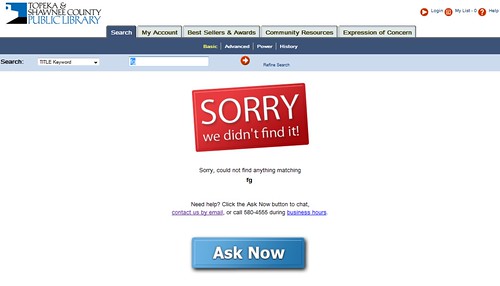
  • 2002 - did a catalog usability test - they found that the greatest number of searches that failed were title searches - title search was the default search setting, students were typing keywords into the default search box and not finding anything… so they found some great info from this test
  • overall, site usability has improved - and they can prove it with statistical measures
  • debates about how to proceed are easier - because they have data to fall back to
  • easier to develop a strategy for incremental improvements over time - no longer locked into a tight academic schedule - they can prove the change will be an improvement, so have the go-ahead to roll the change out
  • remaining issues - jargon and “i can find everything in google” problems

Amanda:

  • spoke on making dynamic, page-based breadcrumbs on a website
  • did a study of common paths customers took to get to certain pages
  • they made something that constantly tells what paths customers are taking - very cool! They can narrow down to a single day if they want to
  • future directions - implement predictive track analysis - find out where people are getting lost dynamically, then have something po up that says “were you really looking for this?”

Share:
  • del.icio.us
  • Digg
  • Furl
  • Technorati
  • BlinkList
  • Reddit
  • E-mail this story to a friend!
  • Facebook
  • Google
  • LinkedIn
  • Pownce
  • StumbleUpon
  • TwitThis

{ 1 comment }

Topeka’s Techie Toybox

by davidleeking on October 23, 2007

Blue Snowball USB MicrophoneI thought some of you might be interested in my library’s “techie toybox” that I have been purchasing over the summer. What is a techie toybox? In our case, it’s a bunch of gadgets, cameras, and the like that library staff can check out and, well, do stuff with. Here’s the list of gadgets (photos of most can be seen here), and some suggestions I gave (on one of our staff blogs) for starters on how to use them:

*****************

The Techie Toybox was started by a generous gift from the Friends. With it, we were able to purchase some “techie toys” with a few goals in mind:

  • keeping our staff current on new technology
  • allowing us to “try out” gadgets our customers are using
  • Allowing us to start creating multimedia content for the digital branch

Here’s what we have (with some starter ideas for trying the techie toys out - don’t limit yourselves to my ideas, though!):

Cameras:

  • Canon Powershot Pro S3 IS – digital camera
  • Canon Powershot A710 IS – digital camera

What can you do with these? Photograph library programs and events, what’s happening at the library, departmental photos, etc - and dump the photos into the library’s flickr account. For starters…

Video Camcorders:

  • Sanyo Xacti HD2 – ultra small video camera, saves to an SD card
  • Sony HDR-SR7 Handycam High Definition Camcorder – consumer-level camera, saves to internal hard drive
  • Panasonic PV-GS320 Camcorder – consumer-level camera, saves to Mini DV tapes
  • Canon GL2 Digital Camcorder – Prosumer-level camcorder, saves to Mini DV tapes
  • Logitech QuickCam Pro 5000 – desktop webcam

What can you do with these? Same as above, but with video instead of audio. Dump videos into the library’s YouTube account. Do something original… Start a weekly “what’s going on at the library” video magazine…

Portable PCs:

  • HP Pavilion tx1000 – tablet PC
  • OQO Model 02 – Ultra portable “fits in your pocket” PC

What can you do with these? See if you can work your desk shift using one of these rather than a service desk PC! Try roaming the stacks (both hook up to our wifi system). You will probably need some type of video editing program too… talk to Digital Services first (unless you already have some editing software, then go for it!).

Microphones and Audio recording:

  • Edirol R-09 24-bit Wave/MP3 Recorder – portable audio recorder, records to an SD card
  • Blue Snowball – upper-end USB microphone
  • Samson C01U – mid-level USB microphone
  • Logitech Desktop Mic – entry-level USB microphone

What can you do with these? Record podcasts! Become a “library reporter for a day!” Podcast your committee minutes (ok, that one’s pretty boring… but might be useful, too). You will need audio editing software if you plan to play much with the audio files. Talk to Digital Services to get Audacity, an excellent, free, open source editing program.

Video/MP3 Players:

  • iPod Touch – new Apple MP3 and video player, and mobile web browser
  • Microsoft Zune – mp3 and video player
  • Video iPod – mp3 and video player
  • Creative Zen Vision – mp3 and video player
  • Sansa 1 gb MP3 player – mp3 player

What can you do with these? Some of them will allow you to listen to our OverDrive ebooks. Others won’t, but our patrons are using them - so get familiar with them! Find out what you can and can’t do - what free ebooks are out there that WILL work… free music sites, etc. Play with the video - see what the video you made with the video equipment (above) looks like in a tiny format… Again, it’s possible that Digital services will need to hook you up with the appropriate software to fully test these out - don’t be afraid to ask!

Miscellaneous:

  • Sony Reader – e-book reader
  • Belkin WiFi phone – wifi phone, can be set up to work with Skype

What can you do with these? The Sony reader already has some books (excerpts, I think) loaded onto it - try it out! Let others know how good/bad it is to read. With the WiFi phone, I plan to hook it up to a year long Skype phone plan for the library - then we can call people with it… using any wifi you can access.

So - that’s what we have. I plan on setting up a “show and tell” on these things, probably late November/early December. Stay tuned for more on that!

****************

So - what techie toys do other libraries have? Please share!

Share:
  • del.icio.us
  • Digg
  • Furl
  • Technorati
  • BlinkList
  • Reddit
  • E-mail this story to a friend!
  • Facebook
  • Google
  • LinkedIn
  • Pownce
  • StumbleUpon
  • TwitThis

{ 18 comments }

New Song and Video: Social Digital Global Shift

by davidleeking on October 23, 2007

Video thumbnail. Click to play
Click To Play

YouTube version | MP3

I recorded a new song and video for y’all! This song is all about social networking and how people are using the emerging social web to connect with each other, to communicate… and in my case, to sing songs to my blog readers.

When writing the song, I was thinking about facebook, twitter, MySpace, and all the social connections that are happening 24/7 - I find it extremely fascinating.

Social Digital Global Shift
by David Lee King

I haven’t seen her since high school
never thought I’d see her again
but yesterday I got a facebook request
she asked to be my friend

so I took a little time to catch up
browsed through her photobucket and blog
I watched some funny videos of her kids
and then I wrote this song

’cause it’s a social digital revolution
social digital relationship
social digital communication
it’s a social digital global shift

I have friends around the world
they’re growing globally
some of them live in Saskatchewan
while others live in D.C.

Enjoy!

Share:
  • del.icio.us
  • Digg
  • Furl
  • Technorati
  • BlinkList
  • Reddit
  • E-mail this story to a friend!
  • Facebook
  • Google
  • LinkedIn
  • Pownce
  • StumbleUpon
  • TwitThis

{ 15 comments }

Information Tomorrow has finally arrived!

by davidleeking on October 19, 2007

Information tomorrow: reflections on technology and the future of public and academic librariesCool beans! Rachel Singer Gordon’s newest book, Information Tomorrow: Reflections on Technology and the Future of Public and Academic Libraries, just came out. I know, because I received a copy in the mail today.

And why did I receive a copy? Because I wrote one of the chapters! My chapter is chapter 10, An Experience to Remember: Building Positive Experiences on Library Web Sites. It’s about… you guessed it… experience design and library websites. If you read the chapter and still want more, never fear - I’m 2/3’s of the way through a whole book on the topic. So hold on to those longings :-)

But please don’t stop at my little chapter! There are a bundle of amazing authors in this book, including:

  • Stephen Abram
  • Lori Bell
  • Steven J. Bell
  • John Blyberg
  • Robert Bocher
  • Daniel Chudnov
  • Jill Emery
  • Meredith G. Farkas
  • Megan K. Fox
  • Beth Gallaway
  • Joseph Janes
  • David Lee King
  • Jenny Levine
  • Tom Peters
  • Dorothea Salo
  • John D. Shank
  • Michael Stephens
  • Rhonda B. Trueman
  • Jessamyn West
  • Alane Wilson

Wow - just wow. I’m thrilled to see my name in this smorgasboard of emerging library delight.

Share:
  • del.icio.us
  • Digg
  • Furl
  • Technorati
  • BlinkList
  • Reddit
  • E-mail this story to a friend!
  • Facebook
  • Google
  • LinkedIn
  • Pownce
  • StumbleUpon
  • TwitThis

{ 8 comments }

Lee County Library System Presentation

by davidleeking on October 10, 2007

sanibel beachOn Monday, I spoke about Web 2.0 and emerging trends at the Lee County Library System’s staff day in Fort Myers, Florida. The day before, I worked extremely hard, as you can tell from the accompanying photo :-)

Anyway… here’s the pdf of my presentation. And an FYI for those of you who are thinking “where have I heard of that library before?” You might have recently read about Lee County and their License to Play / learning 2.0 program in a couple of places.

Keep an eye on them!

Share:
  • del.icio.us
  • Digg
  • Furl
  • Technorati
  • BlinkList
  • Reddit
  • E-mail this story to a friend!
  • Facebook
  • Google
  • LinkedIn
  • Pownce
  • StumbleUpon
  • TwitThis

{ 1 comment }