http://www.davidleeking.com/wp-content/themes/thesis_16

From the category archives:

Younger Generation

Teen Tech Week Mini Grants

by David Lee King on January 2, 2008

Some of you might have heard about this – just passing it along: YALSA has some Teen Tech Week mini grants to give out to some lucky libraries! From Yalsa’s website:

“Thanks to our 2008 Corporate Sponsor Dungeons & Dragons, you could win one of twenty mini grants for your celebration! Mini grants of $450 and $50 worth of Teen Tech Week products are available to YALSA members who plan to offer unique, engaging programming activites, services or resources to celebrate Teen Tech Week in their community. Download the official rules and submit the application form and your proposal to the YALSA office at yalsa@ala.org by January 7, 2008.”

So if you want to do this, get those application forms in fast!

Share:
  • del.icio.us
  • Twitter
  • Facebook
  • email
  • Digg
  • FriendFeed
  • LinkedIn
  • Google Bookmarks
  • Technorati
  • BlinkList
  • Reddit
  • StumbleUpon
  • Tumblr
  • Netvibes
  • Ping.fm
  • MySpace
  • Print

{ 2 comments }

Don’t Set Your MySpace Page Profile to Private!

by David Lee King on December 7, 2006

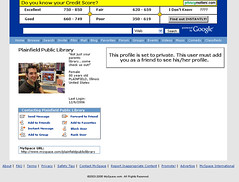
library myspace  pageI just saw Plainfield Public Library’s MySpace page (via Michael Stephens). Well, not really – take a look at the screenshot – their MySpace profile is set to private.

So what? Well… it’s a usability and experience thing. There will be MySpacers that want to peruse the page, see what programs the library has to offer, etc – and not want to sign up to be a friend of the library. By setting their profile to private, the library is basically blocking all their great MySpace content from ALL POTENTIAL CUSTOMERS. It’s sort of like saying “yes, you can enter our library building! Of course! But – do you have a library card? ‘Cause you can ONLY enter our fine library if you have a library card.”

The newspaper article about the page (aside – extremely cool they received press about their MySpace page!) quotes a librarian saying they’ve added more than 80 friends to the site since August. My guess? They’d get more friends if the profile WASN’T set to private.

, ,

Share:
  • del.icio.us
  • Twitter
  • Facebook
  • email
  • Digg
  • FriendFeed
  • LinkedIn
  • Google Bookmarks
  • Technorati
  • BlinkList
  • Reddit
  • StumbleUpon
  • Tumblr
  • Netvibes
  • Ping.fm
  • MySpace
  • Print

{ 5 comments }

More Myspace Thinking

by David Lee King on July 10, 2006

I’ve been looking at some library myspace accounts lately, notably Steele Creek Library and Denver Public Library’s eVolver Myspace accounts. Both are way cool. Steele Creek, especially, has a nifty background on the page that I think rocks.

And both sites have great content – they both use the blog part of Myspace, so any of their myspace “friends” will be updated on events and new stuff when the libraries decide to update. And both use the Blurbs section for different things: Denver points to their Ask a Librarian service, their teen website, and includes a catalog search interface right in Myspace!

Steele Creek Library includes Youtube videos of library events – which is an amazingly cool way to use Youtube… and Myspace… simultaneously.

Then there’s the usual comments section where kids say stuff like “We heart you for the freinds addy”…

I think both these libraries are really going for it, and getting a lot of mileage out of their myspace accounts. I also think they could go one or two steps further. Denver’s Myspace account includes popular music – some band called Hot IQs plays when you go to the page. But as far as I can tell, Denver Public Library doesn’t own a copy of the CD (it doesn’t show up in their catalog, anyway). You have the option to pick songs on myspace – so why not pick things that teens can check out, and even link from myspace directly to the catalog record? That’d be one cooler, for sure.

My other idea is this – Myspace has two types of accounts: the normal one, and one for musicians/bands. The added benefit of registering as a band? You can upload your original songs to your myspace site for everyone to listen to download to their iPods, etc. Pretty cool for bands.

But wait! Can’t a library be slightly devious, and register as a band? Heck – right now we’re registering as a teenager (ex – Denver Public Library is described as an 18 year old female). So why not register as a band? That way, you can download an audio file (I think up to 4 of them, actually). And what could those files be? How about:

  • A compilation of 30-second samples of new music at the library?
  • Your hip library podcast on upcoming teen books
  • A regular what’s hot at the library podcast
  • original music from local bands
  • etc

This type of thing provides the library with another way to get into your teen’s iPod… which is a good thing!

Share:
  • del.icio.us
  • Twitter
  • Facebook
  • email
  • Digg
  • FriendFeed
  • LinkedIn
  • Google Bookmarks
  • Technorati
  • BlinkList
  • Reddit
  • StumbleUpon
  • Tumblr
  • Netvibes
  • Ping.fm
  • MySpace
  • Print

{ 8 comments }

Law Professor Bans Laptops in Class

by David Lee King on March 29, 2006

From this article… a professor has banned the use of laptops in her class. The article says “Professor June Entman says her main concern is that
students are so busy keyboarding they can’t think and analyze what
she’s telling them.”

Wow. Just wow. I have a question… those students are TAKING NOTES. But using a laptop to do the note-taking.

How in the world is typing one’s notes somehow different from using pen and paper to take notes? Is there really a difference, other than laptops might be a bit more noisy?

Compared to what her students just might be doing in the “real world” (as in, using a laptop to take notes, write reports on the go, etc, etc), I’d think the professor would welcome the use of laptops.

But that’s just me.

Share:
  • del.icio.us
  • Twitter
  • Facebook
  • email
  • Digg
  • FriendFeed
  • LinkedIn
  • Google Bookmarks
  • Technorati
  • BlinkList
  • Reddit
  • StumbleUpon
  • Tumblr
  • Netvibes
  • Ping.fm
  • MySpace
  • Print

{ 2 comments }

CIL2006, Day 3: Gary Price – Best of Resource Shelf

by David Lee King on March 25, 2006

Most important – why do we need to know all this stuff Gary talked about? Well – we’re the information go-to… we know our collections. We also need to learn online resources, so when people come asking about the web, we can be ready with a good anser, resources to point them to, etc.

trafficland.com – cams of traffic in DC and NYC

in2tv from AOL – free old TV shows. This is cool…

publicradiofan.com – what’s coming up on public radio – even opens up the live stream.

search engine ordering – a firefox plugin – will it work with an opac? Hmm…

newspaperarchive – free pdf of newspapers

zohowriter – wame as writely – a web-based Word-like application

SECform4.com – free SEC alert service

exalead has proximity searching – 16 words in either direction

rollyo runs on top of the yahoo database, does customized searches

online books page – lots of onlien books, with rss

topix.net – still useful. prebuilt pages for companies and zip codes.

Diplomacy Monitor – primary documents and press releases from world governments

wikiwax, answers.com – word mapping

Gooba – upload and host video content

CIL2006

Share:
  • del.icio.us
  • Twitter
  • Facebook
  • email
  • Digg
  • FriendFeed
  • LinkedIn
  • Google Bookmarks
  • Technorati
  • BlinkList
  • Reddit
  • StumbleUpon
  • Tumblr
  • Netvibes
  • Ping.fm
  • MySpace
  • Print

{ 0 comments }

CIL2006, Day 3: Lee Rainie

by David Lee King on March 25, 2006

Lee Rainie spoke about younger people… here’s what he had to say:

Younger users: they made a recent TIme Magazine cover – “Are Kids too Wired for their Own Good?”

8 Realities of Millenials:

  1. Distinct age cohort: they are not like gen x or baby boomers. They will be a larger generation than the baby boomer generation, and will be more ethnically diverse. They are the generation of No CHild Left Behind, play days, metal detectors at schools, filters, and bike helmets.They are team-oriented and conventional. They are very tech-embracing.
  2. Immersed in the reality of gadgets. They favor the gadget of the moment – if they have a cell phone with them, then that’s the gadget they want information to be delivered on. If they’re at home, then their computer works just fine. If they want to immerse themselves in a subject, then books are great.
  3. Mobile. Lee talked alot about smart mobs, texting, and cell phone use. Media – tivo and ipods. schedules are no longer being formed around a media event (like for a TV show).
  4. Internet plays a special role in their world. 33% of online teens share their creations online! 22% have their own webpage, 19% have a blog. 19% remix content into their own creations.
  5. Multi-taskers. continuous partial attention. Librarians are “information support” – only useful when needed.
  6. Unaware of consequences related to technology. The whole download/copyright/personal privacy thing. [me here - no duh! they're still kids. I think this will change as this generation matures]
  7. Their tech world will change radically in the next decade. [me here: listen up - ours will, too!]. We’re in the middle of a J cuve (which is much steeper than an S curve). Computing power doubles every 18 months; communication power doubles every 9 months; storage doubles every 12 months. RFID stuff, the Long Tail.
  8. The way they approach learning and research will be shaped by their new tech world.

Lee siad the new world is “complcated, scary, and exciting.”

CIL2006

Share:
  • del.icio.us
  • Twitter
  • Facebook
  • email
  • Digg
  • FriendFeed
  • LinkedIn
  • Google Bookmarks
  • Technorati
  • BlinkList
  • Reddit
  • StumbleUpon
  • Tumblr
  • Netvibes
  • Ping.fm
  • MySpace
  • Print

{ 0 comments }

Here’s an interesting news story: E-mail is for older people, teens say in survey.

According to a recent survey, teens (age 12 – 17) think email is for grown-ups (even though 90% of the kids DO have an email account, too).

Interesting stuff!

Share:
  • del.icio.us
  • Twitter
  • Facebook
  • email
  • Digg
  • FriendFeed
  • LinkedIn
  • Google Bookmarks
  • Technorati
  • BlinkList
  • Reddit
  • StumbleUpon
  • Tumblr
  • Netvibes
  • Ping.fm
  • MySpace
  • Print

{ 0 comments }

Audio Content at Thomas Ford Memorial Library

by David Lee King on April 1, 2005

Update from comments: someone asked what a p-slip was. Here’s a definition (from http://www.library.cornell.edu/tsmanual/jargon.html): “A plain piece of paper the size of a catalog card, sometimes with punched hole for use in a catalog drawer.” It’s the little piece of paper by the library computer that you can write a call number on… often, it was an old catalog card. Not sure what the “P” stands for, though.

Aaron at walking paper just posted about adding teen audio reviews on his library’s website. That SO rocks! Teens will listen – if for no other reason than someone’s friend says “hey, you can hear my voice at the library’s website… cool!”

I really think audio content should be included on a library’s website – it just makes sense. Why just type, when one can click and hear something? Especially for, say, introducing new music. With books, you can include a few choice quotes. But with music, why not take a 10-second sample of a CD and drop it online with a review of the CD (and with some teen audio reviewers, too, in Aaron’s case)?

Very cool.

Also – Aaron mentioned in passing that he’s refusing to use the silly term YA/Young Adult for teens. Another good thing. Now if we can just get rid of other terms, like “Audio Visual,” “pathfinder,” and “p-slips.”

Share:
  • del.icio.us
  • Twitter
  • Facebook
  • email
  • Digg
  • FriendFeed
  • LinkedIn
  • Google Bookmarks
  • Technorati
  • BlinkList
  • Reddit
  • StumbleUpon
  • Tumblr
  • Netvibes
  • Ping.fm
  • MySpace
  • Print

{ 5 comments }

Update: here’s an article from CNN about the new study…

This is a must read: Usability of Websites for Teenagers (Jakob Nielsen’s Alertbox).

From the article: “Many people think teens are technowizards who surf the Web with abandon. It’s also commonly assumed that the best way to appeal to teens is to load up on heavy, glitzy, blinking graphics. Our study refuted these stereotypes.

Teens succeeded in the usability tests only 55% of the time, which in usability is BAD. The study showed that teens’ poor performance centered around three things: “insufficient reading skills, less sophisticated research strategies, and a dramatically lower patience level.” – in other words, they’re… well… teens.

Teens DO like cool-looking websites, and pay more attention to graphics… but found modest clean web design to be more usable.

Here’s another good quote from the article: “Teenagers like to do stuff on the Web, and dislike sites that are slow or that look fancy but behave clumsily.” – think about that one – can teens DO stuff on your library’s website? Or is your teen’s site made up primarily of lists of links and books?

Here are some suggestions from the article about interactive stuff to include on a teen’s website:

online quizzes: How about a Harry Potter quiz, with a drawing for free movie passes for the winners?

feedback/comment/question forms For starters, you could ask teens what they want the website to do (of course, then you just might have to DO what they asked for).

online voting: Have them vote on local issues, surround the voting page with explanations of the issues, and see what happens – could be fun.

games: Gaming is HUGE right now for teens. Buy books on gaming, point to gaming websites, or even go one further and set up gaming days at the library.

sharing pictures or stories: Hold a photography contest, and put the winner’s pictures online.

message boards: teen book/music/dvd clubs, local and world issues, etc – just a place for teens to connect with each other to get and share information.

offering and receiving advice: This can be where you use that virtual reference service to connect with teens.

a way to add their own content: We’ve thought about online poetry slams and articles written by teens/for teens…

These are just a few ideas. Go read the Nielsen article and start thinking!

Share:
  • del.icio.us
  • Twitter
  • Facebook
  • email
  • Digg
  • FriendFeed
  • LinkedIn
  • Google Bookmarks
  • Technorati
  • BlinkList
  • Reddit
  • StumbleUpon
  • Tumblr
  • Netvibes
  • Ping.fm
  • MySpace
  • Print

{ 2 comments }