app

CILDC: Mobile Apps & Mobile Web Development

by David Lee King on March 21, 2012

Six speakers in 45 minutes! Here are some highlights…

MIT App Inventor and jQuery:

MIT App Inventor – a web-based Android app development tool. Store your code at the site, can test what you’re building by using the site. Has a designer that lets you add components, modules, etc.

Has an AppToMarket that uploads your app to the Android app stores (some registration and a small payment is required for that).

jQuery: mobile framework that’s completely web-based. Basically a cross-browser javascript library that could be pretty handy for web design, including mobile design. Also check jquerymobile.com – a mobile framework. Sweet.

Next up: what’s a mobile framework? Gave an example of mobile design and redesign… they used jquerymobi

Be the first to comment

Playing with Dragon Express

by David Lee King on February 28, 2012

dragon expressI recently loaded Dragon Express on my laptop, with plans for my son to use it as a tool for his writing-based school work. What’s Dragon Express? Here’s the blurb about it from the App Store:
“Dragon Express is an easy and fun speech recognition utility that introduces … customers to voice-recognition for the Mac. Put your words to work without the hassle of typing. Just speak and amazingly accurate results instantly appear in the Dragon Express window. You can dictate anything – even words that wouldn’t be found in any dictionary – since Dragon Express is customized to recognize your voice and the words you use.

Simply open the Dragon Express utility and start talking. Your words will automatically begin to appear the Dragon Express window. When you’re done, Dragon Express will place the transcribed text into the application of your choice and refresh itself for the next time you’re ready to speak.”

That description is a pretty good one! Here’s a transcription of my first test (corrections noted in [brackets]):

Okay, this is a test. I would like to test out Dragon Express. It’s a pretty cool program that is taking my words that I’m saying that I’m speaking out loud, and transforming them into text. For example, this post is being written as I speak in Dragon Express.

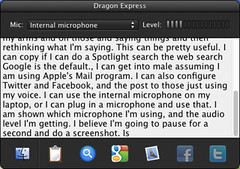
Once I am done speaking, I will copy and paste this text and post it into WordPress as as my post, [I started saying comma - Dragon Express inserts punctuation when you speak the word. So my fault here!]. Looks like I’ll have to do some cleanup work first because of my arms and on those [Ha! I actually said "because of my ums and ahs … I said nothing about my arms. Really.] and saying things and then rethinking what I’m saying.

Cool, huh? There are a couple of interesting options, too. Through voice commands, I can copy/paste, do a Spotlight search (searching my computer), I can search Google or open up email (using Mac’s email program … which I don’t use). I can also configure Twitter and Facebook, and then post to those using my voice rather than typing.

I can use the internal microphone on my laptop, or I can plug in an external microphone and use that. The app shows which microphone I’m using, and displays my audio level.

Cool tool!

Be the first to comment

Twitter Apps for the iPhone

by David Lee King on January 13, 2012

I have been using Twitter’s iPhone app for iPhone tweeting … but since their recent update, the app hasn’t worked well for me. I just tested it – it took 5-6 seconds to open, then when I clicked on Connect, it took about 1 minute to actually show me any tweet replies. Every page of the app has been irritating that way.

So a couple nights ago, I asked some Twitter peeps what their favorite iPhone Twitter apps were … and received some great responses, including:

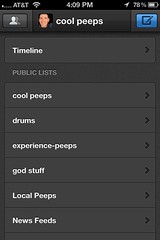
  • Tweetbot – this is the one I settled on for now. Why? The layout works for me, and Tweetbot does one thing I’ve wanted for awhile – have the main screen default to a list (see the accompanying screenshot) instead of the full timeline. I rarely follow the timeline feed. Instead, I created a shorter list of people I want to follow (ok – actually a few different lists), then follow that list. Makes twitter much easier to handle.
  • Echofon – I have used this early on. It’s still a really nice Twitter app.
  • Hootsuite for iPhone – I have this, but haven’t used it much. As far as I can tell, there is no Push setting. So, to see new Twitter replies using Hootsuite, you would need to open up Hootsuite and refresh to see if you received anything new (rather than just letting the Twitter app handle this via a Push). Not useful to me!
  • Osfoora – heard of it, never used it.
  • Twitter – the app made by Twitter that I just complained about…
  • Seesmic – never used the iPhone app.
  • Tweetdeck – I have it, but it’s been pretty buggy for me so I rarely use the iPhone version.
  • Tweetings – never heard of it.
  • … and the Twitter app for android, with a smiley face attached. I’m sure it’s dandy for all you Android users :-)

Is your Twitter app working for you? If not, try out one of these, and share what you like/don’t like about them!

1 comment

Topeka’s Mobile App

by David Lee King on February 15, 2011

Topeka has it’s first mobile library app – brought to you via the fine folks at Boopsie!

In the pic on the left, you can see the icon as it displays on my iPhone. It’s the one that’s titled “Topek….brary.” Apparently, “Topeka Library” doesn’t fit underneath the icon on an iPhone. “Topeka & Shawnee County Public Library” certainly wouldn’t fit! Oh well – not completely unheard of – I’ve seen a couple other app icon titles that do that, too.

So go ahead, download it, and play with it. There’s an iPhone, Android, and Blackberry app. Or, pretty much any phone with browser capabilities can go to tscpl.boopsie.com and you’ll either be directed to download the appropriate app or you’ll be dumped into the web version of the app.

Either way, pretty cool stuff for us!

Here’s what we’re doing with it. Check out the screenshot at the right (larger version here) – it’s the main page of the app. When creating the main functionality of the mobile app, our thinking went like this: when would someone use our mobile phone app, and what would they want to do with it?

We decided they’d be in line at the grocery store, or picking up their child from school. Or they’d be wherever, but have maybe a couple of minutes to quickly check on something. In those scenarios, how might they want to interact with the library?

Here’s what we came up with:

  • Library Catalog: search for something, put it on hold
  • My Account: see what’s due and renew it, etc
  • Ask a Librarian: ask a question – links provided for phone, text messaging, and email questions
  • Locations & Hours: links to addresses and maps for our main building, our bookmobile stops, and our book drop locations
  • Connect with us: links to our Facebook, Twitter, Youtube, and Flickr accounts
  • What’s missing? We wanted to know what our patrons wanted this app to do that wasn’t there yet, so we provided an easy way for them to tell us – it’s a simple form that sends an email to me.

What do our customers want to do that we’re not yet providing?

  • paying fines from their phones
  • checking out our calendar of events
  • checking out movies from our Mediabank DVD dispenser (it’s a separate catalog)

Otherwise, everyone that we’ve heard from has liked the app – we’re getting comments like “so cool! I already think we have the best library and then u show us just another reason to love @topekalibrary.”

Not bad at all!

12 comments

My Favorite Apps

by David Lee King on August 31, 2010

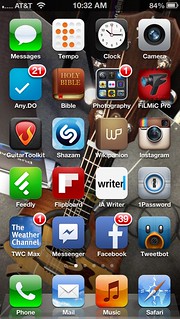
AppsWhich apps have I been using enough that I want them on my main iPhone screen? Here’s a rundown (right now, I have two more screens of apps that I don’t use nearly as much, but are pretty handy once in awhile … like a flashlight or the calculator app):

  • Messages – default text messaging app.
  • Calendar – self-explanatory, and used a lot!
  • Clock – I set lots of alarms to remind myself to do stuff (like picking up a child from dance practice). I also use the alarm clock feature when I’m traveling.
  • Camera – self-explanatory. Does video too.
  • Evernote – I use this for random note-taking, jotting down quick ideas, that type of thing. I also keep some lists here (ie., lists of books I want to read)
  • RTM (Remember the Milk) – It’s a to-do list that works well with the Getting Things Done method.
  • reQall – Very cool app that I just discovered. It’s replacing the Jott service I’ve been using, and doing a nice job of it, too. Basically, you can record a 30-second voice memo, and it turns it into text and emails that text to you. You can do a lot more with it … that’s for another post
  • Photography – These are all different cameras, photograph editors, or effects that I’ve been playing with:

    • CameraBag – has some neat filters, like 1962 (looks like an old photo, Fisheye, etc.
    • Darkroom Pro – alternate camera I was playing with, until …
    • Camera+ – I discovered this one! They were kicked out of the iTunes app store for awhile – not sure if they’re back yet. But it’s a great camera app – better than the default one, plus it has some great filters built-in. The only reason I haven’t replaced it with the default app is video (as in, it takes none).
    • CameraPlus – not sure why I still have this here … must play with it again, then probably delete.
    • PS Express – as in Adobe Photoshop Express. Great little app with some handy editing features.
    • Flickr – a flickr browser.
    • TiltShiftGen – makes those funky tiltshift “miniature” style photos. It’s fun!
    • Photos – default iPhone photo browser.
    • Qik Video Pro – this one’s been a disappointment. I bought it because it has some fun video filters (like black & white, frost, etc.). But guess what? It doesn’t do the 16X9 HD video that my iPhone 4 can do (even though the iTunes app store description says “works with iPhone 4!”). So that’s no fun! Otherwise … the app posts live video to Qik, and sends to other places like Twitter, Facebook, or YouTube.
  • Bibles – a couple different Bibles I use:
    • AcroBible – the NIV version. A classic.
    • Bible (YouVersion) – I use the Bible part of this app, primarily … but it’s really more of a social network with a Bible in it. You can friend people, see any notes they create, set up virtual Bible studies, hook your calendar up with a variety of Bible reading plans, etc. The app comes from lifechurch.tv – a church that makes apps and social networks!
  • TWC – as in The Weather Channel. Hey – I live in Tornado Alley!
  • Wikipanion – a Wikipedia app. I bet I use this app almost every day…
  • Reeder – a Google Reader app. Also used almost every day.
  • Location Stuff – I’ve been experimenting with location-based services, so…
    • Foursquare – you can be the mayor…
    • Gowalla – another cool tool.
    • Brightkite – a third service I play with.
    • Loopt – the first location-based service on the iPhone.
    • check.in – web-based app that lets you checkin to multiple places at once. Right now, I have it hooked into Foursquare, Gowalla, and Brightkite. It’s very beta, so doesn’t always work.
    • Mayorama – lets you see how many checkins you need to be mayor (Foursquare only). Sorta fun playing with this… 31 more checkins until I’m mayor of Lake Shawnee!
    • Whrrl – another location service.
  • Shazam – cool music service. If I hear a song, I can hold it up, press “Tag Now” and find out who it is, and most of the time, it works great. Unfortunately, I’m often listening to weird college radio or a christian station … neither of which are mainstream. So I sometimes get an “unrecognized” out of it.
  • Facebook – self explanatory.
  • Twitter – self explanatory.
  • And of course, my phone/mail/safari/ipod apps that show on every page.

So, that’s what I’m using. What do you have on YOUR smartphone’s main app page? What can’t you live without?

8 comments