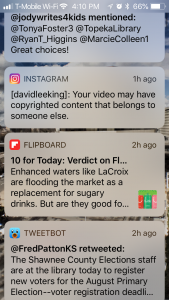
Have you ever received one of those pesky automatic copyright takedown notices? They are so irritating. Especially when they are … well … not accurate.
Here’s an example. A long time ago (around 2010), I made a short time lapse video of clouds going by, and posted it to Instagram. I wanted some music to go with it, so quickly opened up GarageBand, found a couple of synth loops (fully licensed for anyone’s use), and created some mood music for the video.
Fast forward to last month. Instagram flagged my video for using copyrighted music. I didn’t think much about it at the time because I was on vacation. But when I got back home, I poked around a bit more, and found they were incorrectly flagging my original song as a copyright infringement!
So I reposted the video – and immediately received another takedown notice.
Oddly enough, Instagram isn’t really sure what the song is that is being played. The two takedown notices I received reference different songs by different composers:
- #1: Neve su Cimabanche by Alberto Grollo – https://www.youtube.com/watch?v=QwfnRFWqr9A
- #2: Falling Star by Binaural Beats Home – https://www.youtube.com/watch?v=ucyjRGNW9Ec
Well … I can tell you what song I used, because I still have it on my laptop. It is… My Song 3 (yeah, I know … original title!) by David Lee King. Feel free to take a listen – the song and video are included in this post (from my Instagram account).
So what happened? Most likely, Instagram’s automatic copyright music sniffer heard the free synth loop that comes with GarageBand, and matched it – because all three songs most likely used the exact same synth loop (sounds the same to my ears, anyway).
I appealed both of the takedown notices and claimed that I created the song and had permission to use it. The links to both takedown notices have disappeared, so I’m guessing both of my appeals were successful.
I have had similar things happen with YouTube. For example, I’ve used jingle music snippets that come fully licensed with Final Cut Pro and iMovie that have been incorrectly claimed as music from someone else. I have also created original music, and received takedown notices. Thankfully, both platforms offer a way to appeal those copyright flags.
My point? To get you to listen to my bad music! No – really, it’s just to say don’t be worried when you see one of those copyright claims, because it might be wrong. Go ahead and go through the process of making an appeal/challenge. Automated music copyright software is pretty handy, but it’s also not 100% accurate.
More reading:
- Reporting Copyright Infringements – from Instagram
- Content I posted on Instagram was removed because it was reported for intellectual property infringement. What are my next steps? – from Instagram
- This Instagram Copyright Infringement Notice is a Phishing Scam – from Petapixel
- What Happens if You Get an Instagram Music Copyright Strike? – from Ian Corzine
- YouTube restores Lofi Girl account after false copyright claims – from Engadget
 Facebook recently held a
  A couple weeks ago, I made a short
  For a library’s social media channels, I like to friend or follow other library customers when possible. So for Instagram, about once a month I will look at our followers list, see who’s new, and check out each account.