library catalog

The Daily Grape and the Daily Book?

by David Lee King on June 7, 2011

Gary Vaynerchuk, who made videos about wine at Wine Library TV and now at the Daily Grape, has a really cool idea about how to add value to his wine videos, and to help his viewers keep track of (and buy) wine they’re interesting in trying.

Here’s what Gary wants to do (from episode #1 of the Daily Grape):

  • Create mobile app-based video (and have a web-based version too)
  • Make his videos shorter
  • Make the content entertaining and usable
  • Created a mobile app (Daily Grape in the iTunes app store) that goes along with the videos

Gary noticed that he mentions a lot of wine, and some of his viewers forget about the wine after they’re done watching the video. So why not make an app to solve that problem?

Here’s how Gary’s app works:

  • sign up for a free account through the Daily Grape app.
  • Then, watch one of Gary’s videos
  • If you like the sound of a wine Gary mentions, you can click through to the video details, and add the wine to your wish list.
  • Then you have a handy list when you’re at a restaurant or a wine store.
  • You can also comment on the wines found on the app.

Cool idea, huh? Believe it or not, I think this could work for libraries, too. More wine for everybody! No, just kidding.

We have books, don’t we? My library has a collection of almost 500,000 books/videos/etc. Do you think our patrons can remember all those titles?

Right – probably not. But that’s why some of the newer ILS’s include things like wish lists, tags, and comments. I’ve seen some library catalogs that let you take those wish lists and turn them into RSS feeds, which gives your patrons the ability to embed their lists wherever they want.

That’s cool. But what if library staff did the same thing? Why not keep a running list of staff picks that can be discovered in the catalog and on the website. And on the library’s blog sidebar (since it’s embeddable). And in Facebook (with a little coding added in).

In fact, my library is already providing some of that, in the form of blog posts with links to good books that happen to be in our collection.

So – just a slightly different, slightly more purposeful way to think about content created by library staff. Be a bit purposeful, like Gary Vaynerchuk – direct your customer to good content, help them check stuff out – and provide them with ways to remember the books they want to read.

Do you do that? If so – how do you do it?

2 comments

More Chat in the Catalog

by David Lee King on May 30, 2009

Remember my post on TSCPL’s Meebo chat widget embedded in our library catalog? Since then, we have stopped using the Meebo Me widget. It was great – it helped us start our IM reference service, and it was easy to embed pretty much wherever we wanted. But we grew out of it!

We discovered a few shortcomings, like not being able to send hotlinks through it, and our public services staff really wanted the ability to send an IM to someone else. So now, we’re using Libraryh3lp for our IM reference service. Libraryh3lp gives us those added benefits and more.

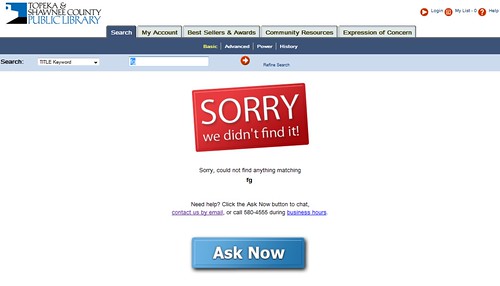
And we’re doing a few different things with the catalog embed, too. Here’s a pic of the keyword, No Records Found search:

New version of the Chat Reference service in the catalog

We’re trying to make instructions clear, friendly and attractive. If you click the Ask Now button, you get a tiny IM widget pop-up page. Why pop-up? With our Meebo widget, we discovered that a lot of people would start asking a question, then click something … and they’d be gone, because they had clicked away from the page with the embedded IM widget. Bumer! With our new pop-up version, that problem is solved. Users can click away all they want … and still interact with us.

But even cooler than that – Michael, our web designer (one of his many hats) discovered a way to embed a similar thing on the Search Results page:

Search Results page - Chat added!

This provides more opportunities for patrons to ask questions when they get stuck on a search – even if they’re finding things. Basically, they have access to us ON EVERY SEARCH they do.

And not just IM access – that’s provided via the Ask Now button. But we also include our phone number and a link to our email Ask a Librarian form.

We’re excited about this – should be fun to see if we get more catalog-related questions.

24 comments

Facebook Catalog App

by David Lee King on March 27, 2009

app on my profileMy way cool web team recently built a Facebook app for our library catalog! If you’re interested in trying it out, simply search for tscpl catalog in Facebook and our app will appear.

Not necessarily a new thing (do an app search in Facebook for library catalog and you’ll find quite a few) … but very useful, nonetheless.

Why haven’t we built an iPhone app like the DC Public Library? Our big goal is to focus on our local community, and build for them. I’m guessing that DCPL has quite a few iPhone users already (or at least potential library users that are also iPhone owners). Topeka? Not so much. I’ve been watching our web stats – last month, we had 63 iphone visits … about .18% of our total web visits. Not enough to design for (yet).

But Facebook use in Topeka? Judging by a quick walkthrough of our building (and peeking at what patrons are doing) – huge.

More Facebook app screenshots:

Enjoy!

1 comment