redesign

Copying Other Websites During a Redesign

by David Lee King on September 16, 2011

During my library’s last website redesign, we went through quite a few design iterations, and we still weren’t happy. Two people in our Creative Group team (more on that in the next post) … ok, our head of marketing and the deputy director … kept sending us website examples they liked. Sites like shoe stores or clothing shops. Yes, they were beautiful websites, and nicely designed. But they weren’t really all that similar to a library website.

One big difference – these attractive websites did one thing well – they sold shoes or clothes. They didn’t have any catalog to speak of. The websites were full of single pages that pointed to single items.

But a library website has at least two basic needs – a site that talks about the library, and shares useful stuff. And we have a library catalog. So it didn’t really make much sense to me to base our library website design around a site that only does half of what we do.

So I started poking around, looking for websites that focus on two things:

  1. stuff, like a storefront.
  2. a “catalog” of some sort.

Amazon and Zappos? Pretty much all catalog. News sites? Pretty much large multi-blog sites – focusing on stuff. Then it dawned on me – library websites are like Apple. Apple essentially has two separate websites – the main site that focuses on their stuff, and their “catalog” – their online store.

We based our redesign around Apple, in these ways:

  • Top horizontal navigation with drop down menus. We also found some “nav bar inspiration” at NPR’s website.
  • Focusing on a single large ad, then a couple of smaller ones, then more detailed content below that – based on many of Apple’s pages. This directs customers to a few things that you REALLY WANT THEM TO DO, while still having easy access to everything else.
  • A prominent link to the store. That’s where you’d click “Find Stuff” to get to our three catalogs (catalog, digital downloads catalog, and DVD dispenser catalog).

So far, it’s working out great – few complaints, lots of compliments. Our public trainers have told us they cut down training on how to use our website from an hour to 10-15 minutes. Fingers crossed that it stays that way for a while!

1 comment

If you’re interested in building better websites, make sure to sign up for my upcoming webinar for ALA TechSource on June 8 – Building the Digital Branch: Designing Effective Library Websites. Just click the link to sign up!

This will be the second time I have given this webinar. If you attended the first one, never fret! There will be new content – I’m going to talk about how Topeka & Shawnee County Public Library (where I work) built our current website (the redesign went live on March 1).

Here’s the blurb for the webinar:

Every library needs a presence on the web. Whether you work at a large academic library or a public library in a small town, you need to be able to deliver service and content to patrons outside  your building. David Lee King will once again present this popular workshop, taking you through the process of building an effective, user-friendly library website that will expand and enhance your library’s presence in the community.

In this workshop, you’ll learn:

  • How to successfully plan and implement a redesign of your website
  • How to find out what patrons want from your website
  • How to use your website to interact with patrons
  • How to create strategic plans and goals for your website

Sign up NOW!

4 comments

Help?

by David Lee King on April 27, 2011

Do you have a help page? On the main page of your website or your catalog?

Have you made it prominent?

And if so … Why?

If you have to have a help section … on the main page of your website … you’re doing something wrong.

Instead of making a help page, or an FAQ, or a list of frequently visited pages … why not just redesign and fix those things so people can find them without needing Help or FAQs??

Usually, the reason you are adding that help page is because lots of people are having problems that information on your website. The reason you’re adding that list of quick links is because people have been looking for those pages, but they can’t find them. Your FAQ? Most likely explaining something that doesn’t make sense to your customers.

Focus on fixing, not on bandaids. Harder to do? Yep. Takes more time? Probably so. But if you fix the underlying root problems, then when it’s time for a major redesign, much of your work will already be done. You’ll have a strong underlying structure in place, and your navigation will work great. And your explanations of how to do things will be simple enough and customer-focused enough that they’ll make sense to the average user.

And you won’t need a Help page.

Image by Dimitri N.

7 comments

Our Website Redesign is Live!

by David Lee King on March 2, 2011

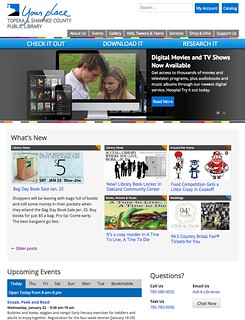
My library – Topeka & Shawnee County Public Library – just released our redesigned website. Check it out!

Our new main page has three main sections that are easily seen in the graphic accompanying this post:

1. Featured Stuff. The top section is reserved for our featured stuff. We have one large featured area that can rotate with multiple . The goal there is to highlight on our 1-2 “Big, Important Things.” That could mean a library event, or it could be some new database we purchased.

There are also three smaller featured boxes that we’ll change up a bit more often. They’ll point to other cool stuff we’re doing.

And of course, the nav bar is in the top section. We went with a top horizonal nav bar this time around. It actually drops down and expands for more links (pretty much a copy of NPR‘s nav bar).

2. What’s Happening Now. The middle section highlights our content that changes often, namely our blog content and our programs. Most of this stuff, especially the blog posts, will disappear off the main page pretty fast, and that’s ok. it’s meant to hightlight “what’s happening now.”

3. Social Media. This is where we highlight our latest Twitter tweets, Youtube videos, flickr and Facebook Page.

Process:

This took us us a little over a year to complete – I started meeting with staff in February of 2010. I met with most of the library, and held some patron focus groups, too – then turned the notes from those meetings into a huge list of stuff we needed to change.

Then, we had quite a few decisions to make:

  • We had to decide how to handle content (more on that in a future post)
  • We needed to assign staff to content (still working on this one)
  • We needed to choose a CMS (we’re using WordPress this time around)
  • Visual design and navigation took awhile to get right, too

Our Creative Group (a team made up of our marketing department and our web developers) did most of this work … but the whole library helped in some way, too.

So yeah – it was a LOT of work … and it never really stops. We’re still cleaning stuff up, and will probably start tweaking pages in another week or so!

14 comments

Answer these Questions for your Website

by David Lee King on November 2, 2010

We’re in the midst of a website redesign for our library. As we start looking at content, links, buttons, headings, etc – stuff like that – you know what we’re thinking?

We’re thinking this: does this link/content/heading/etc answer these questions for our customers?

  • What can I do here?
  • What can I do next?
  • Why should I care?

Answering these are really hard! Think about it for a sec – take a pretty normal link, like the library web designer’s favorite – “Library Databases.” Answering that “what can I do here” question certainly gets into how you label that section of your website (’cause we all know that “Library Databases” means nothing). Perhaps something like “Find articles” or “do some research” might work better?

Or think about a blog post – answering the “what can I do next” question can be as easy as linking to a set of related articles, topics, or even related books at the end of the post. I do this on my blog – when you’re reading it on the actual website, when you finish reading the article, you’ll see a list of related blog posts I wrote. What’s this get you? Website visitors staying on your site for longer amounts of time. More clicks. Hopefully, more conversions – more people clicking “attend this event” or checking out a book, etc.

“Why should I care” is a favorite one of our library director, and it’s probably the hardest of the three questions to answer. One way to do this is in the content itself. So your first couple of questions get the customer to your content … and then your content itself will need to answer that “why should I care” thing.

The answer could be any number of things, ranging from “because you can borrow it for free” to “because you’re a small business owner, and these resources will help you be profitable.” See where I’m going with this? Another way to say “why should I care” is to ask “what’s in it for me” or “why is this interesting?” Give them that reason.

Give your customers a reason to stay on your site by having great content AND by actually telling them why they might want to stay. Do that, and my guess is that … they actually WILL stay on your site – your digital banch – longer, doing more things.

Could be a good thing!

pic by Marco Bellucci

2 comments