social media

Setting up a Google Plus Page for your Library is Easy

by David Lee King on November 9, 2011

g+A day or so ago, Google Plus finally opened up organizational Google Plus “Pages” to everyone. These are similar in concept to Facebook Pages: a Google Plus Page is for brands, organizations, and businesses, and a Google Plus Profile is for individuals.

I just set up my library’s Google Plus Page, and it was really easy to do. Here’s what I did:

  1. First, you need a personal Google Plus Profile. Just like Facebook, Google wants you to be a real person (here’s a link to mine if you’re curious).
  2. Go here -https://plus.google.com/u/0/pages/create - to set up the Page
  3. Choose a category for your library. I chose “Company, Institution or Organization” for ours.
  4. Fill in your Institution’s name and URL. I chose to put in our full name (Topeka & Shawnee County Public Library) rather than the shortened “topekelibrary” that we often use for social media sites, because our full name shows up on the account.
  5. Select a Category – really, a subcategory of the “Company, Institution or Organization” thing you picked up in #3 above. This gives you a lot of suggestions … none of which are Libraries. I ended up choosing Institution (though Government Agency, Education, or Other would have worked ok too).
  6. Click Create.
  7. Then, you’re given the option to Share your new Google Plus Page with all your Google Plus friends (I did that, but you don’t have to).

After that, I fleshed out our account info a little bit by doing these things:

  • Added a photo for the G+ icon (our library’s logo for now)
  • Asked our Marketing dept for some pictures to add on the Photos tab
  • Created some Circles – I kept the Following circle for random follows, then created these additional Circles: Customers (for library patrons), Staff (for library staff), and Librarians (for librarians who don’t work at my library but want to follow)
  • Added links to our Twitter, Facebook, Youtube, and Flickr accounts
  • Finally, I sent out our first status update message – “Just setting up Topeka Library’s dandy new Google Plus Page for organizations. Let’s explore it together!”

That’s pretty much it. What will we do with it? For starters, I’ll probably post a couple things a week there, to see if other people in our service area are interested in using Google Plus to connect with the library. After that (I’ll give it 6 months or so) we’ll see.

A couple other examples of Google Plus Library Pages:

updateJoe Murphy has a great post on Google Plus Pages for Libraries. Check it out!

Cool! Now the question is … what will your library DO with a Google Plus Page, now that they are available?

image by Bruce Clay

19 comments

Brian Solis and privacy

by David Lee King on November 4, 2011

picture of Brian SolisBrian Solis recently wrote about the changing face of privacy in his blog post Whoops, I didn’t mean for you to read this. It’s a really thorough article about privacy and Facebook, which I mentioned in my last post.

Read the whole thing, but here’s the crux of the article:

Indeed, privacy as we knew it is dead. It is now something that we have to learn and teach. Your privacy settings in Facebook are yours to manage. But, to do so takes initiative and an understanding that like your credit score, what you share online requires definition and reinforcement. Remember, what works against us also works for us. We’re essentially adding a layer of thoughtfulness in our social networking to better tell our story and also enjoy the stories of others.

As mentors, parents, teachers, and good social denizens, it’s up to us to help another while taking responsibility for what we do and say online. At the end of the day, we can’t blame Facebook or developers when those whom we care about change how they see us.

I wouldn’t go so far as to say “privacy is dead.” I would, however, say that we need to actually THINK about our privacy, our level of comfort in online sharing, etc. That is something we should have been doing already, but many of us are still wrapping our heads around it.

Like Brian’s post? He writes books, too. His latest is The End of Business As Usual: Rewire the Way You Work to Succeed in the Consumer Revolution.

1 comment

Changing Face of Privacy

by David Lee King on November 1, 2011

I’m leading a webinar on Facebook tomorrow, and because of that, I’ve been thinking a lot about changes I’m seeing in online privacy.

So, as librarians, we historically have been defenders of our patrons’ right to privacy. It’s in our Code of Ethics: “We protect each library user’s right to privacy and confidentiality with respect to information sought or received and resources consulted, borrowed, acquired or transmitted.”

On the opposite end of that are some pretty hip social media companies, like Google Plus and Facebook. Those two companies seem to have an unstated goal of making our world open and transparent … or at least, as open and transparent as we want to be.

Facebook does this by setting default privacy settings to Public. Google Plus does this (at least for now) by requiring us to use our real names on accounts.

Interestingly enough, some of our library tools are pushing for openness in different ways, too. Here are two examples of that:

  • Many of us are familiar with the Overdrive/Amazon deal. Amazon knows what your patrons have checked out, because they send them an offer to buy the ebook 3 days before it’s due. Amazon is, in essence, using what us librarians consider private info that we would never share, to sell ebooks to our patrons. It’s actually a handy thing to do… but flies in the face of our privacy ethics.
  • My library is in the process of moving to Polaris for our ILS/Library catalog. One really cool feature we’ll be getting is public lists. As a patron, I will be able to keep a list of books that I’ve read … and make that public, embed it on my blog, etc, via an RSS feed. It’s an opt-in feature, but still… very public, and very different from what us libraries have traditionally done.

This brings up quite a few questions in my mind:

  • Are libraries ready for opt-in/opt-out transparency?
  • Are we ready to check TOS agreements to catch and discuss things like that with vendors?
  • Some of us are bound by local or state laws on privacy. Are we ready to have discussions about those laws?
  • At the ALA level … are we ready to start discussing potential changes to our code of ethics and other privacy-driven discussions at a national level?
  • Are you ready to protect your own level of privacy
  • Are you ready to learn privacy settings in each online tool, and teach these to your customers?
So – what do you think? And how is your library addressing privacy issues online? I want to know!

10 comments

This was my session – here are my slides – enjoy! Look at the slides, and read this person’s notes, and you will get a good feel for the discussion.

Be the first to comment

Promoting your Social Media Presence – Signage

by David Lee King on October 13, 2011

Social Media icons

Social Media signage at TopekaLibrary

You’ve seen those “follow us on Facebook” signs at stores and restaurants, right? Or heard a radio dj mention following their radio station’s Twitter account on-air?

Guess what? Libraries can do the same thing!

As a first experiment, my library recently placed two “follow us” signs in our building – one at the main entrance to the library, and one on our administrative office doors (shown in the photo).

Why do this? Easy – it’s a relatively unobtrusive way to tell our customers that we have a social media presence, and that we want them to follow us. It’s also a way to link the physical to the digital – by promoting our digital presence (i.e., our Facebook Page) in our physical presence (i.e., our building).

Where else could we put these signs?

  • Our meeting rooms (maybe a stand-up card on a table)
  • Our cafe (stand-up card there, too)
  • In the stacks, with our books
  • As a background on our public PC monitors (we might do this)

One thing we can improve onKathryn Greenhill mentioned this to me recently – when you make a sign advertising your social media presence, make sure to include a URL or at least your social media name. Otherwise, people might not be able to find you (we were talking about this particular sign)! For example, my library’s full name is Topeka & Shawnee County Public Library … but we’re simply topekalibrary on social media sites. We’ll add that on the next version of the signs.

And a funny – watch the arrangement of your icons! We almost put the Facebook icon first … until someone in our Creative Group mentioned that we were spelling “F You[tube].” Certainly not our intent to tell customers to “F You!”

Like these ideas? Come hear more on November 2 at my ALA Techsource webinar on Facebook Pages! Make sure to register!

3 comments

Topeka, KS doesn’t like Social Media

by David Lee King on August 30, 2011

screenshot of City of Topeka website

Topeka uses social media, right?

Wouldn’t it be weird if Google, KS blocked Google from their own computers?

Unfortunately, that just happened.

OK – it’s really Topeka, KS (Topeka renamed the city for that Google Fiber project). And they didn’t really block Google – they blocked Youtube (which Google owns).

But still – there’s some irony there, is there not?

Go read this newspaper article, City tightens control of employee Internet use. Then come back here, and let’s discuss.

Here’s what I find odd about the city’s recent decision to block staff access to social media sites:

Oddity #1:
“City spokesman David Bevens said the city prohibits employees from using their work computers to access YouTube, as well as the Facebook and Twitter social media sites, but some employees have nevertheless accessed YouTube on those computers … “

That’s got nothing to do with social media, and everything to do with employee performance. That’s sorta like saying “obesity has become a health issue at our organization, so we blocked employee lunches.” In other words, the city is dealing with the symptom, rather than with the real problem – in this case, employee performance. Blocking Youtube won’t fix that problem, I’m afraid.

Oddity #2:
“Stanley [interim city manager] said he was disappointed to learn the problem was directly related to the perceived need by some employees to access popular social media websites, such as YouTube and Facebook.”

It’s more than a “perceived need” – the city actually has official Youtube, Twitter, Flickr, and Facebook accounts. So yeah – “some staff” definitely DO need access to those sites, to do actual work.

And since those social media sites are essentially official city channels, I’d go so far as to say all city employees need access to them. At work. Otherwise, the city is blocking official city communications … from city employees. Nicely done, Google, KS!

Oddity #3:
IT manager Mark Biswell is quoted as saying this: “While these websites have value in terms of information transfer and marketing, they also pose an organizational risk in terms of lost productivity and through the potential introduction of viruses and worms … “

First off, let’s deal with that perceived “lost productivity” thing. Recent studies actually show that employees have increased productivity if they have access to social media. Want more productive employees? Give em access to Facebook and Youtube.

Second, that virus and worms thing. Social media sites like Facebook and Youtube don’t become popular if they’re sending out tons of viruses – instead, they get sued (thanks for that thought, @billludwig!). I sincerely hope that most IT managers know that “viruses and worms” generally don’t come from social media sites like Youtube or Facebook. They come from spoofed sites, rogue links in forwarded emails … and from uneducated staff. A better way to approach computer security would be to 1. unblock Facebook and Youtube, and 2. Train staff on appropriate use of web technology, and how to NOT click on those weird links or ads.

Oddity #4:
One last thing. The IT manager is also quoted as saying this: “Biswell said that to balance risks with the informational value of using such sites, the city was taking a proactive approach by cataloguing and safely providing employees access to YouTube videos that have business value related to training and education … The approach is the same one used by educational institutions, he said.”

That’s because the people at “educational institutions” are, for the most part, kids. Don’t treat your adult employees like kids. ‘Nuff said.

So why write this?
Thankfully, I don’t work at a city library, so I haven’t had to deal with this. But some of you librarians have dealt with this, head on. Library Directors – don’t let this happen to you! At least be informed, so you can intelligently argue your points to city administrators, city IT managers, or a city attorney. I’d love to hear from some libraries who successfully argued their points, and were able to keep or get library access to social media sites.

In other news, on Friday I tweeted a question to the City via their official Twitter channel, asking them how they were going to respond to my question, since they are now blocked from using Twitter.

Still no Twitter reply. I wonder why?

5 comments

Seriously Social: Focus on Facebook (new presentation)

by David Lee King on August 2, 2011

I recently gave this presentation at ALA11 and at the Virtual ALA11 conference, along with Kolene Allen who focused on Twitter. Both sessions went well … and someone has been asking me to post my slides! So here they are:

In my part of the presentation, I talked about what libraries can do with Facebook Pages, and why they might want to use Facebook Pages to reach out to customers.

If you’re interested, this fall (November 2) I’ll be doing a 90-minute version of this, through the great ALA Techsource webinars – stay tuned for that later on this year!

3 comments

Google Plus – Should you and your Library be there?

by David Lee King on July 15, 2011

Google Plus is all the rage this week – invites have started spreading around (here’s a link to my Google Plus account – feel free to friend me!).

Some tech leaders have been making big claims about Google Plus, saying things like it will replace blogging, they’re moving from Facebook to Google Plus, it will take over Facebook or Twitter, etc.

Ok … Google Plus is only a week or so old. WAY too early to predict the demise of anything – especially of something like Facebook, with its 600 gazillion followers. Also remember that this is a third try for Google – Waves and Buzz both sorta fizzled out. let’s give it a good 6 months to a year to see if it survives.

On to the more important questions – should YOU be using Google Plus? Should your Library/organization?

You – this one’s easy. If you get an invite (or have an account already), by all means sign up and play around with it. Friend people, do some posting, try a video chat. Get familiar with the tool. Then either use it or not … that part really depends on you. But since it has some early potential in becoming another useful social media tool … why not at least play with it a bit?

Your library/organization – this one’s a bit more tricky. Or not – Google Plus isn’t supporting organizational accounts right now, according to this article from Search Engine Land. This article from ReelSEO goes one further, saying Google Plus will shut down an organizational account (though there are a couple out there [DLK - oops. Google found those, and they're now 404-nothing found pages. You might check this out for some news orgs, from Moonflowerdragon in my comments] anyway).

So for the time being anyway, Google Plus is an individual-only network. That’s great, because it gives you time to play with the new tool, and gives Google time to see if it’s a winner (translation = profitable) for them.

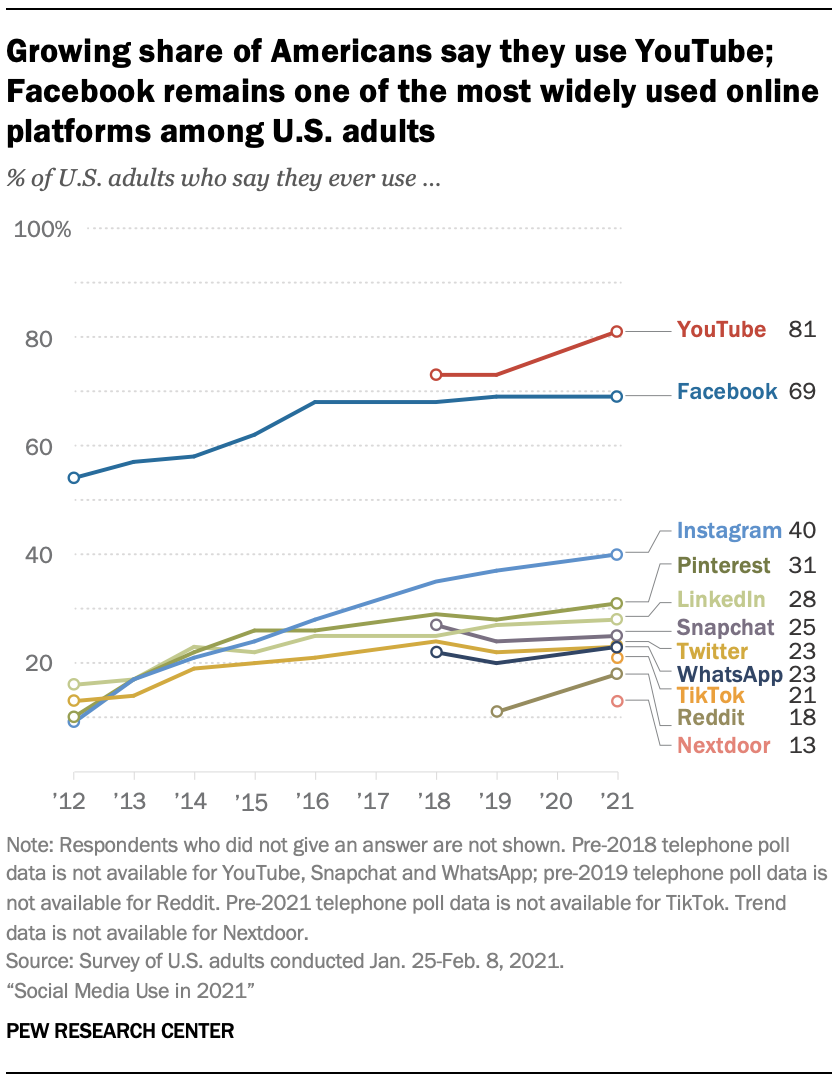
Once that happens, and Google OKs organizational accounts – should you be there? The answer is … it depends. Are your users there? If so, then yes. Recent national stats claim that 51% of people age 12 and up are on Facebook – that’s 51% of your community, so it definitely makes sense for most libraries and organizations to have a Facebook presence.

But for other social networks, it really depends on your organization’s goals, and on where your customers tend to gather. If they start gathering in Google Plus, then yes – you should figure it out and be there for them.

If not? Maybe not so much. Time will tell!

And a question – are you playing with Google Plus? If so – what do you like/dislike about the service? Let me know in the comments!

25 comments

Librarians were trained to Write the Wrong Way

by David Lee King on April 5, 2011

Just thinking about writing for the web. My writing developed this way: I went to school, and learned to write academic papers and speeches. Ok, I also took some poetry and creative writing type classes. And a couple of journalism classes so I learned the inverted pyramid thing.

But other than that, it was pretty much formal academic-type papers. I also learned highly useful stuff … like how to graph out a sentence to discover proper sentence structure. Yikes.

I learned to write in a way that required citations and quotations, which I refined in grad school (I even used one of my class papers as my first official published article). Then the web hit, and I had to learn to write in a new way.

So now, I work hard at writing like I speak. I try to “write it like I say it.” For some people, actually reading what they just wrote out loud can help develop that voice.

Why work at this? Because that type of writing is conversational, social writing. And that’s the type of writing we want on the web – especially in places we are looking for conversations (think blogs or social media spaces).

We are now writing out our conversations, and asking our patrons to respond. To continue the conversation.

How are you learning to write for the web? Have any resources to share?

pic by vial3tt3rs

23 comments

Oops, What Did I Just Do – and What to Do Next

by David Lee King on March 25, 2011

This afternoon, I checked in to a place on Foursquare that I’d never actually go visit in person. Nothing against interesting establishments … but the problem was, I wasn’t there – I was on a plane.

I had just landed at the Kansas City International Airport. The place I didn’t visit and the airport that I did visit share similar names on Foursquare (Kansas City International Airport, and Kansas City International Airport Glory Hole), and the full name of the second place doesn’t display on the iPhone Foursquare app (see the screenshot in this post). Not paying much attention, I checked into the wrong place (and quickly received multiple Twitter replies and DMs, kindly suggesting that I perhaps checked into the wrong place).

Anyone ever done that before? Signed up for an app on Facebook, only to spam your friends list? Suddenly found your Twitter account asking everyone to “click here” when all you did was try out a new service? Or, like me, click something, and then realize that’s not what you wanted to do … but too late to take it back? This has the potential to be pretty embarrassing (thinking about the time I clicked a link in an email from someone that I had been waiting for an email from, only to watch in horror as my email account started spamming everyone in my contact list … including all library staff email accounts).

Yep. Been there, done that. And it’s bound to happen to some of us with our organizational accounts, too. Many of you no doubt have found tools like Tweetdeck or Hootsuite extremely useful – you can log into multiple accounts, both personal and organizational, at the same time. It ends up saving a ton of time … until you accidentally forget to turn something off. Then, much embarrassment and backpedaling ensues.

When this inevitably happens… what should you do?

  • First – don’t panic. It was a mistake, and we all make them.
  • Second – simply publicly admit the mistake. Say something like “oops – wrong account.” Or “How did that happen? Sorry about that” or something similar.
  • Third – delete the mistake if you can (I couldn’t until hours later, and I decided to let the accidental check-in stand. I find it mildly humorous)
  • If you sent out something potentially malicious (like one of those rogue spammy Facebook apps), you should send out a message warning your followers/friends to not click the link, it’s spam, and add a quick “sorry about that.” They’ll understand – most likely, they have done it themselves, too.

And…

How can you avoid having this happen to you?

  • Look before you tweet – make sure you are sending what you think you are sending … before you send it!
  • Check for spelling oddities (auto-correct on the iPhone can do strange and amusing things to seemingly innocuous words).
  • If it’s an interesting-sounding app or tool, you might do a quick search in Google or Twitter first, to see what others thought about the app. This can quickly help weed out spammy apps.
  • Think about keeping your work accounts and your personal accounts separate. Meaning don’t put both on the same Tweetdeck install. Maybe use Hootsuite for work and Tweetdeck for personal, for example.

What else should I add here?

Be the first to comment