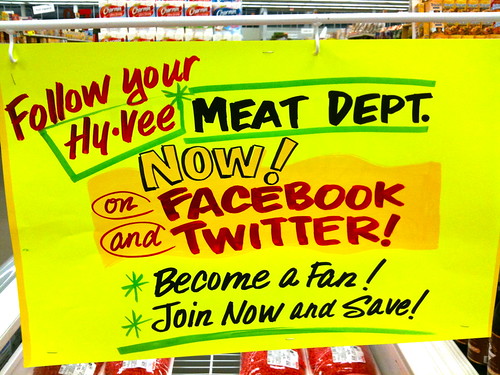
Would you follow your local grocery store in your favorite social network? The Topeka Hy-Vee is on Twitter and Facebook – and they WANT you to follow them!
Two observations here:
Social networking IS slowly becoming “normal” – I’m seeing similar “follow me on Twitter and Facebook” signs all over the place, at stores, restaurants, hearing it on the radio, etc.
If a grocery store can keep multiple social networking sites fresh (the Topeka Hy-Vee Twitter and Facebook Pages are updated daily) … I’m guessing you can, too.
And a question. Hy-Vee put a sign in the middle of their meat department advertising their social networking sites. Where are your signs? How are you inviting users into your digital spaces?
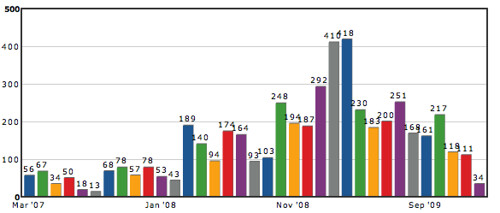
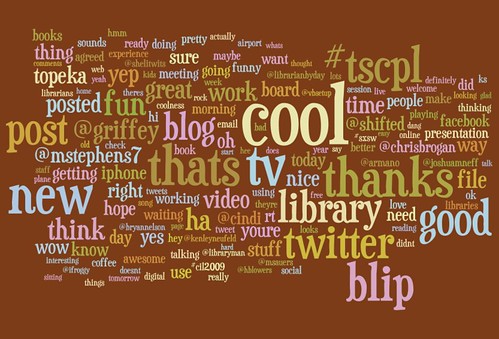
I started experimenting with Twitter on March 6, 2007 (I am @davidleeking on Twitter), and I have just posted my 5000th tweet! What’s that gotten me, exactly? Actually quite a few things, including friends, connections to people, and some actual work, too.
First for some normal stat type things. Right now, I have:
3198 followers
been included on 250 lists (mostly on librarian, kansas, rockstar, and social media lists)
created 4 lists of my own (that 20 people follow)
compiled a huge list of favorites
Also compiled 417 DMs that I need to delete but haven’t yet – most are other Twitter followers, saying something like “thanks for the follow, please click here” But some are more relevant, like working out details of conferences I helped plan or some more personal conversations that didn’t need to be broadcast.
But how about those connections? Twitter isn’t about stats – it’s all about connecting with people. How has that looked over those 5000 tweets?
I have made some new friends through Twitter, and have kept up connections to people that I’ve met once or twice (like @shelitwits or @ifroggy).
Twitter has also given me connections to some smart “popular” people that I follow elsewhere, and normally wouldn’t have direct access to. People like Chris Brogan, Beth Kanter, and Kathy Sierra. They sometimes reply to my tweets – and in this way, Twitter has leveled out the playing field a bit. For the most part, people I want to talk to are a reply away.
I am also connected to lots of friends and colleagues, librarians, local friends and acquaintances, and other people sharing my love of social media tools.
That “actual work” thing. I have done real work that is connected to Twitter. Work that includes:
Overseeing three work-related Twitter accounts
Creating some goals for our primary library twitter account
I have written and spoken about Twitter. I have given at least three presentations on Twitter, and have written about Twitter in my book and in more than one magazine article.
When I have a work-related question? I sometimes go to Twitter first, and get quick, useful responses within minutes.
I use Twitter at conferences for discussion, committee planning, and (of course) dinner planning!
Remember when my library went through that book challenge last year? I tweeted the public meetings, and even “Twitter trended.”
I generally tweet in the mornings and late afternoons
I tweeted the most during the library’s book challenge about 1 year ago
I average 6.1 tweets a day
I use Tweetdeck a lot
I have had 21 twooshes (a 140-character tweet, according to Tweetstats)!
So … looking back, has it been a useful 5000 tweets? I think so. I have made some friends via twitter. I have talked to people about projects, worked through ALA stuff, and shared things that interested me. I have shared jokes, sent links to my blog posts … and had fun.
I’m sometimes asked why librarians should be interested in Facebook. Here’s a great answer to that question, via other librarians!
This video is one of a series of videos I’ve been creating for our library, called Tech Tuesdays. Tech Tuesdays is a weekly video series that focuses on emerging technology, library technology, etc – and focused on our patrons (find more of them in Topeka Library’s YouTube channel).
For this particular Tech Tuesdays video, I interviewed four of my colleagues at work, and asked them why THEY use Facebook. The answers are great:
Jeff, Adult Services:
keep track of friends
invited author to speak at library
Anne, Adult Services:
keep track of friends
teaching a facebook class for senior citizens on how to connect with family through facebook
Kyler, Youth Services:
keep track of friends
posts his upcoming music gigs (for himself and for library storytimes) on facebook
Gina, Library Director:
keep track of friends
shares info about the library and personal life
Interestingly, all four answers include a mix of personal connections and actual library work. Social media is still a pretty gray area – is it work? Is it play? Is it both? I think it’s definitely both… but that’s for another post.
My part of this session is above… I introduced the concept and talked about the variety of interactions available using social networks.
Up next was Amy Kearns and Julie Strange, talking about: Tweet What? 5 sweet ways to connect in 140 characters or less. Notes below:
Searching for tweets with a positive/negative attitude – sentiment at advanced search of search.twitter.com
showing examples of types of tweets from libraries
Twitter can be embedded anywhere…
1. use it for reference
2. connect for customer service
3. broadcast news & events
4. solicit feedback
5. broaden professional networks
6. harness the hive
I am one part of a 3-person preconference session at Internet Librarian 2009 that’s focused completely on Twitter! Here’s my part of the session – enjoy!
Many of us work on listening to our user communities. In the library world, we listen at the reference desk and the circ desk. We hear about the library when we’re at the grocery store (and get asked questions, too and at the local board meeting.
But how do you listen to your local digital community? How do you hear what your online customers are doing / saying / liking / or not liking about your library? Here are some possibilities, from the late 1990s – early 2000s. We’ll call these …
Traditional Listening Tools:
email: providing an email link and/or an email address on each page of the site, usually in the footer
An Ask Us page – can go to email, can also be the ask a librarian service point
a digital comment box (this was fancy back then!)
I’m calling them “traditional listening tools” because there are many more interesting ways to listen now. Check these out …
Shiny New Listening Tools:
Google Alerts – finds blog posts, newspaper articles, local media mentions, etc.
Technorati alerts – finds blog posts about you
Twitter searches (was Summize) – captures twitter conversations (more on Summize/twitter search in the next post)
Youtube alerts – do a search, then subscribe to the corresponding RSS feed.
Flickr alerts – subscribe to a tag related to your library
Subscribe to local blogs and local twitter feeds. This captures conversation in your community, by your patrons.
When you listen using both the Traditional Listening Tools and the Shiny New Listening Tools, you hear very different things. Traditional Listening Tools pick up specific conversation that is purposefully directed at you – via email. Someone has a question or comment, and sends that comment to you.
Shiny New Listening Tools help you discover actual conversations taking place. Those conversations are not necessarily directed at you – but they can certainly be about you. Listening in on Twitter, for example, might find things like this: “The comics section at the Seattle Public Library is f**king STUNNING.” (actual tweet from today). And this type of tweet is a golden opportunity to START a conversation. Let’s pretend this comment happened at the reference desk for a sec – how would you reply? Possibly with something like: “gee, thanks.” That’s a polite response… some of us would probably go one further, and say something like this: “Cool – thanks! So… WHY do you like it? How could we improve it?” This type of response continues a conversation, and pulls out useful info in the process.
DO THAT SAME THING IN YOUR SHINY NEW DIGITAL SETTING.
Again, more on that in my next post… but you get the idea. When you’re eavesdropping on conversations, you have the opportunity to chime in – correct wrong info, add to conversations about the library, and generally help humanize your digital branch by “talking back.”
Wow David – That Sounds Time-Consuming!
Does all this listening take a long time? No – not really. The set-up (doing the searches and subscribing to the feeds) takes the longest amount of time. But once your feeds are set up, it really doesn’t take much time to quickly scan through the results, looking quickly for questions, praises, suggestions, and conversation.
Start participating with those customers using your digital branch. If you do this fully, your listening experience can be transformed from one of eavesdropping to what amounts to a shiny new service point for your library. One that’s called Community Manager in the corporate world.
Your customers are already talking – are you listening?
I’ve been doing some thinking about all the different digital communities I participate in on the web, so I thought I’d create a list of them. It’s not a short list.
justin.tv (experimenting with this – they call it “lifecasting” – but in web years I’m an oldie, so it’s really just a new, easy-to-use webcam service)
Podcasting services (mainly experiments):
utterz (easy-to-use mobile service – done from my cell phone)
talkshoe (used mainly for the LITA election podcasts – not sure what to do with it now)
Music stuff (you can find me singing and musiking in a few different places):
MySpace (recently been actively used with some college friends who have just “discovered the web” )
LibraryThing (I go on LibraryThing binges once in awhile…)
Seeing this list, some of you will have different reactions. Some of you might think “Dang, David – that’s WAY TOO MANY things to sign up for!” while others of you are probably thinking “slacker – get with the program!”
Either way, I’ll say this – if you want to fully understand how the emerging web works, you have to experience it. You have to sign up, friend people (the more the merrier), and PARTICIPATE. There’s no other way to really understand what’s going on and how you might use it personally or for your organization. Reading about it won’t give you a full grasp – it’s like reading about going to a major league ballgame vs. actually going to one – two very different experiences.
Closing Question – is there anything you use frequently that’s NOT on this list? What do you like about it? Something on this list you don’t use? Why?
Coolness – they’re taking questions during the presentation using twitter – twitter.com/snayb4sxsw – great use of twitter!
panelists:
Paul Boag, Jina Bolton, Mark Norman Francis, Steve Ganz, Steve Smith
Defining social networking
it’s something we’ve done forever – even before the web
ways to use personal brand
not just logos and letterhead
your brand is simply the promise of an experience
ways to use personal brand:
Boag – his company used his personal brand to push some stuff out, because he was already well known in the field
Names
some brand themselves by their personal name – some have to use different names/personas to stand out from the crowd (Steve Smith talking here)
[me talking - that's why I use my middle name - it helps differentiate me from the millions of other David Kings out there]
Then you have to be consistent – always use that name
Tips & Tricks:
Pics – use a consistent avatar/icon/thumbnail pic, too.
Commenting – can affect your brand. Some people leave rude comments… you can be polite…. this type of thing can leave good or bad impressions of you.
SOme people give up when they don’t immediately become internet famous – you have to be consistent, and keep keep it going – it’s lots of work.
Represent your self as who you are – be yourself.
Keep your attitude the same as if you were speaking to someone face to face
when it’s a personal brand, you have to watch what you do – don’t necessarily want “I’m wasted” in the same place where potential clients are watching/reading…
stuff can get taken out of context – be careful what you twitter…
Tools:
twitter is used much (the linkdin guy said this)
Paul (a podcaster) says Podcasting!
Campfire, email, IMs, private chatrooms
Bolton – twitter, IM, etc are NOT social networks – they enable social networking – nice differentiation
How do we deal with all these pieces out there?
Reserving your name – dangerous to not get your name in that social space – you want to grab it up before someone else does.
Is it a detriment to get it and then not use it? Not necessarily
The Real World
How do you keep in touch? Email feels too formal. Paul uses Twitter and flickr – you can sort of follow their lives without interrupting their lives so much – and then when you meet up with them again, you have something to talk about
Paul takes business cards he gets at conferences, puts them in his contacts list, and finds a pic online to associate it with – helps him put a name and a face together
Lots of the panelists mentioned flickr as a great way to know the person, know their lives
Balance between private and public stuff
be aware
use the privacy controls if needed
bring out personality, who you are rather than specifics…
you have control of what you put out online
I just read 1000 True Fans from Kevin Kelly’s blog – great article! I suggest you go read it. And then come back! Because… I’m wondering… can that model work in a library/non-profit/website setting?
Here’s the gist of the idea presented in the article: for artists or creatives to make a living, they don’t really need a blockbuster hit and billions of sales – instead, they need 1000 true fans. Here’s how Kevin describes a True Fan: “A True Fan is defined as someone who will purchase anything and everything you produce. They will drive 200 miles to see you sing. They will buy the super deluxe re-issued hi-res box set of your stuff even though they have the low-res version. They have a Google Alert set for your name. They bookmark the eBay page where your out-of-print editions show up. They come to your openings. They have you sign their copies. They buy the t-shirt, and the mug, and the hat. They can’t wait till you issue your next work. They are true fans.”
And if those fans end up spending around $100 or so per year (buying your stuff), then you will earn a good living. Pretty cool idea – it’s basically the long tail working itself out from the artist’s viewpoint.
When I read the article, I couldn’t help but think – how does this work in a library setting? What if we had 1000 True Fans? What would that look like? Especially with the impending release of my library’s digital branch (March 31!) – what would 1000 true fans of our digital branch look like? 1000 people engaged in our blogs, leaving substantive comments, maybe joining an online book club, watching our YouTube videos… those 1000 true fans would keep us extremely busy!
And yet, that’s be just a small sampling of our user base, wouldn’t it? Sorta like… say… the group of people that visit our physical branch regularly! Our “regulars.” Our regulars really make up a minority of our total library visiting population – but we focus alot of time on those people – because they’re the ones using our services.
Sure, I want to reach much further than just 1000 people… but having 1000 True Fans of my library’s Digital Branch? That would keep us extremely busy.