website

Update those Library Policy pages!

by David Lee King on January 3, 2012

This morning, I’ve been watching a small PR fiasco unfold. According to CBS Boston, Charlton Public Library sent a police officer to collect overdue books from a 5-year-old. The story also made the Drudge Report and the UK’s Daily Mail – gotta love that international media attention!

OK – there’s obviously a LOT more to the story that was left out. For example, there’s no mention in the article of the reporter actually talking to library staff, who could have filled in the details (they DID talk to the library – it’s mentioned in the video version of the story).

Via Facebook, the library filled in some pertinent details (i.e., what actually happened) after getting some nasty Facebook comments:

“Library materials are purchased using taxpayer dollars. We feel as library staff that it is our duty to safeguard those tax dollars. We have asked the Charlton Police Dept. to help recover items from those patrons who have been delinquent in returning materials for more than 6 months and who have at least $100 worth of unreturned materials at their homes. We follow our standard procedure of phonecalls and/or emails to remind patrons to return their materials. A bill is sent out once an item is overdue for a month. Sending out the police is a last resort effort to get back some of our most valuable items. The police visited 13 families whose outstanding balance totaled $2634.00 in library materials.” (from Charlton Public Library’s Facebook Page - also just added to the main page of the library’s website).

So good for them for using Facebook and their website to quickly respond to the story.

After I read the article, I first visited the library’s website and tried to find their fines and fees policy. Here’s all I found (until they updated the site and their Facebook Page):

  • Print and audio materials accrue a  10 cent daily overdue fine with a $3.00 maximum fine per item.
  • Dvd and video items accrue a $1.00 daily overdue fine with a maximum fine of $5.00 per item.
  • Patrons are responsible for the repair or replacement of lost or damaged items. Failure to pay fines or damages will result in the loss of borrowing privileges at C/WMARS libraries.
  • from their Library Services page

What’s missing here? Any information about the process, what happens if you don’t pay your late fees, etc – other than the “loss of borrowing privileges” info. That sounds VERY different than explanation from the library quoted above, doesn’t it?

How can this be improved? Simple – if you have a policy, a guideline, a process for fines and fees (or for anything else, for that matter) – put it on your website. Probably in a Library Policies section, or a link to appropriate places on your site. For example, the late fee policy/process could be added to your “get a library card” page.

Then, when the media calls asking why you’re sending police to a poor 5 year old child, you can explain … but you can also email them a link to the appropriate policy and process.

Question – if one of your library customers had a policy-type question, could that question be answered using your  website?

Update button by Bigstock

2 comments

Question #1Ever visited a webpage, then looked around, wondering “what can I do here?”

If you have … that web designer failed!

I think every webpage should answer the question “what can I do here?” either visually, or by spelling it out:

  • Visually: design in such a way that the stuff you can do on a page, like clicking a button, filling in a text box, or even just reading or watching content, is extremely noticeable. Amazon does this by using complimentary colors that “pop” out on the page. They often use blue as a header or sidebar color, but the buttons they really want you to see (ie, the “buy now” button) are orange – a complimentary color.
  • Spelling it out: Use words, colors, graphics, etc to “spell it out” for people – tell or show website visitors what to do on the page. For example, we try to do this at my library’s website. The main page directs people to “Get a Library Card,” “Donate Now,” “Find Stuff,” “Ask a Librarian,” or Subscribe to our blog posts. People know what to do on our site, because we direct them.

On your library’s website, do people know “What can I do here” when they visit the main page? How about the catalog page, the “you didn’t find anything” page, or on your blog? At the comment box? On your Facebook Page even?

Think about it … and make sure to answer the question “What can I do here?”

2 comments

Our Website Redesign is Live!

by David Lee King on March 2, 2011

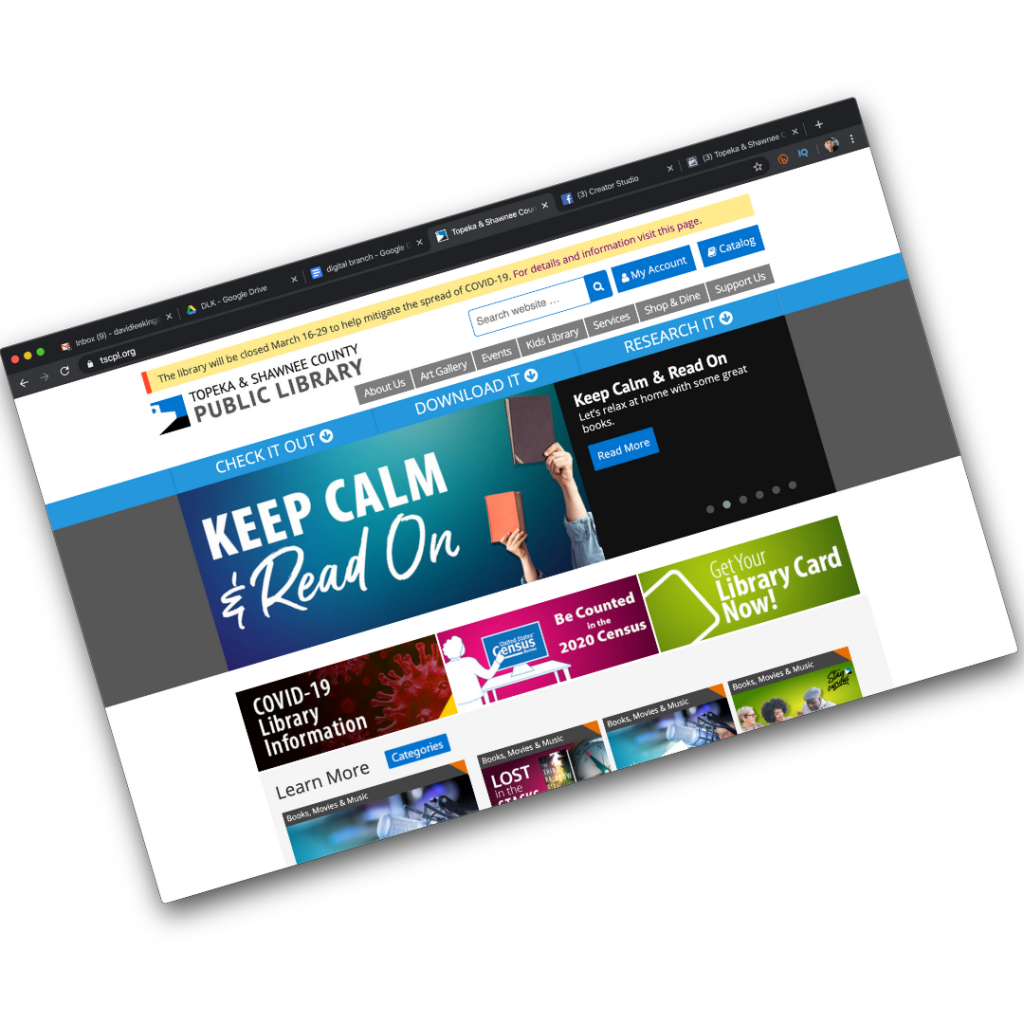
My library – Topeka & Shawnee County Public Library – just released our redesigned website. Check it out!

Our new main page has three main sections that are easily seen in the graphic accompanying this post:

1. Featured Stuff. The top section is reserved for our featured stuff. We have one large featured area that can rotate with multiple . The goal there is to highlight on our 1-2 “Big, Important Things.” That could mean a library event, or it could be some new database we purchased.

There are also three smaller featured boxes that we’ll change up a bit more often. They’ll point to other cool stuff we’re doing.

And of course, the nav bar is in the top section. We went with a top horizonal nav bar this time around. It actually drops down and expands for more links (pretty much a copy of NPR‘s nav bar).

2. What’s Happening Now. The middle section highlights our content that changes often, namely our blog content and our programs. Most of this stuff, especially the blog posts, will disappear off the main page pretty fast, and that’s ok. it’s meant to hightlight “what’s happening now.”

3. Social Media. This is where we highlight our latest Twitter tweets, Youtube videos, flickr and Facebook Page.

Process:

This took us us a little over a year to complete – I started meeting with staff in February of 2010. I met with most of the library, and held some patron focus groups, too – then turned the notes from those meetings into a huge list of stuff we needed to change.

Then, we had quite a few decisions to make:

  • We had to decide how to handle content (more on that in a future post)
  • We needed to assign staff to content (still working on this one)
  • We needed to choose a CMS (we’re using WordPress this time around)
  • Visual design and navigation took awhile to get right, too

Our Creative Group (a team made up of our marketing department and our web developers) did most of this work … but the whole library helped in some way, too.

So yeah – it was a LOT of work … and it never really stops. We’re still cleaning stuff up, and will probably start tweaking pages in another week or so!

14 comments

Trendy Topics on Tuesday

by David Lee King on July 11, 2010

I’m participating in the Trendy Topics online conference this Tuesday – sign up if it looks interesting! Here’s a blurb about it:

TAP Information Services is pleased to announce the sixth in a dynamic monthly series of online workshops librarians can enjoy right at their desktops on hot topics. The latest conference on “Library Websites” is scheduled for Tuesday July 13. Aaron Schmidt, from the District of Columbia Public Library is the keynote speaker. Schmidt will speak on “Improving Library Services by Recognizing That You’re a Designer.” In this talk, he will introduce attendees to the world of user experience design. His talk will contain practical tips for making library websites easier to use and how the same methods can be used for every library service.

Other speakers for this day-long conference include:

  • David Lee King on “Creating User Experiences on the Web”
  • Karen McBride on “Adding Video and Other Media to your Library Website”
  • Chad Mairn on “Creating A Mobile Library Presence”
  • Genna Buhr on “Using WordPress.com for an Easy Library Website”
  • Laura Solomon on “20 Things You can Do to Make your Library Site Better Right Now”

Register at http://www.eventbee.com/view/trendytopics/event?eid=65537

Registration for librarians for the one day conference is $40; for students $30; and for groups $100.

Be the first to comment

Check Your Signs!

by David Lee King on January 4, 2010

I was room 429 ...A couple months ago, I stayed at a hotel in Wisconsin with this sign … seems pretty useful, huh?

Except if you’re in room 429, like I was. I actually had to hunt a bit to find the room (it wasn’t obvious).

The point? Make sure to check your digital “signage” once in awhile. Make sure your labels and headings still make sense. Did you change the name of a room or a service? Make sure to change that name everywhere on your website, too.

Has your budget shrunk and you needed to drop a few databases? Make sure you removed those links on your database page (and any other page that mentions them, too).

Have you checked the driving directions to your library lately? At a previous job, I checked them out after starting, and discovered they were WRONG. So I actually hopped in my car, and drove around for awhile, taking notes of different ways to get to the library – and updated those directions.

Website maintenance never stops, huh?

Oh – and Happy New Year, too! I am looking forward to a fun, challenging 2010 – how about you?

6 comments

IL2009: Experience Design Makeover

by David Lee King on October 28, 2009

Here’s my Tuesday morning presentation on Experience Design Makeovers for library websites. Even better – some of the presentation was livestreamed here and here!

Enjoy!

4 comments

Conversation is Experience

by David Lee King on October 8, 2009

Some web designers, especially those with a marketing or graphic design background, say they want to build an experience – but their designed experience, no matter who the website is for, tends to be designed like a movie or a rockstar’s website  – heavy on the Flash, on the intro page (complete with low-pitched ominous music), and it makes cute noises when you click on a link.

That’s great for a movie or a rockstar website. But most of us are building library, organization and company websites. What type of “experiences” should we be creating for those types of websites?

Conversation Spaces

Visitors to your website want to talk – with you, and with each other. Are you providing conversation spaces? The web is FULL of conversation now – check out Amazon, most newspaper and TV news sites, YouTube, this blog, Facebook, Twitter – all spaces where conversation can happen. And conversation DOES happen, because that’s what people do. We like to talk, we like to share, we like to voice our opinion (as I hope some of you do in the comments!).


So, my simple digital experience tip for today is this – make sure to create conversation spaces on your websites. Places like comment boxes, online forums or discussion groups around a topic, Twitter accounts for feedback, online places to Ask a Librarian, etc.

Enable Conversations

Also remember to actually enable conversations once you build the space. What’s that mean? In my library’s case, we allow unmoderated comments to fly free and easy onto our digital branch. I know what some of you are thinking – “OMG, David! Don’t you have a TON of cussing, swearing, name-calling, and other highly inappropriate things being posted? How could you EVER allow that!???!!??”

Um. No. We simply don’t have that. Yes, once in awhile we have some negative comments. But why would we moderate or not show those? Instead, we respond appropriately.

But some of you will need to moderate comments for one reason or the other (i.e., those old-fashioned city attorneys who haven’t yet discovered the joys of Facebook). If you DO moderate comments, make sure to do it quickly. Same day is good. Same hour is best. Why? Because it’s a CONVERSATION. If someone starts a conversation and you don’t get around to moderating the comment for a few days … well, you have killed the conversation. And that’s really no conversation at all.

pic by Adventures in Librarianship

4 comments

Rethinking the 3rd Place

by David Lee King on September 22, 2009

I had a conversation with my supervisor (Rob Banks, Deputy Director of Operations at the library) a couple days ago, and thought it was worth sharing with y’all.

We were talking about our impending website redesign (yes, we’re at it again). I had sent him a rough draft of my redesign plan, and we were talking through it. He had been reading my book on digital experiences, and that had fired off some really cool thoughts about the concept of 3rd place for him… here’s what he said that made us start thinking:

“It’s not 3rd place – it’s The Place:”

  • Typically, Rob has maybe 6 windows open on his computer while at work – email,   a couple of work documents he’s working on, TweetDeck (ok – does YOUR deputy director have TweetDeck open constantly? Just sayin), and a couple of websites – usually including Facebook.
  • He’s doing several things at the same time … but Facebook is always on, and he’s always connected to his Facebook friends.
  • When he’s not at work, Rob has a Blackberry with a Facebook app – so Facebook is always on there, too. He can connect to Facebook whenever he wants to, no matter where he is.
  • Rob can still be in his physical “3rd place” and (important point) STILL BE CONNECTED to Facebook and his friends.
  • And that’s the idea that needs to be translated over to our library’s digital branch.

Our library websites/digital branches will probably never be a real 3rd place to people – and that’s ok. Instead of working towards that, let’s work harder to make this now-old phrase, “be where the patrons are,” a bit more seamless.

good bookRob can be in his 3rd place – but he is also constantly connected to friends/colleagues/family in Facebook at the same time. Facebook, in a way, has transcended the 3rd place to be “The Place.” It’s always on, always available to him, when he wants to be there.

Our library websites/digital branches can be like this, too! So… still developing, but this is definitely going in the redesign plan.

Thoughts? How are you “always there, always on” when patrons want to reach you?

Photo by javaturtle

20 comments