May 2009

More Chat in the Catalog

by David Lee King on May 30, 2009

Remember my post on TSCPL’s Meebo chat widget embedded in our library catalog? Since then, we have stopped using the Meebo Me widget. It was great – it helped us start our IM reference service, and it was easy to embed pretty much wherever we wanted. But we grew out of it!

We discovered a few shortcomings, like not being able to send hotlinks through it, and our public services staff really wanted the ability to send an IM to someone else. So now, we’re using Libraryh3lp for our IM reference service. Libraryh3lp gives us those added benefits and more.

And we’re doing a few different things with the catalog embed, too. Here’s a pic of the keyword, No Records Found search:
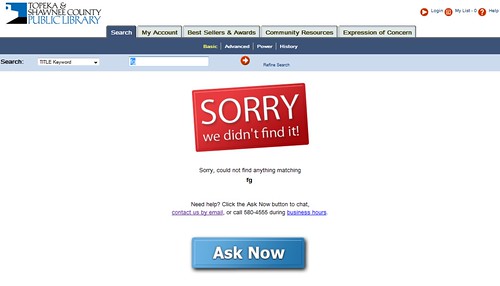
New version of the Chat Reference service in the catalog

We’re trying to make instructions clear, friendly and attractive. If you click the Ask Now button, you get a tiny IM widget pop-up page. Why pop-up? With our Meebo widget, we discovered that a lot of people would start asking a question, then click something … and they’d be gone, because they had clicked away from the page with the embedded IM widget. Bumer! With our new pop-up version, that problem is solved. Users can click away all they want … and still interact with us.

But even cooler than that – Michael, our web designer (one of his many hats) discovered a way to embed a similar thing on the Search Results page:

Search Results page - Chat added!

This provides more opportunities for patrons to ask questions when they get stuck on a search – even if they’re finding things. Basically, they have access to us ON EVERY SEARCH they do.

And not just IM access – that’s provided via the Ask Now button. But we also include our phone number and a link to our email Ask a Librarian form.

We’re excited about this – should be fun to see if we get more catalog-related questions.

24 comments

Making Connections – the Institutional Version

by David Lee King on May 29, 2009

Last post, I covered things I think about when making personal friend connections in a bunch of social networks I use. I also said “for MPOW, it’s slightly different – I might cover that in another post.” Here’s that other post.

As an institution, who should you friend? Why? This is pretty subjective of course, but here are some general guidelines to get you started:

Friend patrons/customers/members. Friend people living in your service area, or who are likely to use your services. Find them using tools like Twitter’s Find People search or any number of third party search services. Your goal is to share your stuff, your events, and yourselves with other people and organizations who can actually use and benefit your content in  a social network.

If someone friends you, check them out. Look at their posts, look at their bio, and where they’re from. If they live close by, friend them. Then start sharing.

Friend other local organizations. Again, the goal is to share your stuff with other organizations that can potentially partner with you, or otherwise send people your way.

Friend others who are interested in your stuff. Have a local history collection that focuses on a certain individual or era? Friend others who are interested in the same things. This should hold true especially on social networks that focus on multimedia, like Flickr and YouTube.

Other Considerations

Facebook Groups
– these can have a narrower focus, so you might be friending fewer people in a group, especially if it’s more of a niche group. For example, if you have a Facebook Group focused on teens, you’ll want to friend actual teens, rather than just anyone of any age.

YouTube – do your local news media outlets have YouTube accounts? Make sure to friend them, and favorite some of their videos.

Finally, be friend-neutral. Don’t agree with what the person says, or don’t like their content? Remind yourself that this isn’t your personal social network you’re developing, but your organization’s network. And most likeley, you take all shapes and sizes of friend connections.

Further reading: my set of posts on attracting friends, starting with Don’t Friend Me.

What am I missing? Any other groups it might be good to friend? Not to friend?

photo from sausyn

Be the first to comment

Making Connections

by David Lee King on May 23, 2009

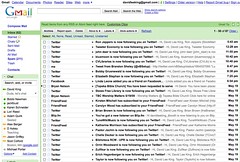
Social Media connections in my inboxIf you sign up and use social media tools, here’s what might happen to you: the image accompanying this post is my inbox. I recently visited my parents, and I only answered pressing emails … but didn’t really clear stuff out like normal.

Check out the pic – everyone wants to follow! Twitter follow requests … Facebook friend requests … blip.fm new listeners … Friendfeed subscribers … Flickr contacts … even a request to do something from church (they’re using a cool 2.0-ish tool for worship team scheduling). Probably a couple of blog comments in there, too. There were 2 pages of this.

And some of you play with this stuff more than me … I can only imagine what YOUR inbox looks like!

Who to friend? Who to ignore? Who to respond to? And when? Here’s what I do:

  • Twitter: I get more of these than the others, so I’m a bit pickier here. I friend you if you sound interesting and don’t look like a spammer. I read your bio and a couple of tweets. Sometimes, I look at your follow-to-follower ratio. I usually don’t follow other libraries or people that sound too much like snakeoil salesmen (i.e, that mention SEO/make money online/I’ll make your life better stuff).
  • Also picky with Flickr – I’ll follow you if I know you, if I’ve met you, or if I might meet you professionally (i.e., if you’re a librarian or a social media type).
  • Facebook: I follow most people who follow me. I recently had a run of high school chums discover Facebook.
  • blip.fm: If you follow me as a listener, I’ll follow you back.
  • Friendfeed: Same – I follow back almost everyone who follows me.
  • In any of these, if you send me a message/tweet me/write on my wall, I’ll read it and usually respond if it makes sense to do so. Sometimes I read it, think “huh” and move on – no response needed.
  • Also – if I come across your blog, your book, or an interesting tweet/post, I might friend/follow you – so I can receive more interesting content from you!

When do I do this? Personally, I usually when I read it and/or when it’s convenient to do so (for MPOW, it’s slightly different – I might cover that in another post). I think of follow requests and comments/tweets/wall posts as introductions and conversation, so it makes sense to me to do it sooner rather than later. But then, I don’t have a ton of them, and find it’s simply easier to quickly deal with a follow request quickly and move on, rather than letting them pile up (unless I’m out of town or away from the web for a bit).

What do you do? Who do you friend? And when do you find the time? Stuff to think about…

25 comments

Ford Flex – Final Thoughts

by David Lee King on May 21, 2009

Some final thoughts on my Ford Flex experience (then back to normal for this blog):

  • Today’s video shows the “packability” of the car. A family of five fit in nicely, luggage included.
  • Just checked my gas mileage. From Branson back to Topeka, I surprisingly got 24 mpg, even though I drove through the Ozarks. That’s pretty decent for the Flex.
  • Hills – my parents live on the side of a small mountain (or a large hill – it IS the Ozarks, after all). The Flex, even when put in the “hill” setting, had to work to climb up those hills, even on the highways.
  • I’m tall – the headrest was never in the right place for me. I figured out how to get around it by adjusting the seatback so my head didn’t touch the headrest. Shorter people won’t have this problem, I’m thinking.
  • And just a thought – this is 2009. Ford built a new car. Why isn’t it a hybrid?

All that said, my family and I had fun driving the Flex! Thanks to Ford and the Social Media Group for the experience.

12 comments

Driving the Ford Flex

by David Lee King on May 20, 2009

Here’s a video of the Ford Flex I’ve been playing with – nice car! See what you think.

5 comments

Ford Flex Road Trip – Thoughts So Far

by David Lee King on May 19, 2009

Ford FlexWe’ve been tooling around in the Ford Flex for about three days now. On Saturday, we drove from Topeka, KS to Branson, MO to visit family (about a 5 hour drive). What do we think about the Flex so far? Here are our likes and dislikes:

Likes:

Plenty of room: this car, as my wife put it, has “boo-koodles of room.” We are, of course, comparing it to our other family car, a Mazda 5. We like the Mazda … but on a multi-hour trip, our family of five starts feeling a little cramped. The Ford Flex has A LOT of space to spread out, and fits our family of five quite nicely.

Design: apparently some people don’t like the boxy shape of the Flex. We think it’s pretty cool. In fact, when the car arrived, my two younger kids could be found sitting in the car for kicks. The interior is nice, too – lots of black, lots of leather, and some retro wood grain trim (which you’ll either think is cool in a retro way or it’ll remind you of your dad’s 77 El Dorado in a bad way).

Drive: it drives nicely – very smooth on the highway and in town. It’s a bigger car – reminds me slightly of driving a truck – but it’s still very easy to handle.

Technology: I’m a geek, so I like lots of fun tech… and this car has lots of fun tech! The console has what Ford calls their “navigation system.” It’s touch screen! That’s cool. The GPS map worked well, the radio/CD player has great sound and lots of visual, touch screen options for moving sound to different speakers, and an option to connect your phone to the system for hands-free talking (I think you need an adapter for that, which I didn’t have). There’s even a 110v 3-prong plug in the car so you don’t have to use adapters – that is a cool geek-inspired surprise.

Rear view camera: this is a cool feature. When you put the Flex in reverse, the rear view camera is activated, and you see what’s behind you via the cam – nice. I think it’d be cool to have that view as an “on all the time” option – like for highway lane changing.

Dislikes:

Voice activated navigation: Didn’t work well for us. Both my wife and I tried it, with mixed results. Sure, we were able to navigate with it … but only navigate around the menus. When we tried to put in my parents’ address, the system didn’t understand us. When that happens, it gives a couple of best guesses that you can choose from. None of the system’s guesses were even close! I played with it later, and discovered that the Sirius map service has my parents living on the wrong street (even though their street has been around for at least five years. Maybe they haven’t updated their map in five years? Maybe I goofed up? Not sure… but either way, it didn’t work for us.

Ford’s marketing: ok, this dislike isn’t really about the car. But the marketing links I was sent are … well … stereotypical icky marketing. Listen to this: “From its planted stance and broad shoulders …” are we talking about a car or a cow here? It continues “… to its all-black greenhouse and contrasting, two-tone roof…” – greenhouse? As far as I can tell, they’re either talking about the interior of the car or the window parts on the outside of the car. Either way, greenhouse is a silly thing to call it. Try looking that up in Google and see what you find (hint – you won’t find anything relating to cars). They continue by comparing the interior of the car to a limo (it’s not the same), then they say this: “we wanted the interior to be a place of contemorary, relaxed style … somewhere you could feel very comfortable, yet involved and connected.” I’ll agree here – the Flex is certainy comfortable. But “involved and connected?” What’s that even mean??? Silly, silly marketers. Stop it.

Price: it’s a large, roomy car with lots of cool features, and is priced that way. The sticker price is approximately $43,000 …. way out of my price range. But then we’re a bit different. We usually set aside some “get a new car money,” then end up with a car that’s just 2-3 years old and costs half the price of a new car. Much smarter way to buy a car, if you can swing it.

So far? There are a couple of secondary things that I’m not tickled with (the mapping system’s voice activation feature). And the marketing (which I always ignore anyway) and the price. But the car itself? The Flex drives well, it’s very comfortable, and it’s loaded with some cool features.

1-2 more videos and possibly one more text post coming – stay tuned!

21 comments

Playing with the Navigation System

by David Lee King on May 16, 2009

More posts later … but for now, here’s a quick little video of the navigation system that came with this Ford Flex. I’m sure some of you already have satellite mapping sytems, so it’s not new to you! But for me, it’s pretty cool stuff.

This Flex has a Sirius Navigation system, and it’s nice. I was actually quite impressed that it even knew when I was on the on/off ramps of a highway – I’m used to Google Maps or even MapQuest types things, so having a seemingly much more accurate map that knows where I am … well, that’s just cool.

1 comment

Test Driving & Experience

by David Lee King on May 15, 2009

Ford FlexA warning for my regular readers – I don’t usually stray very far from professional topics on this blog (well, unless you’ve seen my videos or pics). For the most part, I’m all about social media, technology, and libraries. However, for the next few days, I’m also turning into a car reviewer. Huh? Let me explain …

Rachel from Social Media Group recently emailed, asking if I was interested in test driving a Ford Flex! Here’s the deal – I get to drive the car for about 5 days, and blog/twitter/video my experience driving and using the car. Which works quite well with my family, since we’re headed on a small road trip to visit my parents this weekend.

Seriously.

OK. So why am I doing this? A couple reasons come to mind:

  1. Book promotion. It’s quite possible that my posts will be linked and/or mentioned elsewhere. So I’m hoping people click through to my blog, see the link to my book … etc. More book sales is always a good thing.
  2. I write about emerging technology … and this car purportedly HAS emerging technology… we’ll see.
  3. They want my “authentic voice” or “experience” – if you’ve read my blog for any length of time, you’ll know I’m all about the experience! That felt right to me.
  4. Hoping that other librarian bloggers get noticed more in the general blogosphere. We’re smart! We’ve been doing SEO/search/IA/Usability/etc for much longer than most. And we NEED to have a bigger voice in that arena. Maybe this will help us get noticed a bit more? (ok, that one’s a bit of a stretch).
  5. And of course, there’s the “OhMyGoodnessGraciousTheyOfferedMeACarToTestDrive” reason, too. I admit, this is probably reason #1… so shoot me.

So there you have it! Enjoy … or just mark it “read” and move along…

14 comments

Extreme Customer Service at Darien Library

by David Lee King on May 11, 2009

I recently visited Darien Library with the goal of checking out their innovative approach to technology – goal achieved! Check out the video in this post (and thanks to John Blyberg for the tour and for putting up with my video camera!). While their technology is amazingly cool, that’s not really what excited me. What excited me most was Darien’s idea of extreme customer service.

During my Darien visit, I had the privilege of chatting with Louise Berry, Alan Gray, and John Blyberg over lunch (great lunch, great conversation – thanks guys!). We talked about technology, new library buildings, and how we should be serving our library customers. Louise and Alan told me about their library’s core message – extreme customer service. Basically, they want to demonstrate extreme customer service in everything they do.

This idea of a “core message” is discussed in the book Made to Stick: Why Some Ideas Survive and Others Die by Chip and Dan Heath. Most of the book is devoted to making your core message “stick” – this is what Darien Library has done.

They even provided examples. During lunch, Louise, Alan and John mentioned an after-hours wine and cheese event they held at the library. The library was closed, but doors were open. Patrons not attending the event came in anyway … and guess what? They weren’t turned away – instead, they were allowed to check out books (RFID-based self-check-out machines help). Staff were even seen setting up new library cards for patrons. This is very different from what many libraries do. For most after-hours events, patrons would simply be told (nicely, I’m sure) to come back tomorrow.

So – one example of extreme customer service at Darien. You can find another example in the video. Watch for the mini laptops in the children’s area of the library. Those are staff public service laptops used for roaming reference type stuff. But listen to the children’s staff talk about them – kids pick those laptops up and use them. Patrons even use the public service desktop … and Darien’s staff is fine with that! When I asked about this, here’s what I heard: “why would we NOT allow that?”

John said the same thing later on in my tour (not captured on video). We were in a staff area, and I noticed someone had brought in her personal laptop. I asked what she could connect to … and John said staff can bring in their personal laptops and connect to Darien’s staff-only network. I pried a bit further, and this is when John said “why would we NOT allow that? It would simply hinder their work!” Then John went on to explain that they plan for the exceptions and fix those things, rather than lock down technology so much that it hinders the work of the library. Extreme customer service for their staff, too!

Does your library have a core message, and how does that play out? And … does your library lock technology down so much so that it hinders the work of the library? What would happen if you opened that can of worms up? Would any escape? Something to think about…

15 comments

Mashing Up the Community at MLA2009

by David Lee King on May 6, 2009

I spoke at the Massachusetts Library Association conference today – fun time! Here’s the Slideshare version of my presentation – moved from traditional mashups to mashing up the library’s community.

And – I spotted my book! They were selling it at their book table – coolness!

Found my book at MLA!

6 comments